ရိုးရိုးလေး ရှင်းပြမယ်
ရိုးရိုးလေး ရှင်းရရင်
Tuple က list နဲ့ အရမ်းဆင်ပါတယ် — value တွေကို အစဉ်လိုက် သိမ်းပြီး index နဲ့ ဖတ်လို့ရပါတယ်။ ကွာတာက တစ်ခုတည်းပါ၊ ဖန်တီးပြီးရင် ထည့်လို့၊ ဖျက်လို့၊ ပြင်လို့ မရတော့ပါဘူး။ Square bracket အစား ("red", "green", "blue") လို ကွင်းစကွင်းပိတ်နဲ့ ရေးပါတယ်။
မွေးနေ့ (1995, 8, 17)၊ မြေပုံပေါ်က နေရာ (16.8, 96.1)၊ RGB အရောင် (255, 128, 0) လို အမြဲ အတူတူ သွားပြီး မပြောင်းသင့်တဲ့ data တွေအတွက် tuple က သင့်တော်ပါတယ်။ "ဒီ data ကို ဘယ်သူမှ မပြင်ရ" လို့ code ကနေ ပြောလိုက်တာပါပဲ။
Problem → Why → Solution
ပြဿနာ: comma တစ်ခု ကျန်ခဲ့လို့ "min" က admin ဖြစ်သွားတယ်
ခွင့်ပြုထားတဲ့ role တွေကို tuple နဲ့ သိမ်းပြီး in နဲ့ စစ်ပါတယ်။ အစက role နှစ်ခုရှိခဲ့ပေမယ့် တစ်ခု ဖယ်လိုက်တော့ ("admin") ပဲ ကျန်ပါတယ်။ ရုတ်တရက် "min"၊ "ad"၊ "dmi" ဆိုတဲ့ role တွေ ပါ access ရသွားပါတယ်၊ ဘယ်မှာမှ error မပေါ်ပါဘူး။
ALLOWED_ROLES = ("admin")      # meant to be a one-item tuple

role = "min"
if role in ALLOWED_ROLES:
    print("Access granted")    # runs!

print(type(ALLOWED_ROLES))      # <class 'str'>
ဘာကြောင့် ဒီလို ဖြစ်တာလဲ
Python မှာ tuple ကို ဖန်တီးတာ ကွင်းမဟုတ်ဘဲ comma ပါ။ ကွင်းက (2 + 3) * 4 မှာလို အုပ်စုဖွဲ့ရုံပဲ လုပ်လို့ ("admin") က string "admin" ပဲ ဖြစ်ပါတယ်။ String ပေါ်မှာ in က substring ကို ရှာလို့ "min" in "admin" က True ဖြစ်သွားပါတယ်။ ("admin",) လို့ comma ထည့်လိုက်မှ element တစ်ခုပါတဲ့ tuple ဖြစ်ပြီး in က element တစ်ခုလုံးကို နှိုင်းယှဉ်ပါတယ်။
Core concept: tuple က မပြောင်းနိုင်တဲ့ ordered collection ပါ
Tuple က ordered ဖြစ်ပြီး duplicate တွေကို ခွင့်ပြုတာ list နဲ့ တူပါတယ်။ fruits[0]၊ fruits[-1]၊ fruits[0:2]၊ len(fruits)၊ "apple" in fruits နဲ့ for loop အားလုံး list မှာလိုပဲ အလုပ်လုပ်ပြီး slice က tuple အသစ်ကို ပြန်ပေးပါတယ်။ ကွာခြားချက်က immutable ဖြစ်တာပါ — fruits[1] = "mango" က TypeError: 'tuple' object does not support item assignment ဖြစ်ပြီး append()၊ remove() လို method တွေလည်း မရှိပါဘူး။ Tuple မှာ method နှစ်ခုပဲ ရှိပါတယ် — count() နဲ့ index()။
| List | Tuple | |
|---|---|---|
| ရေးပုံ | [1, 2, 3] | (1, 2, 3) ဒါမှမဟုတ် 1, 2, 3 |
| ပြင်လို့ရလား | ရ (mutable) | မရ (immutable) |
| Element တစ်ခုတည်း | ["a"] | ("a",) — comma လို |
| သုံးလေ့ရှိတာ | အရေအတွက် ပြောင်းနိုင်တဲ့ item တူတွေ | ပုံသေ field တွေ (x, y) |
Comma က tuple ကို ဖန်တီးလို့ point = 3, 4 လို ကွင်းမပါဘဲ ရေးလည်း tuple ပါပဲ။ ဗလာ tuple ကတော့ () ပါ။ Unpacking ဆိုတာ tuple ထဲက value တွေကို variable တွေထဲ တစ်ခါတည်း ခွဲထည့်တာပါ — r, g, b = colors။ ဘယ်ဘက် variable အရေအတွက်နဲ့ element အရေအတွက် မကိုက်ရင် ValueError: too many values to unpack ဖြစ်ပါတယ်။ ဒီ unpacking ကြောင့် a, b = b, a နဲ့ temporary variable မလိုဘဲ value နှစ်ခု swap လုပ်လို့ရပြီး function က return low, high လို့ value အများကြီး ပြန်ပေးနိုင်ပါတယ်။
Immutable ဆိုတာ tuple ရဲ့ "ဘယ် object တွေ ပါလဲ" ဆိုတာ မပြောင်းတာပါ။ ([1], 2) လို tuple ထဲမှာ list ပါရင် အဲဒီ list ကိုယ်တိုင်ကိုတော့ append လုပ်လို့ ရနေဆဲပါ။ Element အားလုံး immutable ဖြစ်တဲ့ tuple တွေကိုတော့ dictionary key အဖြစ် သုံးလို့ရပါတယ်၊ list ကိုတော့ မရပါဘူး။
Tuple ကို ပြောင်းသလို ထင်ရတဲ့ operation တွေက တကယ်တော့ tuple အသစ်ကို တည်ဆောက်တာပါ။ (1, 2) + (3,) က tuple အသစ် (1, 2, 3) ကို ပြန်ပေးပြီး (1, 2) * 2 က (1, 2, 1, 2) ကို ပြန်ပေးပါတယ်။ tuple(some_list) ကလည်း list ထဲက element တွေကို tuple အသစ်ထဲ ကူးထည့်ပါတယ်။ မူရင်း tuple က လုံးဝ မပြောင်းလို့ အဲဒါကို ညွှန်နေတဲ့ တခြား နာမည်တွေကို မထိခိုက်ပါဘူး။
- Comma က value တွေကို ထုပ်ပိုး
- ထုပ်ပြီးရင် ဖွင့်ဖတ်လို့ပဲ ရ
- ပြင်ချင်ရင် ထုပ်ပိုး အသစ် လုပ်
- Unpacking က variable တွေထဲ ပြန်ဖြန့်
Tuple ကို တံဆိပ်ခတ်ထားတဲ့ ထုပ်ပိုးလို မြင်ပါ — အထဲကို ကြည့်လို့ရပေမယ့် ပြင်ချင်ရင် ထုပ်ပိုး အသစ်တစ်ခု လုပ်ရပါတယ်။
အထွေထွေ ပုံစံ
record = (field_one, field_two, field_three)
single = (only_value,)            # the comma is required
empty = ()

value = record[index]             # read like a list
part = record[start:stop]         # a new tuple

first, second, third = record     # unpacking
left, right = right, left         # swap
updated = record[:1] + (new_value,) + record[2:]   # build a new tuple
ဖတ်တာက list လိုပဲ ဖြစ်ပြီး ပြင်ချင်ရင် slice တွေနဲ့ tuple အသစ် တည်ဆောက်ရပါတယ်။ Element တစ်ခုတည်း tuple မှာ comma ကို ဘယ်တော့မှ မမေ့ပါနဲ့။
Example: tuple ဖန်တီး၊ ဖတ်၊ ပြင်ဖို့ ကြိုးစား၊ unpack
ဒီ example က tuple တစ်ခုကို ဖတ်ပြီး ပြင်ဖို့ ကြိုးစားကာ ဖြစ်လာတဲ့ TypeError ကို try/except နဲ့ ဖမ်းပြပါတယ်။ ပြီးရင် list ပြောင်းပြီး tuple အသစ် ပြန်တည်ဆောက်တဲ့ နည်း၊ comma ပါတဲ့နဲ့ မပါတဲ့ one-item tuple နဲ့ unpacking ကို စမ်းပါတယ်။ Error ဖြစ်တဲ့ line ကို တကယ် run ထားလို့ ပြောပြရုံ မဟုတ်ဘဲ တကယ့် error message ကို ကိုယ်တိုင် မြင်ရပါမယ်၊ နောက်ဆုံး loop ကတော့ ပြန်တည်ဆောက်ထားတဲ့ fruits tuple ပေါ်မှာ ပတ်ပါတယ်။
# ===== 1. Create a Tuple =====
fruits = ("apple", "banana", "cherry")
print(f"Tuple: {fruits}")
print(f"Type: {type(fruits)}")

# ===== 2. Indexing & Slicing =====
print("\n===== Indexing & Slicing =====")
print(f"First item: {fruits[0]}")
print(f"Last item: {fruits[-1]}")
print(f"Slice [0:2]: {fruits[0:2]}")

# ===== 3. Tuple is Immutable =====
print("\n===== Immutable =====")
try:
    fruits[1] = "mango"
except TypeError as err:
    print(f"Error: {err}")

# To change: convert to a list, modify, convert back (builds a NEW tuple)
temp = list(fruits)
temp[1] = "mango"
fruits = tuple(temp)
print(f"After conversion: {fruits}")

# ===== 4. Tuple Length =====
print(f"\nLength: {len(fruits)}")

# ===== 5. One-item Tuple =====
print("\n===== One-item Tuple =====")
a = ("apple",)   # Tuple (the comma makes it a tuple)
b = ("apple")    # Just a string in parentheses
print(f"Type of a: {type(a)}")
print(f"Type of b: {type(b)}")

# ===== 6. Tuple Unpacking =====
print("\n===== Unpacking =====")
colors = ("red", "green", "blue")
r, g, b = colors
print(f"Red: {r}, Green: {g}, Blue: {b}")

# ===== 7. Loop Through Tuple =====
print("\n===== Looping =====")
for item in fruits:
    print(item)
Code ကို တစ်ပိုင်းချင်း ရှင်းပြမယ်
- Lines 14-17
fruits[1] = "mango"Tuple ရဲ့ element ကို assign လုပ်ဖို့ ကြိုးစားတာမို့ TypeError ဖြစ်ပြီး except က message ကို print ထုတ်ပါတယ်။ fruits က ဘာမှ မပြောင်းပါဘူး။
- Lines 20-22
fruits = tuple(temp)list(fruits) နဲ့ list မိတ္တူ လုပ်ပြီး ပြင်ကာ tuple() နဲ့ tuple အသစ် ပြန်လုပ်ပါတယ်။ မူရင်း tuple ကို ပြင်လိုက်တာ မဟုတ်ဘဲ fruits ဆိုတဲ့ နာမည်ကို tuple အသစ်ဆီ ရွှေ့လိုက်တာပါ။
- Line 30
a = ("apple",) # Tuple (the comma makes it a tuple)နောက်က comma ကြောင့် type(a) က <class 'tuple'> ပါ။ Line 31 က ("apple") ကတော့ comma မပါလို့ <class 'str'> ဖြစ်ပါတယ်။
- Line 38
r, g, b = colorsElement သုံးခုကို variable သုံးခုထဲ အစဉ်လိုက် ခွဲထည့်ပါတယ်။ ဒီနေရာမှာ b ကို ပြန်သုံးလို့ အရင် string "apple" ကို "blue" က အစားထိုးသွားပါတယ်။
- Lines 43-44
for item in fruits:Tuple ကို list လိုပဲ loop ပတ်လို့ရပြီး tuple အသစ်ဖြစ်တဲ့ ("apple", "mango", "cherry") ကို print ထုတ်ပါတယ်။
Tuple: ('apple', 'banana', 'cherry')
Type: <class 'tuple'>

===== Indexing & Slicing =====
First item: apple
Last item: cherry
Slice [0:2]: ('apple', 'banana')

===== Immutable =====
Error: 'tuple' object does not support item assignment
After conversion: ('apple', 'mango', 'cherry')

Length: 3

===== One-item Tuple =====
Type of a: <class 'tuple'>
Type of b: <class 'str'>

===== Unpacking =====
Red: red, Green: green, Blue: blue

===== Looping =====
apple
mango
cherry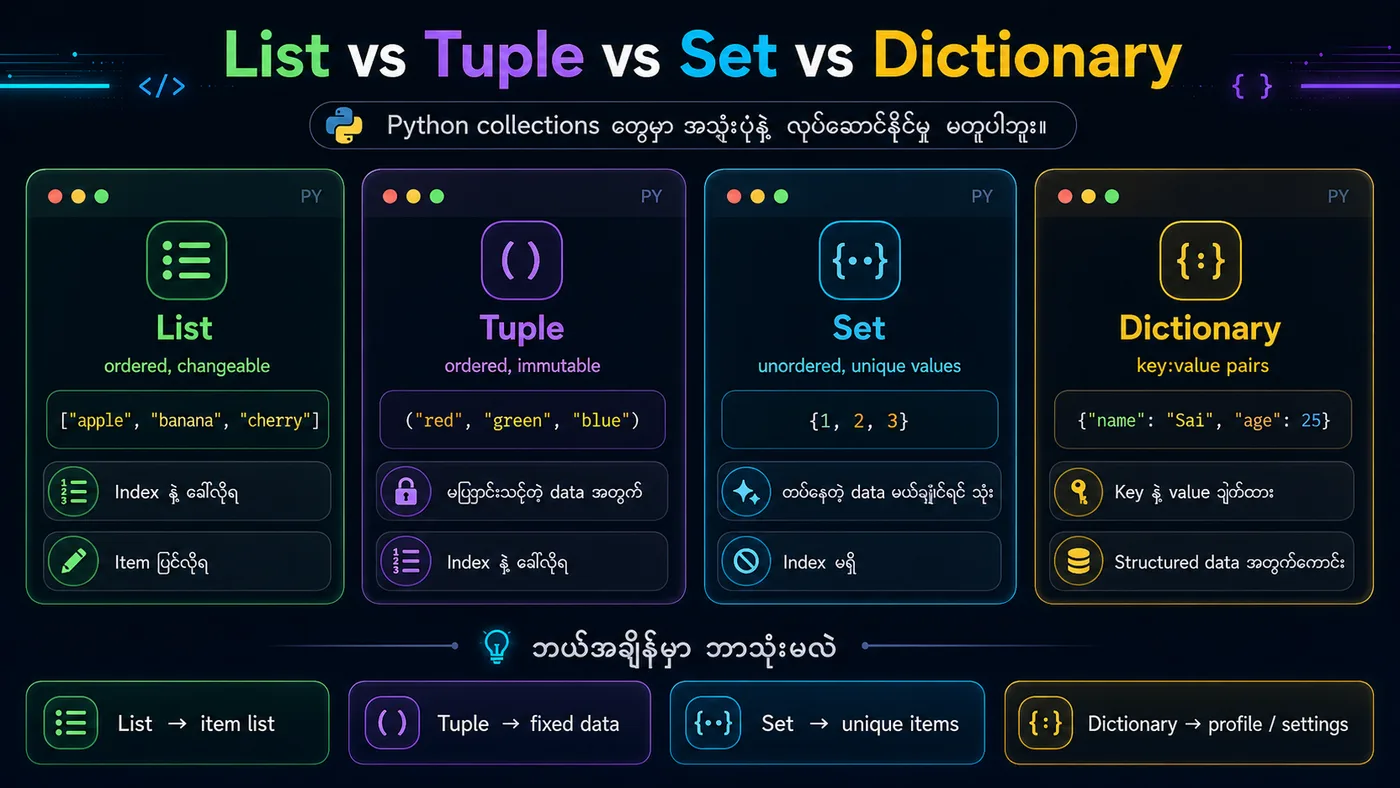
Star unpacking နဲ့ dictionary key အဖြစ် tuple
Element အရေအတွက် အတိအကျ မသိရင် * ပါတဲ့ variable တစ်ခုက ကျန်တာ အားလုံးကို list အဖြစ် စုယူပါတယ် — first, *rest = (1, 2, 3) မှာ rest က [2, 3] ပါ။ Tuple က immutable ဖြစ်လို့ dictionary key အဖြစ် သုံးလို့ရပြီး grid ပေါ်က နေရာ (row, col) လို coordinate တွေနဲ့ data ကို ချိတ်တဲ့အခါ အသုံးဝင်ပါတယ်။ Dictionary ကို နောက် lesson တစ်ခုမှာ အသေးစိတ် လေ့လာပါမယ်။
first, *rest = (1, 2, 3)
print(first, rest)              # 1 [2, 3]

board = {(0, 0): "start", (2, 3): "treasure"}
print(board[(2, 3)])            # treasure

pair = ([1], 2)
pair[0].append(9)               # the inner list can still change
print(pair)                     # ([1, 9], 2)
လက်တွေ့ project တွေမှာ
Real project တွေမှာ ဘယ်လို သုံးလဲ
Database library တွေက query ရလဒ်ရဲ့ row တစ်ခုချင်းကို tuple အဖြစ် ပြန်ပေးလေ့ရှိပါတယ် — sqlite3 မှာ cursor.fetchone() က (1, "Aye", "aye@mail.com") လို tuple ပြန်ပေးပြီး user_id, name, email = row နဲ့ unpack လုပ်ပါတယ်။ divmod(17, 5) လို built-in function တွေကလည်း (3, 2) tuple ပြန်ပေးပြီး dict.items() နဲ့ loop ပတ်ရင် (key, value) tuple တွေ ရပါတယ်။
Configuration မှာ မပြောင်းသင့်တဲ့ တန်ဖိုးတွေ ALLOWED_EXTENSIONS = (".jpg", ".png") ကို tuple နဲ့ ထားရင် program တစ်နေရာက မတော်တဆ append မလုပ်နိုင်ပါဘူး။ str.endswith() နဲ့ startswith() က tuple ကို လက်ခံလို့ filename.endswith(ALLOWED_EXTENSIONS) လို့ တစ်ကြောင်းတည်းနဲ့ စစ်လို့ရပါတယ်။ Function က ရလဒ်နဲ့ error ကို return result, error လို တွဲပြန်ပေးတာလည်း tuple ပါပဲ။ အရှည်တူ list တွေထက် tuple တွေက memory နည်းနည်း ပိုသက်သာလို့ record သေးသေးလေး သန်းချီ သိမ်းထားရတဲ့ program တွေမှာ ကွာခြားမှု ရှိလာပါတယ်။
အမှားများ
အဖြစ်များတဲ့ အမှားတွေ
1. One-item tuple မှာ comma မေ့တာ
("admin") က string ဖြစ်ပြီး (5) က int ဖြစ်ပါတယ်။ in နဲ့ စစ်ရင် substring စစ်ချက် ဖြစ်သွားပြီး loop ပတ်ရင် စာလုံး တစ်လုံးချင်း ပတ်သွားပါတယ်။ ("admin",) လို့ comma ထည့်ပါ၊ type() နဲ့ စစ်ကြည့်ပါ။
2. Tuple ကို နေရာမှာတင် ပြင်ဖို့ ကြိုးစားတာ
point[0] = 10 ဒါမှမဟုတ် point.append(5) က TypeError နဲ့ AttributeError ပေးပါတယ်။ Data က မကြာခဏ ပြောင်းရမယ်ဆိုရင် list ကို ရွေးပါ၊ တစ်ခါတလေပဲ ပြောင်းရမယ်ဆိုရင် point = (10, point[1]) လို tuple အသစ် တည်ဆောက်ပါ။
3. Unpack အရေအတွက် မကိုက်တာ
x, y = (1, 2, 3) က ValueError: too many values to unpack (expected 2) ဖြစ်ပါတယ်။ Function က ပြန်ပေးတဲ့ tuple ပုံစံ ပြောင်းသွားရင် ခေါ်တဲ့ နေရာတိုင်း ကျိုးပါတယ်၊ ကျန်တာကို လက်ခံဖို့ x, y, *_ = values လို star unpacking ကို သုံးနိုင်ပါတယ်။
4. Tuple ထဲက list ကလည်း immutable လို့ ထင်တာ
settings = ("dark", ["en", "my"]) ကို ဘယ်သူမှ မပြင်နိုင်ဘူးလို့ ထင်ရပေမယ့် settings[1].append("th") က အလုပ်လုပ်ပါတယ်။ Tuple က ဘယ် object တွေ ပါလဲကိုပဲ ပုံသေ ထားပြီး အထဲက list ကို မကာကွယ်ပါဘူး။ တကယ် မပြောင်းစေချင်ရင် အထဲမှာလည်း tuple ကို သုံးပါ။
Best Practices
အကောင်းဆုံး အလေ့အကျင့်များ
- Item အမျိုးအစားတူတွေ အရေအတွက် ပြောင်းနိုင်ရင် list၊ ပုံသေ field အုပ်စုဆိုရင် tuple ကို ရွေးပါ။
- Tuple ကို unpack လုပ်ပြီး low, high လို အဓိပ္ပာယ်ရှိတဲ့ နာမည်တွေ ပေးပါ၊ result[0] ထက် ဖတ်ရလွယ်ပါတယ်။
- မပြောင်းသင့်တဲ့ constant collection တွေကို tuple နဲ့ သိမ်းပါ။
Mini challenge
Mini challenge: value အများ ပြန်ပေးပြီး unpack လုပ်ခြင်း
Tuple ကို return၊ unpack၊ swap နဲ့ membership စစ်တဲ့ နေရာတွေမှာ သုံးတဲ့ program လေး ရေးပါ။
- score_stats(scores) က (အနိမ့်ဆုံး, အမြင့်ဆုံး, ဒသမ တစ်နေရာ ပျမ်းမျှ) tuple ပြန်ပေးရမယ်
- describe_point(point) က (x, y) ကို unpack လုပ်ပြီး "x=3, y=4" ပြန်ပေးရမယ်
- first, second ကို temporary variable မသုံးဘဲ swap လုပ်ရမယ်
- ("admin",) နဲ့ ("admin") ပေါ်မှာ 'min' in ... ရလဒ် နှစ်ခုကို နှိုင်းယှဉ်ပြရမယ်
def score_stats(scores: tuple[int, ...]) -> tuple[int, int, float]:
    # TODO: return min, max and the average rounded to 1 decimal
    ...


def describe_point(point: tuple[int, int]) -> str:
    # TODO: unpack point into x and y, return "x=..., y=..."
    ...


scores = (72, 95, 88, 64)
# TODO: unpack score_stats(scores) into three names and print them
# TODO: print describe_point((3, 4))
# TODO: swap first = "Aye" and second = "Mya" in one line
# TODO: compare 'min' in ("admin",) with 'min' in ("admin")
# TODO: print scores.count(88) and scores.index(95)
ရလဒ်: Program က အောက်ပါအတိုင်း ထုတ်ပေးရပါမယ်: Lowest 64, highest 95, average 79.8 x=3, y=4 After swap: first=Mya, second=Aye 'min' in roles: False 'min' in ('admin'): True Count of 88: 1, index of 95: 1
အရိပ်အမြွက် ကြည့်ရန်
return min(scores), max(scores), avg လို့ comma ခံပြီး ရေးရင် tuple ဖြစ်ပါတယ်၊ ကွင်း မလိုပါဘူး။ Swap က first, second = second, first ပါ။
အဖြေ ကြည့်ရန်
def score_stats(scores: tuple[int, ...]) -> tuple[int, int, float]:
    """Return (lowest, highest, average rounded to 1 decimal)."""
    return min(scores), max(scores), round(sum(scores) / len(scores), 1)


def describe_point(point: tuple[int, int]) -> str:
    x, y = point
    return f"x={x}, y={y}"


scores = (72, 95, 88, 64)
low, high, avg = score_stats(scores)
print(f"Lowest {low}, highest {high}, average {avg}")

home = (3, 4)
print(describe_point(home))

first, second = "Aye", "Mya"
first, second = second, first
print(f"After swap: first={first}, second={second}")

roles = ("admin",)
print(f"'min' in roles: {'min' in roles}")
print(f"'min' in ('admin'): {'min' in ('admin')}")
print(f"Count of 88: {scores.count(88)}, index of 95: {scores.index(95)}")
Quick Quiz 1 / 3
Quick Quiz 2 / 3
Quick Quiz 3 / 3
မှတ်ထားရမယ့် အချက်များ
- Tuple က ordered ဖြစ်ပြီး duplicate ခွင့်ပြုကာ immutable ဖြစ်တဲ့ collection ပါ။
- Tuple ကို ဖန်တီးတာ comma ဖြစ်လို့ element တစ်ခုတည်းဆိုရင် ("apple",) လို့ ရေးရပါတယ်။
- ပြင်ချင်ရင် list ပြောင်းတာ ဒါမှမဟုတ် slice တွေ ပေါင်းပြီး tuple အသစ် တည်ဆောက်ပါ။
- Unpacking က value အများ return ပြန်တာ၊ a, b = b, a swap လုပ်တာကို ရိုးရှင်းစေပါတယ်။
The Python Tutorial — Python Software Foundation