ရိုးရိုးလေး ရှင်းပြမယ်
ရိုးရိုးလေး ရှင်းရရင်
Class ဆိုတာ အိမ်ဆောက်ဖို့ ပုံစံကြမ်း (blueprint) လိုပါပဲ။ ပုံစံကြမ်းထဲမှာ အခန်းဘယ်နှခန်း၊ တံခါးဘယ်နှပေါက် ရှိမလဲဆိုတာ ရေးထားပေမယ့် အဲဒီ စာရွက်ထဲမှာ ဘယ်သူမှ နေလို့ မရပါဘူး။ အဲဒီ blueprint ကနေ ဆောက်လိုက်တဲ့ အိမ်တစ်လုံးချင်းစီကတော့ object (instance) တွေပါ။
အိမ်တစ်လုံးချင်းစီမှာ ကိုယ်ပိုင် အရောင်၊ ကိုယ်ပိုင် အိမ်ရှင် ရှိသလို object တစ်ခုချင်းစီမှာလည်း ကိုယ်ပိုင် data (attribute) တွေ ရှိပါတယ်။ အိမ်တိုင်း တံခါးဖွင့်လို့ ရသလို object တိုင်းကလည်း class ထဲမှာ ရေးထားတဲ့ function (method) တွေကို ခေါ်လို့ ရပါတယ်။ ဒါကြောင့် data နဲ့ အဲဒီ data ကို ကိုင်တွယ်တဲ့ code ကို နေရာတစ်ခုတည်းမှာ စုထားနိုင်ပါတယ်။
Problem → Why → Solution
ပြဿနာ: cart နှစ်ခုက list တစ်ခုတည်းကို မျှသုံးနေတယ်
Class အသစ်ရေးတဲ့သူ အများစု ကြုံဖူးတဲ့ bug တစ်ခုကို ကြည့်ရအောင်။ Shopping cart class မှာ items = [] ကို class body ထဲမှာ တိုက်ရိုက် ရေးလိုက်ပါတယ်။ Cart a ထဲကို ပန်းသီး ထည့်လိုက်တော့ ဘာမှ မထည့်ရသေးတဲ့ cart b ထဲမှာပါ ပန်းသီး ပေါ်လာပါတယ်။ Error message တစ်ခုမှ မတက်ဘဲ customer တစ်ယောက်ရဲ့ ပစ္စည်းတွေ နောက်တစ်ယောက်ရဲ့ cart ထဲ ရောက်သွားတာပါ။
class Cart:
    items = []                 # class attribute: ONE list for every cart

    def add(self, item):
        self.items.append(item)

a = Cart()
b = Cart()
a.add("apple")
print(b.items)                 # ['apple']  (b never added anything!)
ဘာကြောင့် ဒီလို ဖြစ်တာလဲ
class body ထဲမှာ တိုက်ရိုက် assign လုပ်တဲ့ name တွေက class object ပေါ်မှာ တစ်ကြိမ်ပဲ ဖန်တီးတဲ့ class attribute တွေပါ။ self.items လို့ ဖတ်တဲ့အခါ object ပေါ်မှာ items မရှိလို့ Python က class ဆီ ဆက်ရှာပြီး မျှသုံးနေတဲ့ list တစ်ခုတည်းကို ရှာတွေ့ပါတယ်။ ဖြေရှင်းနည်းကတော့ object တစ်ခုချင်းစီ ဖန်တီးတဲ့အချိန် __init__ ထဲမှာ self.items = [] လို့ list အသစ် ပေးတာပါ။
Core concept: class object, instance နဲ့ self
Python က class statement ကို run လိုက်တဲ့အခါ class object တစ်ခု ဖန်တီးပြီး class နာမည် (ဥပမာ Person) နဲ့ ချိတ်ထားပါတယ်။ အဲဒီ class object ကို function လို ခေါ်လိုက်ရင် (Person("Sai", 25)) Python က object အလွတ်တစ်ခု ဖန်တီးပြီး __init__ ကို အလိုအလျောက် ခေါ်ပါတယ်။ __init__ ရဲ့ အလုပ်က object ကို စတင် သုံးလို့ရတဲ့ မှန်ကန်တဲ့ အခြေအနေ (valid initial state) ရောက်အောင် attribute တွေ ထည့်ပေးတာပါ။ __init__ က value တစ်ခုမှ return မပြန်ရပါဘူး၊ object ကို ပြန်ပေးတာက class ခေါ်တဲ့ expression ကိုယ်တိုင်ပါ။
self ဆိုတာ "လက်ရှိ object" ကို ညွှန်းတဲ့ ပထမ parameter ပါ။ p1.greet() လို့ ခေါ်လိုက်ရင် Python က နောက်ကွယ်မှာ Person.greet(p1) လို့ ပြောင်းခေါ်ပြီး p1 ကို self ထဲ ထည့်ပေးပါတယ်။ ဒါကြောင့် method တစ်ခုတည်းကပဲ p1 နဲ့ ခေါ်ရင် Sai ရဲ့ data ကို၊ p2 နဲ့ ခေါ်ရင် Aye ရဲ့ data ကို ဖတ်ပါတယ်။ self ဆိုတာ keyword မဟုတ်ဘဲ convention သက်သက်ပါ၊ ဒါပေမယ့် Python programmer အားလုံး ဒီနာမည်ကိုပဲ သုံးကြလို့ ပြောင်းမသုံးသင့်ပါဘူး။
self.name = name လို __init__ ထဲမှာ ရေးတဲ့ attribute တွေက instance attribute ပါ — object တစ်ခုချင်းစီမှာ ကိုယ်ပိုင် copy ရှိပါတယ်။ class body ထဲမှာ တိုက်ရိုက် ရေးတဲ့ species = "human" လို name တွေကတော့ class attribute ပါ — object အားလုံး မျှသုံးပါတယ်။ Attribute တစ်ခုကို ဖတ်တဲ့အခါ Python က object ပေါ်မှာ အရင်ရှာပြီး မတွေ့မှ class ဆီ ဆက်ရှာပါတယ်။
အဲဒီ lookup စည်းမျဉ်းကြောင့် string, number လို immutable class attribute တွေက default value အဖြစ် ဘေးကင်းပါတယ်၊ self.species = "robot" လို assign လုပ်ရင် အဲဒီ object ပေါ်မှာပဲ attribute အသစ် ဖန်တီးလို့ပါ။ list, dict လို mutable value တွေကိုတော့ append လုပ်တဲ့အခါ ရှိပြီးသား shared object ကို တိုက်ရိုက် ပြင်လို့ ပြဿနာ ဖြစ်ပါတယ်။ Object တစ်ခုချင်းစီ ကိုယ်ပိုင် ပိုင်ရမယ့် data ကို __init__ ထဲမှာ အမြဲ ဖန်တီးပါ။
Method တွေက class ထဲမှာ ရေးထားတဲ့ function တွေဖြစ်ပြီး object ရဲ့ state ကို ဖတ်တာ (greet) ဒါမှမဟုတ် ပြောင်းတာ (have_birthday) လုပ်ပါတယ်။ type(p1) က object ဘယ် class ကနေ လာလဲ ပြပြီး isinstance(p2, Person) က object တစ်ခု class တစ်ခုရဲ့ instance ဟုတ်မဟုတ် စစ်ပါတယ်။
- class statement က class object ဖန်တီး
- Person(...) က object အလွတ် ဖန်တီး
- __init__ က self ပေါ်မှာ attribute ထည့်
- p1.method() က p1 ကို self အဖြစ် ပို့
Attribute ဖတ်တဲ့အခါ object ပေါ်မှာ အရင်ရှာပြီး မတွေ့မှ class ဆီ ဆက်ရှာပါတယ်။
အထွေထွေ ပုံစံ
class ClassName:
    shared_value = "same for all"      # class attribute

    def __init__(self, param1, param2):
        self.attr1 = param1            # instance attributes
        self.attr2 = param2

    def method_name(self, arg):
        return ...                     # uses self.attr1, arg

obj = ClassName(value1, value2)
obj.method_name(arg)
Class နာမည်ကို CapWords ပုံစံနဲ့ ရေးပါတယ်။ __init__ မှာ self ပေါ်ကို attribute တွေ assign လုပ်ပြီး method တိုင်းရဲ့ ပထမ parameter က self ဖြစ်ရပါမယ်။ Object ဖန်တီးတဲ့အခါ self အတွက် argument မပို့ရပါဘူး၊ Python က ထည့်ပေးပါတယ်။
Example: Person object နှစ်ခု
ဒီ example မှာ Person class တစ်ခုကနေ object နှစ်ခု ဖန်တီးပါတယ်။ p1 ရဲ့ အသက်ကို ပြောင်းလိုက်တဲ့အခါ p2 က မပြောင်းဘဲ ကျန်နေတာ၊ species ကတော့ နှစ်ခုလုံးမှာ တူနေတာကို သတိထားကြည့်ပါ။
class Person:
    species = "human"          # class attribute: one value shared by all

    def __init__(self, name, age):
        self.name = name       # instance attributes: each object
        self.age = age         # gets its own copy

    def greet(self):
        return f"Hello, my name is {self.name} and I am {self.age} years old."

    def have_birthday(self):
        self.age += 1          # changes only this object


p1 = Person("Sai", 25)
p2 = Person("Aye", 30)

print(p1.greet())
print(p2.greet())

p1.have_birthday()
print(p1.age, p2.age)
print(p1.species, p2.species)
print(type(p1).__name__, isinstance(p2, Person))
Code ကို တစ်ပိုင်းချင်း ရှင်းပြမယ်
- Line 2
species = "human"Class body ထဲမှာ တိုက်ရိုက် ရေးထားလို့ class attribute ပါ။ Person.species မှာ တစ်ခုတည်း ရှိပြီး object အားလုံးက ဖတ်လို့ ရပါတယ်။
- Lines 4-6
def __init__(self, name, age):Person("Sai", 25) ခေါ်တိုင်း object အသစ်ပေါ်မှာ run ပါတယ်။ self.name နဲ့ self.age က object တစ်ခုချင်းစီရဲ့ ကိုယ်ပိုင် attribute တွေပါ။
- Line 12
self.age += 1self က have_birthday() ကို ခေါ်တဲ့ object ဖြစ်လို့ p1.have_birthday() က p1 ရဲ့ age ကိုပဲ ပြောင်းပါတယ်။
- Line 22
print(p1.age, p2.age)26 30 ထွက်ပါတယ်။ p1 က birthday ရလို့ 26 ဖြစ်ပြီး p2 ရဲ့ 30 က မပြောင်းပါဘူး — instance attribute တွေ သီးခြားစီ ရှိတာကို သက်သေပြပါတယ်။
- Line 24
print(type(p1).__name__, isinstance(p2, Person))type(p1) က Person class object ကို ပြန်ပေးပြီး __name__ က အဲဒီ class ရဲ့ နာမည် string ပါ။ isinstance() က True ပြန်ပါတယ်။
Hello, my name is Sai and I am 25 years old.
Hello, my name is Aye and I am 30 years old.
26 30
human human
Person True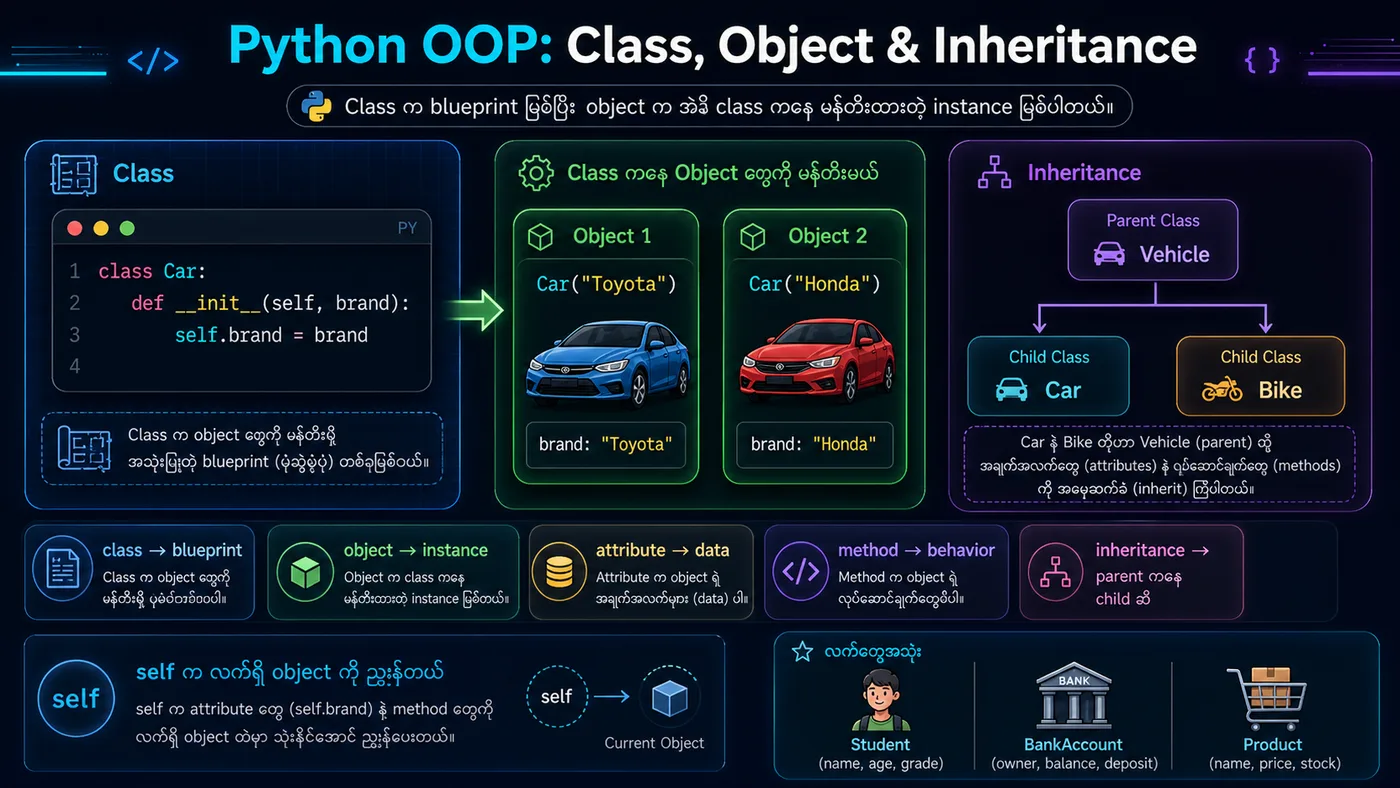
Data class တွေအတွက် @dataclass
Data သိမ်းဖို့ အဓိကဖြစ်တဲ့ class တွေမှာ __init__ ထဲ self.x = x လို line တွေ ထပ်ခါထပ်ခါ ရေးရတာ ပျင်းစရာပါ။ Standard library ရဲ့ dataclasses module က type annotation ပါတဲ့ field တွေကနေ __init__, __repr__ နဲ့ __eq__ ကို အလိုအလျောက် ထုတ်ပေးပါတယ်။ List လို mutable default တွေအတွက် field(default_factory=list) ကို သုံးရပါတယ် — ဒါမှ object တစ်ခုချင်းစီ list အသစ် ရမှာပါ၊ အထက်က Cart bug ကို ဒီနည်းနဲ့ ရှောင်ပါတယ်။
from dataclasses import dataclass, field

@dataclass
class Product:
    name: str
    price: float
    tags: list[str] = field(default_factory=list)

    @property
    def price_with_tax(self):
        return round(self.price * 1.05, 2)

pen = Product("Pen", 1.20)
book = Product("Book", 20.0, ["paper"])
pen.tags.append("office")
print(pen)
print(book.tags, book.price_with_tax)
print(pen == Product("Pen", 1.20, ["office"]))
Output က Product(name='Pen', price=1.2, tags=['office']) ၊ ['paper'] 21.0 နဲ့ True ပါ။ pen ရဲ့ tags ကို ပြင်လိုက်ပေမယ့် book ရဲ့ tags မပြောင်းတာ၊ generated __eq__ က field value တွေကို နှိုင်းယှဉ်လို့ True ရတာကို သတိထားပါ။
လက်တွေ့ project တွေမှာ
Real project တွေမှာ ဘယ်လို သုံးလဲ
Web application တွေမှာ User, Order, Product လို domain object တွေကို class နဲ့ ဖော်ပြကြပါတယ်။ Django model တစ်ခုစီဟာ class တစ်ခုဖြစ်ပြီး database row တစ်ကြောင်းစီက အဲဒီ class ရဲ့ instance တစ်ခု ဖြစ်လာပါတယ်။ order.total() လို method ရှိနေရင် ဈေးနှုန်းတွက်တဲ့ logic က view ဆယ်ခုမှာ ပြန့်ကျဲမနေဘဲ နေရာတစ်ခုတည်းမှာ ရှိနေပါတယ်။
API client တွေမှာလည်း class ကို သုံးပါတယ် — base URL, timeout, session လို setting တွေကို __init__ မှာ တစ်ကြိမ် ထည့်ပြီး client.get_user(42) လို method တွေက အဲဒီ setting တွေကို self ကနေ ပြန်သုံးပါတယ်။ Server တစ်ခုစီအတွက် client object တစ်ခုစီ ဖန်တီးလို့ ရလို့ global variable တွေ မလိုတော့ပါဘူး။
Configuration, API response လို data ကိုင်တဲ့ class တွေအတွက်တော့ dataclass ကို အများဆုံး တွေ့ရပါတယ်။ Request တစ်ခုချင်းစီက ကိုယ်ပိုင် object ရဖို့ လိုတဲ့ server code မှာ mutable class attribute bug က user တစ်ယောက်ရဲ့ data ကို နောက်တစ်ယောက်ဆီ ပေါက်ကြားစေနိုင်လို့ အထူး အန္တရာယ်ရှိပါတယ်။
အမှားများ
အဖြစ်များတဲ့ အမှားတွေ
1. Method မှာ self မေ့တာ
def greet(): လို့ ရေးပြီး p1.greet() ခေါ်ရင် "TypeError: Person.greet() takes 0 positional arguments but 1 was given" ရပါတယ်။ Python က p1 ကို ပထမ argument အဖြစ် အမြဲ ပို့လို့ပါ။ Method တိုင်းရဲ့ ပထမ parameter ကို self လို့ ရေးပါ။
2. self. မပါဘဲ assign လုပ်တာ
__init__ ထဲမှာ name = name လို့ ရေးရင် local variable တစ်ခုပဲ ဖန်တီးပြီး function ပြီးတာနဲ့ ပျောက်သွားပါတယ်။ နောက်မှ p1.name ဖတ်တဲ့အခါ AttributeError တက်ပါတယ်။ Object ပေါ်မှာ သိမ်းချင်ရင် self.name = name လို့ ရေးရပါမယ်။
3. List ကို class attribute အဖြစ် ထားတာ
items = [] ကို class body ထဲမှာ ရေးရင် object အားလုံး list တစ်ခုတည်းကို မျှသုံးပါတယ်။ Constant တွေကိုပဲ class attribute အဖြစ် ထားပြီး object ပိုင်ရမယ့် list, dict တွေကို __init__ ထဲမှာ ဖန်တီးပါ။
4. Class ကို ခေါ်ဖို့ မေ့တာ
p = Person (ကွင်းမပါ) ဆိုရင် p က object မဟုတ်ဘဲ class ကိုယ်တိုင်ပါ။ p.greet() ခေါ်ရင် self မရလို့ TypeError တက်ပါတယ်။ Person("Sai", 25) လို့ ကွင်းနဲ့ argument ပါအောင် ခေါ်ပါ။
Best Practices
အကောင်းဆုံး အလေ့အကျင့်များ
- Object ရဲ့ attribute အားလုံးကို __init__ ထဲမှာ ဖန်တီးပါ၊ ဒါမှ class ကို ဖတ်တဲ့သူက object မှာ ဘာတွေ ရှိလဲ တစ်နေရာတည်းမှာ မြင်ရမှာပါ။
- __init__ ထဲမှာ မမှန်တဲ့ input (အနုတ် အသက်လို) ကို စစ်ပြီး ValueError raise လုပ်ပါ၊ မမှန်တဲ့ object တစ်ခုမှ မဖန်တီးမိစေပါနဲ့။
- Class တစ်ခုကို တာဝန်တစ်ခုပဲ ပေးပါ၊ method နှစ်ဆယ်ကျော်လာရင် ခွဲသင့်ပြီလား စဉ်းစားပါ။
Mini challenge
Mini challenge: Playlist class
သီချင်းတွေ ထည့်လို့ရတဲ့ Playlist class တစ်ခု ရေးပြီး playlist နှစ်ခုက သီချင်း list ကို မျှမသုံးကြောင်း သက်သေပြပါ။
- __init__(self, name) က name ကို သိမ်းပြီး playlist တစ်ခုချင်းစီအတွက် songs list အသစ် ဖန်တီးရမယ်
- add(title, minutes) က (title, minutes) tuple ကို ထည့်ရမယ်၊ minutes <= 0 ဆိုရင် ValueError raise လုပ်ရမယ်
- total_minutes() နဲ့ describe() method တွေ ရေးရမယ်
- playlist နှစ်ခု ဖန်တီးပြီး songs list တွေ object တူမတူ is နဲ့ စစ်ပြရမယ်
class Playlist:
    def __init__(self, name):
        # TODO: store the name and give this playlist its own empty list
        pass

    def add(self, title, minutes):
        # TODO: reject minutes <= 0, otherwise append (title, minutes)
        pass

    def total_minutes(self):
        # TODO: add up the minutes of every song
        pass

    def describe(self):
        # TODO: return "Morning: 2 songs, 7 min"
        pass


# TODO: build "Morning" and "Gym", add songs, print describe() for both
# TODO: print whether the two songs lists are the same object
ရလဒ်: Morning: 2 songs, 7 min Gym: 2 songs, 11 min False
အရိပ်အမြွက် ကြည့်ရန်
sum(minutes for _, minutes in self.songs) နဲ့ tuple တွေရဲ့ ဒုတိယ value ကို ပေါင်းလို့ ရပါတယ်။ self.songs = [] ကို __init__ ထဲမှာ ရေးရင် object တိုင်း list အသစ် ရပါတယ်။
အဖြေ ကြည့်ရန်
class Playlist:
    def __init__(self, name):
        self.name = name
        self.songs = []        # a NEW list for every playlist

    def add(self, title, minutes):
        if minutes <= 0:
            raise ValueError("minutes must be positive")
        self.songs.append((title, minutes))

    def total_minutes(self):
        return sum(minutes for _, minutes in self.songs)

    def describe(self):
        return f"{self.name}: {len(self.songs)} songs, {self.total_minutes()} min"


morning = Playlist("Morning")
gym = Playlist("Gym")
morning.add("Sunrise", 4)
morning.add("Coffee", 3)
gym.add("Run", 5)
gym.add("Stretch", 6)

print(morning.describe())
print(gym.describe())
print(morning.songs is gym.songs)
Quick Quiz 1 / 3
Quick Quiz 2 / 3
Quick Quiz 3 / 3
မှတ်ထားရမယ့် အချက်များ
- Class က blueprint ဖြစ်ပြီး ClassName(...) ခေါ်တိုင်း __init__ run ပြီး object အသစ် ရပါတယ်။
- self က method ကို ခေါ်တဲ့ object ဖြစ်ပြီး p1.greet() က Person.greet(p1) နဲ့ တူပါတယ်။
- __init__ ထဲက self.x တွေက object တစ်ခုစီရဲ့ ကိုယ်ပိုင်ပါ၊ class body ထဲက name တွေက အားလုံး မျှသုံးပါတယ်။
- Mutable data ကို __init__ ထဲမှာ ဖန်တီးပါ၊ data class တွေအတွက် @dataclass နဲ့ field(default_factory=...) ကို သုံးပါ။
Python Documentation — Classes — Python Software Foundation