ရိုးရိုးလေး ရှင်းပြမယ်
ရိုးရိုးလေး ရှင်းရရင်
Data type ဆိုတာ value တစ်ခုက ဘယ်လို အမျိုးအစားလဲ၊ သူနဲ့ ဘာတွေ လုပ်လို့ရလဲ ဆိုတာကို သတ်မှတ်ပေးတာပါ။ မီးဖိုချောင်က ပစ္စည်းတွေလိုပါပဲ — ကြက်ဥကို ခွဲလို့ရပြီး ဆားကို ဖျော်လို့ရပေမယ့် ဆားကို ခွဲလို့ မရပါဘူး။ Python မှာလည်း ဂဏန်းနှစ်ခုကို စားလို့ရပေမယ့် စာသားနှစ်ခုကို စားလို့ မရပါဘူး။
Python မှာ built-in type တွေ အများကြီး ပါပြီးသားပါ။ ဂဏန်းအတွက် int နဲ့ float၊ စာသားအတွက် str၊ ဟုတ်/မဟုတ်အတွက် bool၊ "ဘာမှမရှိ" အတွက် None၊ value အများကြီး စုထားဖို့ list, tuple, set, dict ရှိပါတယ်။ Type မှန်ကို ရွေးတတ်ရင် code က ပိုရိုးရှင်းပြီး bug နည်းပါတယ်။
| Type | ရိုးရိုး အဓိပ္ပာယ် | ဥပမာ |
|---|---|---|
| int | ကိန်းပြည့် | age = 25 |
| float | ဒသမကိန်း | pi = 3.14 |
| str | စာသား | name = "Sai" |
| bool | အမှန်/အမှား | is_active = True |
| NoneType | Value မရှိသေး | result = None |
Problem → Why → Solution
ပြဿနာ: list ကို dict key အဖြစ် သုံးလို့ မရ
Delivery app တစ်ခုမှာ နေရာ (latitude, longitude) တစ်ခုစီကို ဘယ်နှစ်ကြိမ် သွားခဲ့လဲ ရေတွက်ချင်ပါတယ်။ Coordinate ကို [16.8, 96.1] လို list နဲ့ သိမ်းပြီး dict ရဲ့ key အဖြစ် သုံးလိုက်တော့ program က ချက်ချင်း crash ဖြစ်ပါတယ်။ Data နဲ့ logic မှန်နေပေမယ့် type ရွေးတာ မှားသွားလို့ပါ။
location = [16.8, 96.1]
visits = {location: 1}
# TypeError: unhashable type: 'list'
ဘာကြောင့် list ကို လက်မခံတာလဲ
Dict က key တစ်ခုစီကို hash လို့ခေါ်တဲ့ ဂဏန်းတစ်ခုအဖြစ် ပြောင်းပြီး မြန်မြန် ရှာပါတယ်။ List က mutable (ပြောင်းလို့ရ) ဖြစ်လို့ key ထည့်ပြီးမှ ပြင်လိုက်ရင် hash ပြောင်းပြီး dict က ပြန်ရှာမတွေ့တော့ပါဘူး၊ ဒါကြောင့် Python က list ကို key အဖြစ် လုံးဝ လက်မခံပါဘူး။ ပြောင်းလို့မရတဲ့ tuple (16.8, 96.1) ကို သုံးရင် အဆင်ပြေပါတယ်။
Core concept: type က value နဲ့ လုပ်လို့ရတာကို ဆုံးဖြတ်တယ်
Python ရဲ့ value တိုင်းမှာ type တစ်ခု ရှိပြီး type() နဲ့ မေးလို့ ရပါတယ်။ Type က operation တွေရဲ့ အဓိပ္ပာယ်ကို ပြောင်းစေပါတယ် — 2 * 3 က 6 ပေမယ့် "ab" * 3 က "ababab" ပါ၊ [1] + [2] က [1, 2] ပါ။ Built-in type တွေကို အုပ်စု ငါးခုလောက် ခွဲကြည့်ရင် မှတ်ရ လွယ်ပါတယ်။
| အုပ်စု | Type | ဥပမာ |
|---|---|---|
| ဂဏန်း | int, float, complex | 25, 3.14, 2+1j |
| စာသားနဲ့ bytes | str, bytes | "Sai", b"raw" |
| Sequence (အစဉ်လိုက်) | list, tuple, range | [1, 2], (1, 2), range(5) |
| Set (ထပ်မရှိ) | set, frozenset | {1, 2, 3} |
| Mapping (key-value) | dict | {"name": "Sai"} |
| ဟုတ်/မဟုတ်နဲ့ ဘာမှမရှိ | bool, NoneType | True, False, None |
ဒုတိယ အရေးကြီးတဲ့ ခွဲခြားချက်က mutability ပါ။ list, dict, set က mutable ဖြစ်လို့ append(), update() လို method တွေနဲ့ နေရာမှာတင် ပြင်လို့ရပါတယ်။ int, float, str, tuple, frozenset က immutable ပါ — word.upper() က word ကို မပြောင်းဘဲ string အသစ်တစ်ခု ပြန်ပေးလို့ ရလဒ်ကို variable တစ်ခုထဲ သိမ်းရပါမယ်။ Immutable value (အတွင်းမှာ mutable value မပါတဲ့ tuple အပါအဝင်) တွေက hashable ဖြစ်လို့ dict key နဲ့ set member ဖြစ်နိုင်ပြီး list, dict, set ကတော့ မဖြစ်နိုင်ပါဘူး။
| Collection | အစဉ်နဲ့ ထပ်နေတာ | ပြင်လို့ရလား |
|---|---|---|
| list [ ] | အစဉ်ရှိ၊ ထပ်လို့ရ | ရ (mutable) |
| tuple ( ) | အစဉ်ရှိ၊ ထပ်လို့ရ | မရ (immutable) |
| set { } | အစဉ် အာမမခံ၊ ထပ်လို့မရ | ရ (member တွေက hashable ဖြစ်ရ) |
| dict {k: v} | ထည့်တဲ့ အစဉ်အတိုင်း၊ key ထပ်လို့မရ | ရ (key တွေက hashable ဖြစ်ရ) |
Type စစ်ဖို့ နည်း နှစ်မျိုး ရှိပါတယ်။ type(x) == int က type အတိအကျ တူမှ True ပါ။ isinstance(x, int) ကတော့ subclass တွေကိုပါ လက်ခံပြီး isinstance(x, (int, float)) လို type အများကြီးကို တစ်ခါတည်း စစ်လို့ ရပါတယ်၊ ဒါကြောင့် ပုံမှန်အားဖြင့် isinstance() ကို ပိုသုံးပါတယ်။ သတိထားရမှာက bool က int ရဲ့ subclass ဖြစ်လို့ isinstance(True, int) က True ပါ၊ True + True က 2 တောင် ရပါတယ်။ Bool ကို ဂဏန်းနဲ့ ခွဲချင်ရင် bool ကို အရင် စစ်ပါ။
နောက်ဆုံးအချက်က truthiness ပါ။ if value: လို့ ရေးရင် Python က value ကို True/False အဖြစ် ယူဆပါတယ်။ 0, 0.0, "", [], {}, set() နဲ့ None က falsy ဖြစ်ပြီး ကျန်တာ အားလုံးနီးပါး truthy ပါ — "0" (string) နဲ့ [0] တောင် truthy ပါ။
- ဘာ type လဲ? (type/isinstance)
- နေရာမှာတင် ပြင်လို့ရလား?
- Key/set member ဖြစ်နိုင်လား?
- if ထဲမှာ True လား False လား?
ဒီမေးခွန်း လေးခုရဲ့ အဖြေက value ကို ဘယ်နေရာမှာ သုံးလို့ရလဲ ဆိုတာ ဆုံးဖြတ်ပါတယ်။
အထွေထွေ ပုံစံ: type စစ်ခြင်း
type(value)                       # the exact type, e.g. <class 'int'>
type(value).__name__              # just the name: 'int'
isinstance(value, SomeType)       # True for SomeType and its subclasses
isinstance(value, (TypeA, TypeB)) # True if it matches any of them
bool(value)                       # how 'if value:' will treat it
type() က type object ကို ပြန်ပေးပြီး isinstance() က True/False ပြန်ပေးပါတယ်။ Logic ထဲမှာ ဆုံးဖြတ်ချက်ချဖို့ isinstance() ကို၊ debugging အတွက် print(type(value)) ကို သုံးလေ့ ရှိပါတယ်။
Example: value ကိုး မျိုးရဲ့ type
ဒီ program က built-in type ကိုးမျိုးကို loop တစ်ခုနဲ့ ပြပြီး isinstance() ရဲ့ ထူးခြားချက်တွေကို စစ်ပါတယ်။ repr() က value ကို code ထဲမှာ ရေးသလို ပြလို့ string တွေမှာ quote ပါလာပါတယ်။ Set {1, 2, 3, 3} မှာ 3 က တစ်ခုပဲ ကျန်တာကိုလည်း သတိထားကြည့်ပါ။
values = [25, 3.14, "Sai", True, None,
          ["apple", "banana"], ("red", "green"), {1, 2, 3, 3}, {"name": "Sai"}]

for value in values:
    print(type(value).__name__, "->", repr(value))

print(isinstance(10, int), isinstance(10, float))
print(isinstance(True, int), type(True) == int)
print(isinstance(3.5, (int, float)))
Code ကို တစ်ပိုင်းချင်း ရှင်းပြမယ်
- Lines 1-2
values = [25, 3.14, "Sai", True, None,List တစ်ခုထဲမှာ type မတူတဲ့ value တွေ ရောထည့်လို့ ရပါတယ်။ ကွင်းဖွင့်ထားလို့ line နှစ်ကြောင်း ခွဲရေးထားတာပါ။
- Line 5
print(type(value).__name__, "->", repr(value))type(value).__name__ က int, str လို နာမည်တိုကို ပေးပြီး repr(value) က 'Sai' လို quote ပါတဲ့ ပုံစံကို ပေးပါတယ်။ None ရဲ့ type နာမည်က NoneType ပါ။
- Line 2 (set)
{1, 2, 3, 3}Set က ထပ်နေတဲ့ value တွေကို အလိုအလျောက် ဖယ်လို့ {1, 2, 3} ပဲ ကျန်ပါတယ်။ {} ဗလာကတော့ set မဟုတ်ဘဲ dict ဗလာ ဖြစ်လို့ set ဗလာအတွက် set() ကို သုံးရပါတယ်။
- Line 8
print(isinstance(True, int), type(True) == int)bool က int ရဲ့ subclass ဖြစ်လို့ isinstance က True ပေးပေမယ့် type အတိအကျက bool ဖြစ်လို့ type(True) == int က False ပါ။ ဒါက type() နဲ့ isinstance() ကွာခြားချက်ကို တိုက်ရိုက် ပြပါတယ်။
- Line 9
print(isinstance(3.5, (int, float)))Tuple နဲ့ type အများကြီး ပေးရင် တစ်ခုခုနဲ့ ကိုက်တာနဲ့ True ပါ။ "ဂဏန်း ဟုတ်လား" လို့ စစ်ချင်တဲ့အခါ အသုံးဝင်ပါတယ်။
int -> 25
float -> 3.14
str -> 'Sai'
bool -> True
NoneType -> None
list -> ['apple', 'banana']
tuple -> ('red', 'green')
set -> {1, 2, 3}
dict -> {'name': 'Sai'}
True False
True False
True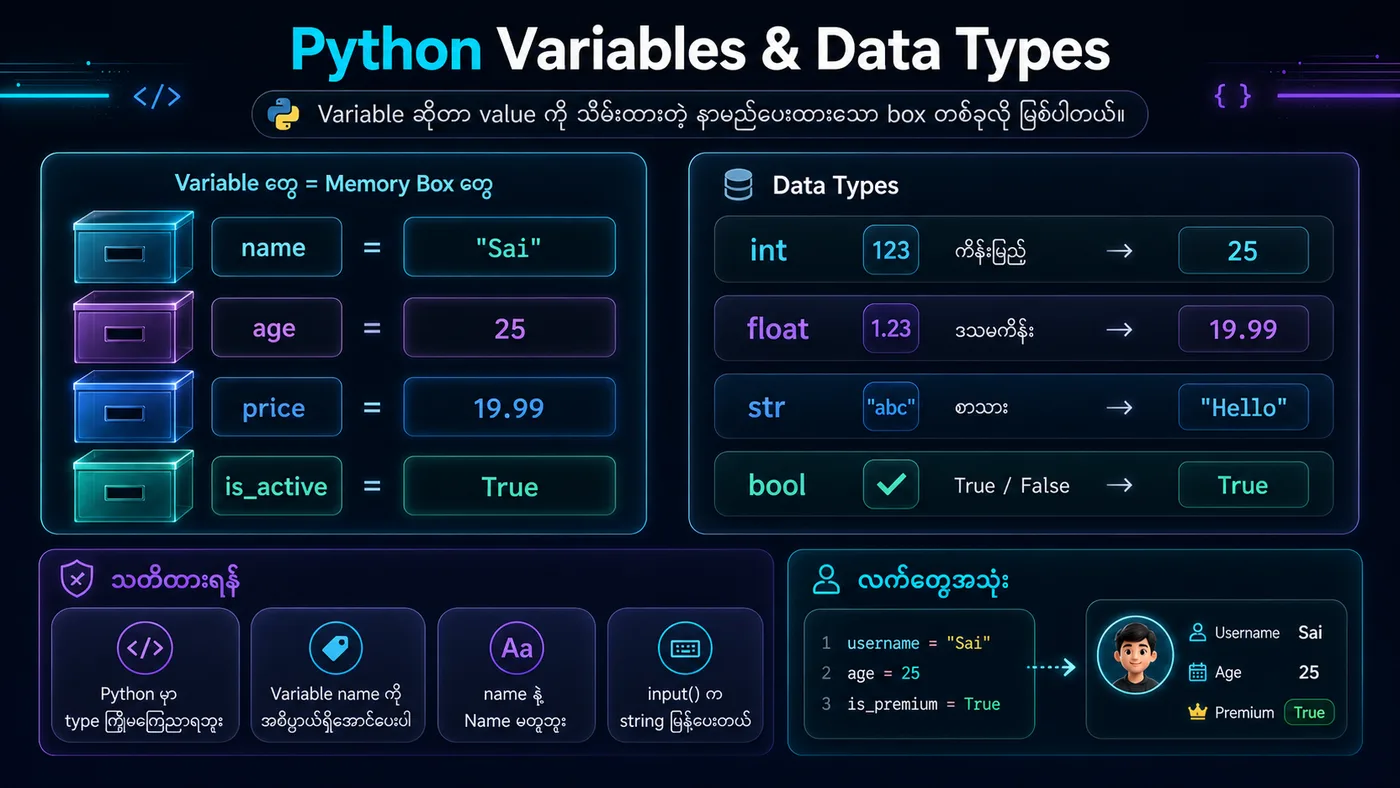
Mutability နဲ့ hashability ကို လက်တွေ့ စမ်းခြင်း
အောက်က code မှာ tuple ကို dict key အဖြစ် အောင်မြင်စွာ သုံးပြီး str method က မူရင်းကို မပြောင်းကြောင်း၊ list ကတော့ နေရာမှာတင် ပြောင်းကြောင်း ပြပါတယ်။ နောက်ဆုံးမှာ list ကို key အဖြစ် သုံးတဲ့ ပြဿနာ section ရဲ့ error ကို try/except နဲ့ ဖမ်းပြထားပါတယ်။
location = (16.8, 96.1)
visits = {location: 3}
print(visits[(16.8, 96.1)])          # 3

word = "python"
loud = word.upper()
print(word, loud)                    # python PYTHON

colors = ["red"]
colors.append("blue")
print(colors)                        # ['red', 'blue']

try:
    bad = {["a", "b"]: 1}
except TypeError as err:
    print("TypeError:", err)
Truthy နဲ့ falsy value များ
if cart: လို့ ရေးရင် "cart ထဲမှာ item ရှိလား" လို့ မေးတာနဲ့ အတူတူပါ။ ဘယ် value တွေ falsy ဖြစ်လဲ ကိုယ်တိုင် run ကြည့်ပါ — "0" နဲ့ [0] ကို သတိထားပါ။ 0 က မှန်ကန်တဲ့ value ဖြစ်နိုင်တဲ့ နေရာမှာ သတိထားပါ — if quantity: က quantity 0 ကို value မရှိတာနဲ့ အတူတူ သဘောထားလို့ အဲဒီလို နေရာမှာ if quantity is not None: လို့ ရေးပါ။
for value in [0, 0.0, "", [], {}, None, "0", [0], -1]:
    print(repr(value), bool(value))
လက်တွေ့ project တွေမှာ
Real project တွေမှာ ဘယ်လို သုံးလဲ
API ကနေ JSON data လက်ခံတဲ့အခါ JSON object တွေက dict၊ array တွေက list၊ null က None ဖြစ်လာပါတယ်။ ဒါကြောင့် dict, list, None ကို ကောင်းကောင်း နားလည်ရင် web data နဲ့ အလုပ်လုပ်ရတာ လွယ်ပါတယ်။ ငွေကြေးတွက်တဲ့အခါ float က 0.1 + 0.2 ကို 0.30000000000000004 လို့ ပြတတ်လို့ ဘဏ်နဲ့ စာရင်းကိုင် code တွေမှာ decimal.Decimal ဒါမှမဟုတ် ပြား/ကျပ်ကို int နဲ့ သိမ်းတာကို ရွေးကြပါတယ်။
Type ရွေးချယ်မှုက performance ကိုလည်း ပြောင်းစေပါတယ်။ "ဒီ email ကို မြင်ဖူးပြီလား" လို့ value သန်းချီထဲမှာ ထပ်ခါထပ်ခါ စစ်ရင် list က item တစ်ခုချင်း လိုက်ရှာရပေမယ့် set က hash ကို သုံးလို့ ချက်ချင်းနီးပါး အဖြေပေးပါတယ်။ Function ကို input စစ်ဖို့ isinstance() ကို သုံးပြီး မှားတဲ့ type ဝင်လာရင် ရှင်းလင်းတဲ့ TypeError ပေးတာက library ကောင်းတွေရဲ့ အလေ့အကျင့်ပါ။ Database တွေမှာလည်း ပုံစံ အတူတူပါပဲ — SQLite ကနေ ဖတ်တဲ့ row တစ်ခုက int, float, str, bytes ဒါမှမဟုတ် None value တွေအဖြစ် ရောက်လာလို့ ဒီ lesson ရဲ့ စစ်ဆေးနည်းတွေကို အဲဒီမှာလည်း သုံးရပါတယ်။
အမှားများ
အဖြစ်များတဲ့ အမှားတွေ
1. str method ရဲ့ ရလဒ်ကို မသိမ်းတာ
name.strip() ဒါမှမဟုတ် name.upper() လို့ ရေးရုံနဲ့ name မပြောင်းပါဘူး၊ str က immutable ဖြစ်လို့ပါ။ name = name.strip() လို့ ရလဒ်ကို ပြန် assign လုပ်ရပါမယ်။ list.append() ကတော့ ပြောင်းပြန် — နေရာမှာတင် ပြင်ပြီး None ပြန်ပေးလို့ items = items.append(x) လို့ ရေးရင် list ပျောက်သွားပါတယ်။
2. Bool ကို int အဖြစ် လက်ခံမိတာ
isinstance(value, int) တစ်ခုတည်းနဲ့ "quantity က ဂဏန်းလား" စစ်ရင် True နဲ့ False ကပါ ဖြတ်သွားပြီး quantity = True က 1 လို အလုပ်လုပ်ပါတယ်။ Bool ကို ပယ်ချင်ရင် isinstance(value, bool) ကို အရင် စစ်ပါ။
3. {} ကို set ဗလာလို့ ထင်တာ
seen = {} က dict ဗလာ ဖြစ်လို့ seen.add("x") က "AttributeError: 'dict' object has no attribute 'add'" ပေးပါတယ်။ Set ဗလာကို seen = set() နဲ့ ဆောက်ပါ။
Best Practices
အကောင်းဆုံး အလေ့အကျင့်များ
- ပြောင်းစရာ မလိုတဲ့ value အုပ်စုတွေ (coordinate, RGB color) ကို tuple နဲ့ သိမ်းပါ။
- ထပ်နေတာ ဖယ်ချင်တာ ဒါမှမဟုတ် "ပါလား" လို့ မကြာခဏ စစ်ရတာဆို set ကို ရွေးပါ။
- Logic ထဲမှာ type(x) == ... ထက် isinstance() ကို ပိုသုံးပါ။
- Value မရှိသေးတာကို None နဲ့ ပြပြီး if value is None: နဲ့ စစ်ပါ၊ == None နဲ့ မစစ်ပါနဲ့။
Mini challenge
Mini challenge: value တွေကို အမျိုးအစား ခွဲပါ
Value တစ်ခုကို လက်ခံပြီး သူ့အမျိုးအစားကို စာသားနဲ့ ပြန်ပေးတဲ့ describe() function ကို ရေးပြီး sample value ရှစ်ခုနဲ့ စမ်းပါ။
- None ဆိုရင် "nothing" ပြန်ပေးရမယ်
- Bool ဆိုရင် "yes/no" ပြန်ပေးရမယ် (int ထက် အရင် စစ်ရမယ်)
- int ဒါမှမဟုတ် float ဆိုရင် "number"၊ str ဆိုရင် "text" ပြန်ပေးရမယ်
- list, tuple, set, dict ဆိုရင် "collection of N" (N = item အရေအတွက်)၊ ကျန်တာ "other"
def describe(value):
    # TODO: None -> "nothing"
    # TODO: bool -> "yes/no"   (why must this come before the int check?)
    # TODO: int or float -> "number"
    # TODO: str -> "text"
    # TODO: list/tuple/set/dict -> "collection of <len>"
    # TODO: anything else -> "other"
    ...


samples = [42, 2.5, True, "hi", [1, 2, 3], {"a": 1}, None, b"raw"]
# TODO: print each sample with repr() and its description
ရလဒ်: ထွက်လာမယ့် output: 42: number 2.5: number True: yes/no 'hi': text [1, 2, 3]: collection of 3 {'a': 1}: collection of 1 None: nothing b'raw': other
အရိပ်အမြွက် ကြည့်ရန်
isinstance(value, (int, float)) လို tuple နဲ့ type အများကြီးကို တစ်ခါတည်း စစ်ပါ။ f"{sample!r}" က repr(sample) နဲ့ အတူတူပါ။
အဖြေ ကြည့်ရန်
def describe(value):
    if value is None:
        return "nothing"
    if isinstance(value, bool):
        return "yes/no"
    if isinstance(value, (int, float)):
        return "number"
    if isinstance(value, str):
        return "text"
    if isinstance(value, (list, tuple, set, dict)):
        return f"collection of {len(value)}"
    return "other"


samples = [42, 2.5, True, "hi", [1, 2, 3], {"a": 1}, None, b"raw"]
for sample in samples:
    print(f"{sample!r}: {describe(sample)}")
Quick Quiz 1 / 3
Quick Quiz 2 / 3
Quick Quiz 3 / 3
မှတ်ထားရမယ့် အချက်များ
- Type က value နဲ့ လုပ်လို့ရတာကို ဆုံးဖြတ်ပြီး built-in type တွေကို number, text, sequence, set, mapping အုပ်စုခွဲလို့ ရပါတယ်။
- list, dict, set က mutable၊ int, float, str, tuple က immutable ပါ — immutable value တွေပဲ dict key ဖြစ်နိုင်ပါတယ်။
- Logic ထဲမှာ isinstance() ကို သုံးပြီး bool က int ရဲ့ subclass ဖြစ်တာကို သတိထားပါ။
- 0, "", [], {}, set(), None က falsy ဖြစ်ပြီး "0" နဲ့ [0] က truthy ပါ။
The Python Tutorial — Python Software Foundation