ရိုးရိုးလေး ရှင်းပြမယ်
ရိုးရိုးလေး ရှင်းရရင်
အိမ်က ထွက်ခါနီး ကောင်းကင်ကို မော့ကြည့်ပါတယ်။ မိုးရွာနေရင် ထီးယူမယ်၊ နေပူရင် ဦးထုပ်ဆောင်းမယ်၊ ကျန်တဲ့ အခြေအနေမှာတော့ ဘာမှ မယူဘူး။ ဆုံးဖြတ်ချက် တစ်ခုချင်းက အခြေအနေ တစ်ခုပေါ် မူတည်ပြီး ရွေးချယ်မှု တစ်ခုပဲ လုပ်ပါတယ်။
Python ရဲ့ if...else က program ကို အဲဒီလို ဆုံးဖြတ်ခိုင်းတာပါ။ Condition တစ်ခုကို True လား False လား စစ်ပြီး True ဖြစ်တဲ့ branch ထဲက code ကိုပဲ run ပါတယ်။ ကျန်တဲ့ branch တွေကို လုံးဝ ကျော်သွားပါတယ်။
Problem → Why → Solution
ပြဿနာ: condition အစဉ်မှားလို့ A ရသင့်သူ D ရတာ
ဆရာတစ်ယောက်က grade တွက်တဲ့ code ကို ရေးတဲ့အခါ စာရွက်ပေါ်က စည်းမျဉ်းအတိုင်း "60 နဲ့ အထက် D" ကို အရင်ရေးပြီး "90 နဲ့ အထက် A" ကို နောက်မှ ရေးလိုက်ပါတယ်။ အမှတ် 95 ရတဲ့ ကျောင်းသားက D ရသွားပြီး error ဘာမှ မတက်ပါဘူး။ elif score >= 90 branch က ဘယ်တော့မှ run မလာနိုင်တော့ပါဘူး။
score = 95

if score >= 60:
    grade = "D"      # 95 >= 60 is True, so we stop here
elif score >= 90:
    grade = "A"      # unreachable: every 90+ score already matched above
else:
    grade = "F"

print(grade)  # D
ဘာကြောင့် ဒီလိုဖြစ်တာလဲ
if/elif chain က အပေါ်ကနေ အောက်ကို တစ်ခုချင်း စစ်ပြီး True ဖြစ်တဲ့ ပထမဆုံး branch ကို run ပြီးတာနဲ့ chain တစ်ခုလုံးကနေ ထွက်ပါတယ်။ 90 အထက် အမှတ်တိုင်းက 60 အထက်လည်း ဖြစ်လို့ ကျယ်တဲ့ condition က ကျဉ်းတဲ့ condition ကို ဖုံးသွားပါတယ်။ အဖြေက specific အကျဆုံး condition (>= 90) ကို အပေါ်ဆုံး ထားတာပါ။
Core concept: ပထမဆုံး True ဖြစ်တဲ့ branch တစ်ခုပဲ
if statement တစ်ခုက if keyword၊ condition၊ colon (:) နဲ့ indent လုပ်ထားတဲ့ block တစ်ခု ပါပါတယ်။ Python မှာ curly brace မရှိလို့ indentation (ပုံမှန် space လေးခု) က ဘယ် line တွေ branch ထဲ ပါလဲ ဆုံးဖြတ်ပါတယ်။ Colon မေ့ရင် SyntaxError ဖြစ်ပြီး indent မညီရင် IndentationError ဖြစ်ပါတယ်။ elif (else if ရဲ့ အတို) ကို လိုသလောက် ထည့်လို့ရပြီး else က အဆုံးမှာ တစ်ခုပဲ ရှိနိုင်ပါတယ်၊ condition မပါပါဘူး။
Python က condition တွေကို အပေါ်ကနေ စစ်ပြီး ပထမဆုံး True ဖြစ်တာကို run ကာ ကျန်တာ အကုန် ကျော်ပါတယ်။ ဒါကြောင့် if/elif/else chain တစ်ခုမှာ branch တစ်ခုထက် ပိုမ run ပါဘူး။ if တွေကို elif မသုံးဘဲ သီးခြားစီ ရေးရင်တော့ condition တိုင်းကို စစ်လို့ branch အများကြီး run နိုင်ပါတယ် — ရွေးချယ်မှု တစ်ခုတည်း လိုချင်ရင် elif ကို သုံးပါ။
Condition က True/False အစစ် ဖြစ်စရာ မလိုပါဘူး။ Python က value တိုင်းကို truthy ဒါမှမဟုတ် falsy အဖြစ် သတ်မှတ်ပါတယ်။ False, None, 0, 0.0, "" (empty string), [], (), {}, set() တွေက falsy ဖြစ်ပြီး ကျန်တာ အားလုံး truthy ပါ။ ဒါကြောင့် if not name: က empty string ကို စစ်တဲ့ ရိုးရှင်းတဲ့ နည်းပါ။ "0" ဆိုတဲ့ string ကတော့ စာလုံးတစ်လုံး ပါလို့ truthy ပါ။
Condition တွေကို and (နှစ်ခုလုံး), or (တစ်ခုခု), not (ပြောင်းပြန်) နဲ့ ပေါင်းပါတယ်။ Python မှာ 18 <= age < 65 လို chained comparison ရေးလို့ရပြီး age >= 18 and age < 65 နဲ့ အဓိပ္ပာယ်တူပါတယ်။ Value တစ်ခုကို condition ပေါ်မူတည်ပြီး ရွေးရုံပဲဆိုရင် status = "adult" if age >= 18 else "minor" လို conditional expression (ternary) ကို သုံးပါ၊ ဒါပေမယ့် action တွေ လုပ်ဖို့ ရှည်လျားတဲ့ logic အတွက်တော့ ရိုးရိုး if block က ပိုဖတ်ရလွယ်ပါတယ်။
- ပထမ condition ကို စစ်
- True ဆို အဲဒီ block ကို run
- Chain တစ်ခုလုံးကနေ ထွက်
- False ဆို နောက် elif ဆီ ဆင်း
- ဘာမှ မကိုက်ရင် else
ကျဉ်းတဲ့ (specific) ဂိတ်ကို အပေါ်မှာ ထားပါ၊ ကျယ်တဲ့ ဂိတ်က အရင်ဆိုရင် အကုန်လုံးကို ဖမ်းယူသွားပါမယ်။
အထွေထွေ ပုံစံ
if condition_a:
    action_a()
elif condition_b:
    action_b()
else:
    fallback()

value = option_1 if condition else option_2
if နဲ့ elif တိုင်းမှာ condition နဲ့ colon လိုပြီး else မှာတော့ colon ပဲ လိုပါတယ်။ Block ထဲက line တွေကို တူညီတဲ့ indentation နဲ့ ရေးရပါမယ်။ နောက်ဆုံး line က value နှစ်ခုထဲက တစ်ခုကို ရွေးတဲ့ expression ပုံစံပါ။
Example: grade, ရာသီဥတု, nested if နဲ့ truthiness
ဒီ example က if statement ပုံစံ ငါးမျိုးကို ပြပါတယ်။ elif chain နဲ့ grade တွက်တာ၊ if/else ရိုးရိုး၊ if ထဲမှာ if ထပ်ထည့်တာ၊ empty string ကို falsy အဖြစ် စစ်တာ၊ conditional expression နဲ့ chained comparison ပါ။ Output ကို မကြည့်ခင် line တစ်ကြောင်းချင်း ဘာထွက်မလဲ ခန့်မှန်းကြည့်ပါ။
score = 75

if score >= 90:
    grade = "A"
elif score >= 80:
    grade = "B"
elif score >= 70:
    grade = "C"
elif score >= 60:
    grade = "D"
else:
    grade = "F"
print(f"Score {score} -> grade {grade}")

temperature = 25
if temperature > 30:
    print("It's a hot day!")
else:
    print("It's a nice day.")

num = 15
if num > 0:
    if num % 2 == 0:
        print(num, "is positive and even")
    else:
        print(num, "is positive and odd")

nickname = ""
if not nickname:
    print("No nickname given")

age = 20
status = "adult" if age >= 18 else "minor"
print(status)

if 18 <= age < 65 and status == "adult":
    print("Can apply for the job")
Code ကို တစ်ပိုင်းချင်း ရှင်းပြမယ်
- Lines 3-12
elif score >= 70:75 က >= 90 နဲ့ >= 80 မှာ False ဖြစ်ပြီး >= 70 မှာ True ဖြစ်လို့ grade = "C" ပါ။ >= 60 branch က True ဖြစ်နိုင်ပေမယ့် chain က ပြီးသွားပြီမို့ မစစ်တော့ပါဘူး။
- Lines 22-26
if num % 2 == 0:Nested if က အပြင် condition (num > 0) True ဖြစ်မှသာ စစ်ပါတယ်။ 15 % 2 က 1 ဖြစ်လို့ inner else branch run ပါတယ်။ Indentation အဆင့် နှစ်ဆင့်ကို သတိထားကြည့်ပါ။
- Line 29
if not nickname:Empty string က falsy ဖြစ်လို့ not nickname က True ပါ။ if nickname == "": လို့ ရေးတာနဲ့ ရလဒ် တူပေမယ့် Python ပုံစံက ဒါပါ။
- Line 33
status = "adult" if age >= 18 else "minor"Conditional expression က value တစ်ခုကို ပြန်ပေးလို့ assignment ရဲ့ ညာဘက်မှာ တိုက်ရိုက် ရေးလို့ရပါတယ်။ 20 >= 18 ဖြစ်လို့ "adult" ရပါတယ်။
- Line 36
if 18 <= age < 65 and status == "adult":Chained comparison က age ကို အကန့်အသတ် နှစ်ဖက်နဲ့ တစ်ခါတည်း စစ်ပြီး and က ဒုတိယ condition ပါ True ဖြစ်မှ block ကို run ခွင့်ပေးပါတယ်။
Score 75 -> grade C
It's a nice day.
15 is positive and odd
No nickname given
adult
Can apply for the job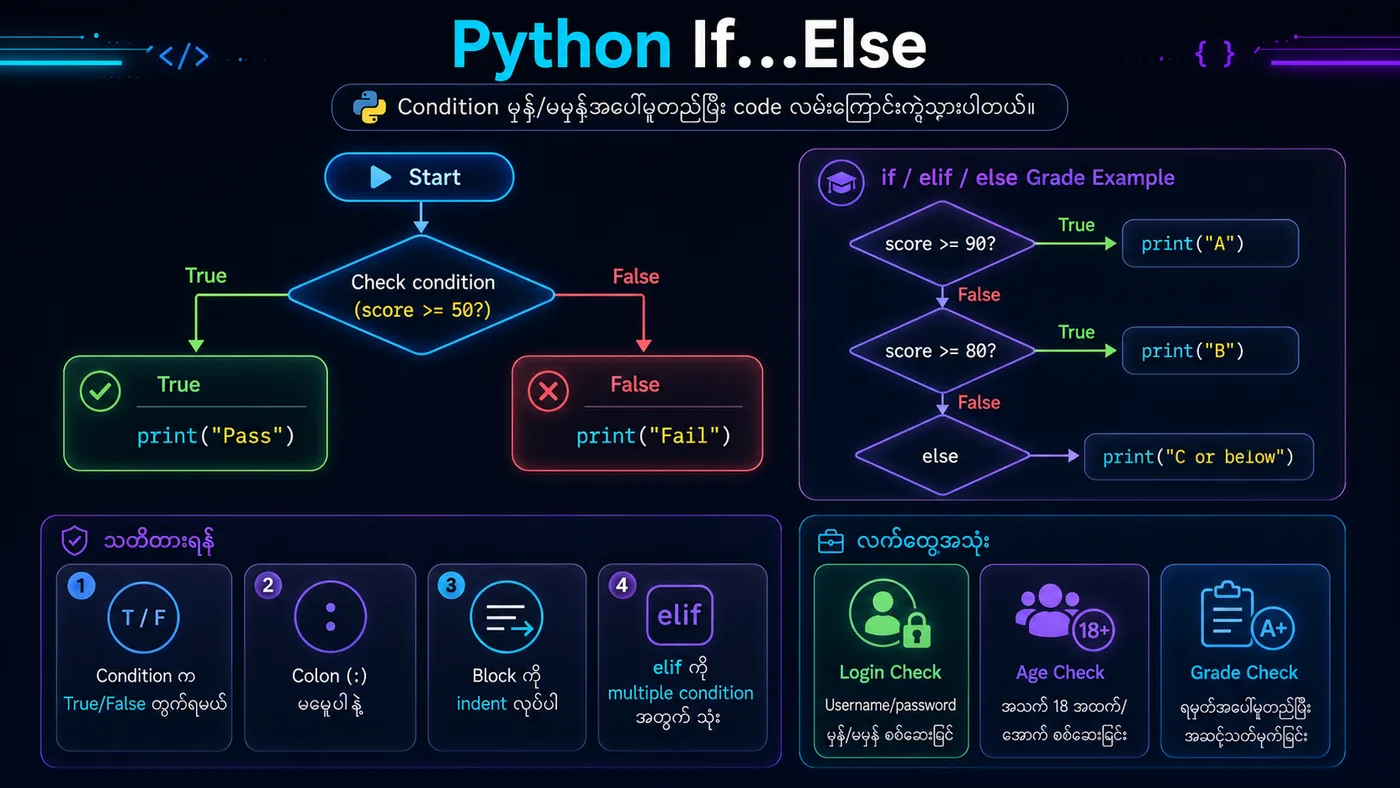
Guard clause နဲ့ nesting လျှော့ခြင်း
if တွေ အဆင့်လေးငါးဆင့် ထပ်ထားရင် ဘယ် else က ဘယ် if နဲ့ ဆိုင်လဲ ဖတ်ရခက်ပါတယ်။ မမှန်ကန်တဲ့ အခြေအနေတွေကို အရင်ဆုံး ဖယ်ထုတ်ပြီး (guard) ပုံမှန် လမ်းကြောင်းကို နောက်ဆုံးမှာ indent နည်းနည်းနဲ့ ရေးတာက ပိုရှင်းပါတယ်။ Function တွေ သင်ပြီးရင် ဒီ guard တွေက return နဲ့ စောစော ထွက်တဲ့ ပုံစံ ဖြစ်လာပါမယ်။
address = "12 Bogyoke Rd"
country = "MM"
total = 42

if not address:
    message = "Add an address first"
elif country not in ("MM", "TH"):
    message = "We do not ship there yet"
elif total >= 50:
    message = "Free shipping"
else:
    message = f"Add {50 - total} more for free shipping"
print(message)
ဒီ code က "Add 8 more for free shipping" ကို print ထုတ်ပါတယ်။ Guard နှစ်ခုက လိပ်စာနဲ့ နိုင်ငံကို အရင်စစ်လို့ နောက်ဆုံး branch နှစ်ခုကို ရောက်တဲ့အခါ data မှန်ကြောင်း သေချာနေပါပြီ။ Value တစ်ခုကို pattern အများကြီးနဲ့ တိုက်စစ်ရရင် Python 3.10 ကစပြီး match statement လည်း ရှိပါတယ်၊ ဒါပေမယ့် ရိုးရိုး range နဲ့ boolean condition တွေအတွက်တော့ if/elif က အသင့်တော်ဆုံးပါ။
လက်တွေ့ project တွေမှာ
Real project တွေမှာ ဘယ်လို သုံးလဲ
Online shop တစ်ခုရဲ့ checkout မှာ ပို့ဆောင်ခ ဆုံးဖြတ်ချက်က if/elif chain တစ်ခုပါ။ လိပ်စာ မရှိတာ၊ account ပိတ်ခံထားရတာ၊ ပို့လို့မရတဲ့ နိုင်ငံ ဖြစ်တာလို ငြင်းပယ်ရမယ့် အခြေအနေတွေကို အရင် စစ်ပြီး ပစ္စည်းဖိုး 50 ကျော်ရင် free shipping ပေးတဲ့ ပုံမှန် rule ကို နောက်မှ စစ်ပါတယ်။ Test ရေးတဲ့အခါ branch တိုင်း အနည်းဆုံး တစ်ခါ run ဖို့ input တစ်ခုစီ ပြင်ဆင်ပါတယ်၊ 49.99 နဲ့ 50 လို boundary value တွေကိုလည်း သီးသန့် စစ်ပါတယ်။
Web form validation, game ရဲ့ score စည်းမျဉ်း, user role အလိုက် menu ပြတာလို နေရာတိုင်းမှာ if/elif ကို တွေ့ရပါတယ်။ Business rule တွေ များလာရင် is_eligible လို နာမည်ကောင်းတဲ့ boolean variable တွေထဲ condition ကို အရင် သိမ်းပြီးမှ if is_eligible: လို့ ရေးတာက code review မှာ ဖတ်ရလွယ်ပါတယ်။ မသိတဲ့ status value ရောက်လာရင် ဘာလုပ်မလဲဆိုတာကိုလည်း else branch မှာ တိတိကျကျ ဆုံးဖြတ်ထားရပါမယ်၊ မဟုတ်ရင် အမှားတွေ တိတ်တဆိတ် ကျော်သွားပါတယ်။
အမှားများ
အဖြစ်များတဲ့ အမှားတွေ
1. if color == "red" or "blue": လို့ ရေးတာ
Python က ဒါကို (color == "red") or "blue" လို့ ဖတ်ပါတယ်။ "blue" က non-empty string ဖြစ်လို့ truthy အမြဲဖြစ်ပြီး color က green ဖြစ်နေရင်တောင် branch run ပါတယ်။ color == "red" or color == "blue" ဒါမှမဟုတ် color in ("red", "blue") လို့ ရေးပါ။
2. elif နေရာမှာ if သီးခြားစီ ရေးတာ
if score >= 90: grade = "A" ပြီးနောက် if score >= 80: grade = "B" လို့ ရေးရင် 95 အတွက် ဒုတိယ if ကလည်း run ပြီး grade ကို B နဲ့ ထပ်ရေးပါတယ်။ ရွေးချယ်မှု တစ်ခုတည်း လိုရင် elif ကို သုံးပါ။
3. Comparison နေရာမှာ = သုံးတာ
if age = 18: က SyntaxError ပါ — = က assign လုပ်တာဖြစ်ပြီး နှိုင်းယှဉ်ဖို့ == ကို သုံးရပါတယ်။ Python က ဒီအမှားကို run မလုပ်ခင်ကတည်းက ဖမ်းပေးလို့ ကံကောင်းပါတယ်၊ C လို တချို့ language တွေမှာတော့ ဒီ typo က တိတ်တဆိတ် assign လုပ်သွားပါတယ်။
4. Indentation ရောထွေးတာ
Branch ထဲမှာ ပါသင့်တဲ့ print ကို indent မလုပ်မိရင် အဲဒီ line က if အပြင်ရောက်ပြီး အမြဲ run ပါတယ်။ Error မတက်တဲ့အတွက် ရှာရခက်ပါတယ်၊ editor ကို tab အစား space လေးခု သုံးဖို့ setting ပြင်ထားပါ။
Best Practices
အကောင်းဆုံး အလေ့အကျင့်များ
- Range condition တွေကို specific အကျဆုံးကနေ အကျယ်ဆုံး အစဉ်နဲ့ စီပြီး boundary value တွေကို test လုပ်ပါ။
- x == True နဲ့ len(items) > 0 အစား if x: နဲ့ if items: လို truthiness ကို တိုက်ရိုက် သုံးပါ။
- Condition ရှည်လာရင် နာမည်ကောင်းတဲ့ boolean variable ထဲ ခွဲထုတ်ပါ၊ nesting သုံးဆင့်ထက် မပိုပါစေနဲ့။
Mini challenge
Mini challenge: ရုပ်ရှင်လက်မှတ် ဈေးနှုန်း
အသက်၊ နေ့၊ ကျောင်းသား ဟုတ်မဟုတ်နဲ့ coupon ရှိမရှိပေါ် မူတည်ပြီး ရုပ်ရှင်လက်မှတ် ဈေးကို တွက်ပါ။ Variable တန်ဖိုးတွေ ပြောင်းပြီး branch တိုင်း run အောင် စမ်းကြည့်ပါ။
- အသက် 0 အောက် ဒါမှမဟုတ် 120 အထက်ဆိုရင် "Invalid age" ပြရမယ် (guard ကို အရင်ဆုံး စစ်)
- 5 အောက် အခမဲ့၊ 13 အောက် 3000၊ ကျောင်းသား ဒါမှမဟုတ် 65 နဲ့အထက် 4000၊ ကျန်တာ 6000
- Sat/Sun မှာ အခမဲ့ မဟုတ်တဲ့ လက်မှတ်ကို 1000 တိုးရမယ်၊ coupon ရှိရင် 500 လျှော့ရမယ်
- "free" ဒါမှမဟုတ် "paid" ကို conditional expression နဲ့ ရွေးပြီး print ရမယ်
age = 16
day = "Sat"
is_student = True
has_coupon = False

# TODO: if/elif/else chain that sets price
#   invalid age (< 0 or > 120) -> None, then the age bands, most specific first

# TODO: if price is None, print "Invalid age"
# TODO: otherwise apply the weekend surcharge and the coupon,
#       pick "free"/"paid" in one line, and print the result
ရလဒ်: ပေးထားတဲ့ value တွေနဲ့ ဆိုရင်: Age 16, Sat: 5000 MMK (paid)
အရိပ်အမြွက် ကြည့်ရန်
day in ("Sat", "Sun") နဲ့ weekend ကို စစ်ပါ။ None ကို စစ်တဲ့အခါ price is None လို့ ရေးပါ — if not price: လို့ ရေးရင် 0 (အခမဲ့) ကိုပါ invalid လို့ ထင်သွားပါမယ်။
အဖြေ ကြည့်ရန်
age = 16
day = "Sat"
is_student = True
has_coupon = False

if age < 0 or age > 120:
    price = None
elif age < 5:
    price = 0
elif age < 13:
    price = 3000
elif is_student or age >= 65:
    price = 4000
else:
    price = 6000

if price is None:
    print("Invalid age")
else:
    if day in ("Sat", "Sun") and price > 0:
        price += 1000
    if has_coupon:
        price -= 500
    kind = "free" if price == 0 else "paid"
    print(f"Age {age}, {day}: {price} MMK ({kind})")
Quick Quiz 1 / 3
Quick Quiz 2 / 3
Quick Quiz 3 / 3
မှတ်ထားရမယ့် အချက်များ
- if/elif/else chain က အပေါ်ကနေ စစ်ပြီး ပထမဆုံး True ဖြစ်တဲ့ branch တစ်ခုပဲ run ပါတယ်။
- Indentation က block ကို သတ်မှတ်ပြီး condition တိုင်းနောက်မှာ colon လိုပါတယ်။
- False, None, 0, "", နဲ့ empty collection တွေက falsy ဖြစ်ပြီး ကျန်တာ truthy ပါ။
- Specific condition ကို အရင်ထားပြီး value ရွေးရုံဆို x if cond else y ကို သုံးပါ။
The Python Tutorial — Python Software Foundation