ရိုးရိုးလေး ရှင်းပြမယ်
ရိုးရိုးလေး ရှင်းရရင်
Syntax ဆိုတာ language တစ်ခုရဲ့ သဒ္ဒါ စည်းမျဉ်းတွေပါ။ မြန်မာစာမှာ ပုဒ်မ မှားရင် အဓိပ္ပာယ် ပြောင်းသွားနိုင်သလို Python မှာလည်း colon တစ်လုံး ကျန်တာ၊ space အရေအတွက် လွဲတာက program ကို run မရအောင် ဒါမှမဟုတ် တခြား အလုပ်လုပ်အောင် ဖြစ်စေပါတယ်။
Python ရဲ့ အထူးဆုံး စည်းမျဉ်းက indentation ပါ။ တခြား language တွေက { } ကွင်းနဲ့ "ဒီ line တွေက အတူတူပါ" လို့ ပြောပေမယ့် Python ကတော့ ရှေ့က space အရေအတွက်ကိုပဲ ကြည့်ပါတယ်။ ညီညီ ရွှေ့ထားတဲ့ line တွေက အုပ်စုတစ်ခုတည်း ဖြစ်ပါတယ်။
Problem → Why → Solution
ပြဿနာ: error မတက်ဘဲ အဖြေမှားတာ
Indentation အမှားမှာ နှစ်မျိုး ရှိပါတယ်။ ကျယ်ကျယ်လောင်လောင် အမှားကတော့ IndentationError နဲ့ program ကို ရပ်ပစ်လို့ ချက်ချင်း သိပါတယ်။ ပိုအန္တရာယ်များတာက တိတ်တိတ်လေး အမှားပါ — line တစ်ကြောင်းကို level မှားထားရင် grammar အရ မှန်နေလို့ Python က run ပေးပေမယ့် ရည်ရွယ်ထားတာနဲ့ မတူတဲ့ အလုပ်ကို လုပ်ပါတယ်။ အောက်က code မှာ order တိုင်းအတွက် receipt line ထုတ်ချင်ပေမယ့် တစ်ကြောင်းပဲ ထွက်ပါတယ်။
orders = [1200, 800, 450]
total = 0
for amount in orders:
    total = total + amount
print(f"Added {amount}, total is now {total}")   # meant to be inside the loop
ဘာကြောင့် တစ်ကြောင်းပဲ ထွက်တာလဲ
print() line က for နဲ့ level တူနေလို့ loop ထဲမှာ မဟုတ်ဘဲ loop ပြီးမှ တစ်ကြိမ်တည်း run ပါတယ်။ Python အတွက် indentation က အလှအပ မဟုတ်ဘဲ အဓိပ္ပာယ်ပါ — space လေးခု ရွှေ့လိုက်တာနဲ့ "loop ထဲမှာ အကြိမ်တိုင်း" ဖြစ်သွားပါတယ်။ ဒါကြောင့် block တစ်ခု ဘယ်မှာ စပြီး ဘယ်မှာ ဆုံးလဲ မျက်စိနဲ့ ဖတ်တတ်ဖို့ လိုပါတယ်။
Core concept: statement, block နဲ့ indentation
Python program တစ်ခုက statement တွေ အစဉ်လိုက် စုထားတာပါ၊ ပုံမှန်အားဖြင့် line တစ်ကြောင်းမှာ statement တစ်ခုပါ။ if, for, while, def, class လို statement တွေကတော့ header line ပါ — colon (:) နဲ့ ဆုံးရပြီး အောက်က line တွေကို indent လုပ်ထားတဲ့ body တစ်ခု လိုက်ရပါတယ်။ Colon ကျန်ရင် "SyntaxError: expected ':'" ရပြီး body မှာ indent မပါရင် "IndentationError: expected an indented block" ရပါတယ်။
Body ထဲက line တိုင်းကို တူညီတဲ့ အကွာအဝေး ရွှေ့ရပါတယ်၊ PEP 8 style guide က space လေးခု ကို အကြံပြုပါတယ်။ ဘယ်ဘက်ကို ပြန်ဆုတ်လိုက်တဲ့ (dedent) ပထမ line မှာ block ဆုံးပါတယ်။ Block ထဲမှာ block ထပ်ထည့်လို့ ရလို့ for ထဲက if ရဲ့ body ဆိုရင် space ရှစ်ခု ဖြစ်ပါတယ်။ Tab နဲ့ space ကို file တစ်ခုတည်းမှာ ရောသုံးရင် မျက်စိနဲ့ကြည့်တော့ ညီနေပေမယ့် Python က TabError ပေးပါတယ်၊ ဒါကြောင့် editor ကို Tab နှိပ်ရင် space လေးခု ထည့်အောင် set ထားပါ။
Python က case-sensitive ပါ — name, Name, NAME က variable သုံးခု သီးသန့်ပါ။ if, for, class, True, None လို keyword တွေကိုတော့ variable နာမည်အဖြစ် သုံးလို့ မရပါဘူး။ နာမည်ပေးပုံအတွက် PEP 8 က variable နဲ့ function ကို snake_case (total_price)၊ class ကို CapWords (ShoppingCart)၊ ပြောင်းမှာ မဟုတ်တဲ့ constant ကို UPPER_CASE (MAX_ITEMS) နဲ့ ရေးဖို့ အကြံပြုပါတယ်။
| စည်းမျဉ်း | ဆိုလိုချက် | ဥပမာ |
|---|---|---|
| Case-sensitive | အကြီး/အသေး ကွဲရင် နာမည် မတူ | name နဲ့ Name က variable နှစ်ခု |
| Indentation | Space ၄ ခုနဲ့ block ကို ခွဲ | if x > 0: အောက်က line တွေကို ရွှေ့ |
| Colon | Header line တိုင်း : နဲ့ ဆုံး | for item in items: |
| Line continuation | ကွင်းဖွင့်ထားသရွေ့ line ခွဲလို့ရ | total = (price + tax + fee) ကို + နောက်မှာ ခွဲ |
| Comment | # နောက်က စာကို Python က ကျော် | # explain why here |
Statement တစ်ခုက line တစ်ကြောင်းထက် ရှည်ရင် ( ), [ ], { } ကွင်းထဲမှာ ရှိနေသရွေ့ ဆက်ရေးလို့ ရပါတယ် — Python က ကွင်းပိတ်မတွေ့မချင်း statement မပြီးသေးဘူးလို့ သိပါတယ်။ Line အဆုံးမှာ backslash (\) ထည့်တာလည်း အလုပ်လုပ်ပေမယ့် backslash နောက်မှာ space တစ်ခုတည်း ပါသွားရင် SyntaxError ဖြစ်လို့ ကွင်းကို ပိုသုံးကြပါတယ်။ Semicolon (;) နဲ့ statement အများကြီးကို line တစ်ကြောင်းတည်း ရေးလို့ ရပေမယ့် ဖတ်ရခက်လို့ ရှောင်ပါ။
- Header line က : နဲ့ ဆုံး
- Body line တွေ space ၄ ခု ရွှေ့
- Nested block ဆို ထပ် ၄ ခု
- ဘယ်ဘက် ပြန်ဆုတ်ရင် block ပြီး
Line တစ်ကြောင်းက ဘယ် block ထဲမှာလဲ သိချင်ရင် အပေါ်ဘက်မှာ သူ့ထက် ဘယ်ဘက်ကျတဲ့ ပထမဆုံး header line ကို ရှာပါ။
အထွေထွေ ပုံစံ: block နဲ့ ကွင်းထဲ ဆက်ရေးခြင်း
header_statement:
    body_line          # 4 spaces: inside the block
    nested_header:
        nested_body    # 8 spaces: inside both blocks
after_block            # back at the left: the block is over

long_value = (first_part
              + second_part)
header_statement နေရာမှာ if condition, for item in items လို code ဝင်ပါတယ်။ ကွင်းဖွင့်ထားသရွေ့ line ခွဲလို့ရပြီး ဆက်ရေးတဲ့ line တွေကို ဖတ်ရလွယ်အောင် ညှိထားလေ့ ရှိပါတယ်။
Example: block, case နဲ့ ကွင်းထဲ ဆက်ရေးခြင်း
ဒီ example မှာ block level သုံးမျိုး ပါပါတယ်။ Run မလုပ်ခင် line တစ်ကြောင်းစီက ဘယ် block ထဲမှာလဲ၊ ဘယ်နှစ်ကြိမ် run မလဲ ဆုံးဖြတ်ကြည့်ပါ။ အထူးသဖြင့် line 6 နဲ့ line 19 က ဘာကြောင့် တစ်ကြိမ်ပဲ ထွက်လဲ စဉ်းစားပါ။
temperature = 31

if temperature > 30:
    print("Hot day")
    print("Drink water")
print("This line is outside the if block")

name = "Sai"
Name = "Aye"
print(name, Name)

total = (1 + 2 + 3
         + 4 + 5 + 6)
print(f"Total: {total}")

for n in range(4):
    if n % 2 == 0:
        print(n, "is even")
print("Loop finished")
Code ကို တစ်ပိုင်းချင်း ရှင်းပြမယ်
- Lines 3-5
if temperature > 30:Colon နဲ့ ဆုံးတဲ့ header line ပါ။ Space လေးခု ရွှေ့ထားတဲ့ print နှစ်ကြောင်းက if ရဲ့ body ဖြစ်လို့ temperature က 30 ထက် ကြီးမှသာ run ပါတယ်။
- Line 6
print("This line is outside the if block")ဘယ်ဘက်ဆုံးကို ပြန်ရောက်လို့ if block ပြီးသွားပါပြီ။ temperature = 20 ပြောင်းကြည့်ရင် ဒီ line တစ်ကြောင်းပဲ ထွက်ပါမယ်။
- Lines 8-10
print(name, Name)name နဲ့ Name က variable နှစ်ခု သီးသန့်ပါ။ Code ဖတ်ရ ရှုပ်လို့ လက်တွေ့မှာ ဒီလို နာမည်တွေ မပေးသင့်ပေမယ့် case-sensitive ဖြစ်ပုံကို ပြထားတာပါ။
- Lines 12-13
total = (1 + 2 + 3
         + 4 + 5 + 6)
ကွင်းဖွင့်ထားလို့ Python က line 12 ပြီးတာနဲ့ statement ပြီးပြီလို့ မယူဆပါဘူး။ Line အဆုံးမှာ backslash ထည့်ပြီးလည်း ဆက်ရေးလို့ရပေမယ့် ကွင်းက ပိုစိတ်ချရပါတယ်။
- Lines 16-18
if n % 2 == 0:for ထဲမှာ if ရှိလို့ print က space ရှစ်ခုမှာပါ။ range(4) က 0, 1, 2, 3 ကို ပေးပြီး % 2 == 0 (နှစ်နဲ့ စားလို့ အကြွင်းမရှိ) ဖြစ်တဲ့ 0 နဲ့ 2 ပဲ print ထွက်ပါတယ်။
- Line 19
print("Loop finished")Level 0 ကို ပြန်ရောက်လို့ for block ပြီးပါပြီ၊ loop လေးကြိမ် ပတ်ပြီးမှ တစ်ကြိမ်တည်း run ပါတယ်။
Hot day
Drink water
This line is outside the if block
Sai Aye
Total: 21
0 is even
2 is even
Loop finished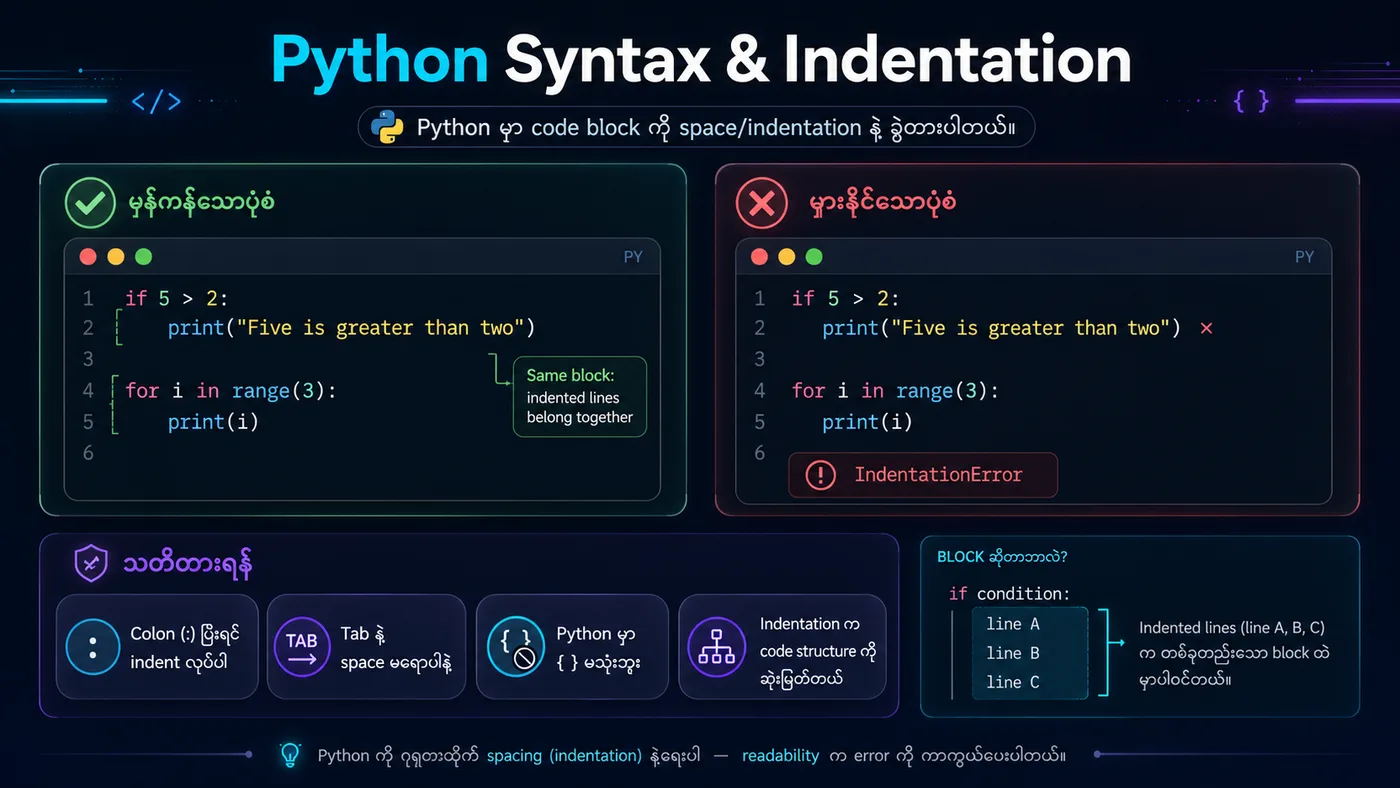
Error message တွေကို ဖတ်တတ်ခြင်း
Syntax error တွေက program မ run ခင် ပေါ်ပြီး Python က line နံပါတ်နဲ့ ^ သင်္ကေတနဲ့ နေရာကို ညွှန်ပြပါတယ်။ တစ်ခါတစ်လေ ညွှန်ပြတဲ့ line က အမှားရှိတဲ့ line ရဲ့ နောက် line ဖြစ်နေတတ်လို့ အပေါ် line ကိုပါ စစ်ပါ။ Python 3.13 မှာ မြင်ရတဲ့ message တွေကို ဇယားမှာ ပြထားပါတယ်။
| Message | အဓိပ္ပာယ်နဲ့ ပြင်နည်း |
|---|---|
| SyntaxError: expected ':' | if/for/def line ရဲ့ အဆုံးမှာ colon ထည့်ပါ |
| IndentationError: expected an indented block | Header line အောက်က body ကို space ၄ ခု ရွှေ့ပါ |
| IndentationError: unexpected indent | Header မရှိဘဲ ရွှေ့ထားတဲ့ line ကို ဘယ်ဘက် ပြန်ဆုတ်ပါ |
| IndentationError: unindent does not match any outer indentation level | ပြန်ဆုတ်တဲ့ line ကို အပေါ်က level တစ်ခုခုနဲ့ ညီအောင် ညှိပါ |
| TabError: inconsistent use of tabs and spaces in indentation | Tab တွေကို space အဖြစ် ပြောင်းပါ |
လက်တွေ့ project တွေမှာ
Real project တွေမှာ ဘယ်လို သုံးလဲ
Team project တွေမှာ code style ကို လူတိုင်း လက်နဲ့ မညှိကြပါဘူး၊ Black ဒါမှမဟုတ် Ruff လို formatter tool တွေက file ကို save လုပ်တာနဲ့ indentation, line အရှည်၊ ကွင်းထဲ line ခွဲပုံတွေကို PEP 8 နဲ့ ကိုက်အောင် အလိုအလျောက် ပြင်ပေးပါတယ်။ Code review မှာ space အကြောင်း ငြင်းခုံစရာ မလိုတော့ဘဲ logic ကိုပဲ အာရုံစိုက်နိုင်ပါတယ်။ Project အများစုက ဒီ formatter ကို commit မလုပ်ခင် အလိုအလျောက် run အောင် ထားပြီး style နဲ့ မကိုက်တဲ့ code ကို CI pipeline မှာ ငြင်းပယ်ပါတယ်။
Indentation က YAML config file တွေ၊ Jupyter notebook cell တွေ၊ Django view function တွေ စတဲ့ Python နဲ့ ဆက်စပ်တဲ့ နေရာတိုင်းမှာ ပေါ်ပါတယ်။ Website တစ်ခုကနေ code copy ကူးတဲ့အခါ tab တွေ ပါလာတတ်လို့ editor ရဲ့ "Convert indentation to spaces" command ကို သုံးပါ။ Git diff မှာလည်း indentation ပြောင်းတာက logic ပြောင်းတာဖြစ်လို့ reviewer တွေက whitespace ပြောင်းလဲမှုကိုပါ သေချာ စစ်ကြပါတယ်။
အမှားများ
အဖြစ်များတဲ့ အမှားတွေ
1. Loop ပြီးမှ run ရမယ့် line ကို loop ထဲ ထည့်မိတာ
ပြဿနာ section ရဲ့ ပြောင်းပြန်ပါ — print("Average:", total / len(orders)) ကို loop body ထဲ ရွှေ့မိရင် order တိုင်းမှာ မပြီးသေးတဲ့ ပျမ်းမျှကို print ထုတ်ပါတယ်။ Loop ပြီးမှ တစ်ကြိမ်ပဲ လိုတဲ့ အရာတွေကို for နဲ့ level တူအောင် ထားပါ။
2. Header line မှာ colon မေ့တာ
JavaScript ဒါမှမဟုတ် C ကနေ ပြောင်းလာသူတွေက if x > 5 လို့ colon မပါဘဲ ရေးမိတတ်ပါတယ်။ Python 3.13 က "expected ':'" လို့ တိတိကျကျ ပြောလို့ line အဆုံးမှာ : ထည့်လိုက်ရုံပါပဲ။ else: နဲ့ elif condition: မှာလည်း colon လိုပါတယ်။
3. Backslash နောက်မှာ space ကျန်တာ
total = 1 + 2 + \ ရဲ့ နောက်မှာ မမြင်ရတဲ့ space တစ်ခု ပါသွားရင် "unexpected character after line continuation character" SyntaxError ရပါတယ်။ Backslash ကို လုံးဝ မသုံးဘဲ expression တစ်ခုလုံးကို ( ) နဲ့ ဝိုင်းလိုက်ရင် ဒီပြဿနာ မရှိတော့ပါဘူး။
Best Practices
အကောင်းဆုံး အလေ့အကျင့်များ
- Editor မှာ whitespace ကို မြင်ရအောင် ဖွင့်ထားပါ၊ tab နဲ့ space ကို မျက်စိနဲ့ ခွဲနိုင်ပါတယ်။
- Nested block သုံးဆင့်ထက် နက်လာရင် code ကို function သေးသေးလေးတွေ ခွဲဖို့ အချိန်တန်ပါပြီ။
- Line တစ်ကြောင်းကို 79 လုံးဝန်းကျင်အတွင်း ထားပါ (PEP 8)၊ team အချို့က 88 ထိ ခွင့်ပြုပါတယ်။
- Block ထဲမှာ ဘာမှ မရေးရသေးရင် pass ကို placeholder အဖြစ် ထည့်ပါ။
Mini challenge
Mini challenge: အမှတ်စာရင်း report
ကျောင်းသားအမှတ် list တစ်ခုကို loop ပတ်ပြီး အောင်/ကျ print ထုတ်ကာ အနှစ်ချုပ်ကို နောက်ဆုံးမှာ တစ်ကြိမ်တည်း print ထုတ်တဲ့ program ရေးပါ။ Block level တွေကို မှန်အောင် ထားဖို့ အဓိကပါ။
- Loop ထဲမှာ if/else နဲ့ 50 နဲ့ အထက်ဆို pass, အောက်ဆို retake print ထုတ်ရမယ်
- အောင်တဲ့ အရေအတွက်ကို counter variable နဲ့ ရေတွက်ရမယ်
- Summary line ကို loop ပြီးမှ တစ်ကြိမ်တည်း print ထုတ်ရမယ်
- Summary စာကြောင်းကို ( ) ထဲမှာ line နှစ်ကြောင်း ခွဲရေးရမယ်
scores = [72, 45, 88, 50]
PASS_MARK = 50
passed = 0

for score in scores:
    # TODO: if the score reaches PASS_MARK, print "<score>: pass" and add 1 to passed
    # TODO: else print "<score>: retake"
    pass

# TODO: summary = ( "...first part..."
#                   "...second part..." )  built inside brackets
# TODO: print the summary once, outside the loop
ရလဒ်: ထွက်လာမယ့် output: 72: pass 45: retake 88: pass 50: pass 3 of 4 students passed (pass mark 50).
အရိပ်အမြွက် ကြည့်ရန်
if နဲ့ else က for body ထဲမှာမို့ space ၄ ခု၊ သူတို့ရဲ့ body က space ၈ ခုမှာ ရှိရပါမယ်။ ကွင်းထဲမှာ f-string နှစ်ခုကို ဘေးချင်းကပ်ရေးရင် တစ်ခုတည်းအဖြစ် ဆက်ပေးပါတယ်။
အဖြေ ကြည့်ရန်
scores = [72, 45, 88, 50]
PASS_MARK = 50
passed = 0

for score in scores:
    if score >= PASS_MARK:
        print(f"{score}: pass")
        passed = passed + 1
    else:
        print(f"{score}: retake")

summary = (f"{passed} of {len(scores)} students passed "
           f"(pass mark {PASS_MARK}).")
print(summary)
Quick Quiz 1 / 3
Quick Quiz 2 / 3
Quick Quiz 3 / 3
မှတ်ထားရမယ့် အချက်များ
- if, for, def လို header line တွေက : နဲ့ ဆုံးပြီး indent လုပ်ထားတဲ့ body လိုက်ရပါတယ်။
- Indentation က Python အတွက် အဓိပ္ပာယ်ပါ — level မှားရင် error မတက်ဘဲ logic ပြောင်းသွားနိုင်ပါတယ်။
- Space ၄ ခုကို အမြဲ သုံးပြီး tab နဲ့ မရောပါနဲ့။
- Python က case-sensitive ဖြစ်ပြီး PEP 8 အရ snake_case, CapWords, UPPER_CASE နဲ့ နာမည်ပေးပါ။
- စာကြောင်းရှည်ကို backslash အစား ( ) ထဲမှာ ခွဲပါ။
The Python Tutorial — Python Software Foundation