ရိုးရိုးလေး ရှင်းပြမယ်
ရိုးရိုးလေး ရှင်းရရင်
JSON (JavaScript Object Notation) ဆိုတာ program တွေကြား data ပို့ဖို့ ကမ္ဘာတစ်ဝှမ်း သဘောတူထားတဲ့ စာသား ပုံစံတစ်ခုပါ။ Python, JavaScript, Java, Go ဘယ် language ကမဆို ဖတ်နိုင်လို့ web API အများစုက JSON နဲ့ ပြောဆိုကြပါတယ်။ လူလည်း ဖတ်လို့ရတဲ့ text ဖြစ်ပါတယ်။
Python မှာ json module က စကားပြန်ပါ။ json.dumps() က Python dict ကို JSON text အဖြစ် ပြောင်းပြီး json.loads() က JSON text ကို dict အဖြစ် ပြန်ပြောင်းပါတယ်။ နာမည်နောက်က s က "string" ကို ဆိုလိုပါတယ်။
Problem → Why → Solution
ပြဿနာ: Python ရဲ့ print ပုံစံက JSON မဟုတ်ဘူး
Dict ကို print ထုတ်ကြည့်ရင် JSON နဲ့ တူတူပဲလို့ ထင်ရလို့ str() နဲ့ ပြောင်းပြီး frontend ဆီ ပို့ကြတာ ရှိပါတယ်။ JavaScript ရဲ့ JSON.parse() က single quote, True, None တွေကို လက်မခံလို့ ချက်ချင်း error တက်ပါတယ်။ နောက်တစ်ခုက date object ပါတဲ့ dict ကို json.dumps() ထဲ ထည့်လိုက်တာနဲ့ TypeError ဖြစ်ပါတယ်။
import json
from datetime import date

payload = str({"name": "Aye", "active": True, "manager": None})
# "{'name': 'Aye', 'active': True, 'manager': None}"  <- JSON.parse() rejects this

json.dumps({"joined": date(2024, 5, 1)})
# TypeError: Object of type date is not JSON serializable
ဘာကြောင့် ကွာတာလဲ
str() က Python ရဲ့ ကိုယ်ပိုင် ပုံစံ (repr) ကို ထုတ်တာပါ၊ JSON standard ကတော့ string တွေကို double quote နဲ့ပဲ ရေးရပြီး true, false, null ကို စာလုံးအသေးနဲ့ ရေးရပါတယ်။ JSON မှာ type ခြောက်မျိုးပဲ ရှိလို့ date, Decimal, set လို Python type တွေကို ဘယ်လို ပြောင်းမလဲ ကိုယ်တိုင် ဆုံးဖြတ်ပေးရပါတယ်။ json module ကို သုံးမှပဲ standard နဲ့ ကိုက်တဲ့ output ကို အာမခံရပါတယ်။
Core concept: type mapping နဲ့ function လေးခု
JSON မှာ object, array, string, number, boolean, null ဆိုပြီး type ခြောက်မျိုးပဲ ရှိပါတယ်။ json module က Python type တွေကို အောက်ပါအတိုင်း ပြောင်းပါတယ်၊ ပြန်ပြောင်းတဲ့အခါ အမြဲ မူရင်းအတိုင်း ပြန်မရတာကို သတိထားပါ။
| Python | JSON | ပြန် parse ရင် |
|---|---|---|
| dict | object {} | dict (key တွေ အမြဲ str) |
| list, tuple | array [] | list (tuple မဟုတ်တော့) |
| str | string "..." | str |
| int, float | number | int ဒါမှမဟုတ် float |
| True / False / None | true / false / null | True / False / None |
Function လေးခုကို နာမည်နဲ့ မှတ်ပါ — s ပါရင် string နဲ့ အလုပ်လုပ်ပြီး s မပါရင် file object နဲ့ အလုပ်လုပ်ပါတယ်။ json.dumps(obj) နဲ့ json.loads(text) က string အတွက်၊ json.dump(obj, f) နဲ့ json.load(f) က with open(...) နဲ့ ဖွင့်ထားတဲ့ file အတွက်ပါ။ Serialize လုပ်တဲ့ function တွေမှာ indent=2 (ဖတ်ရလွယ်အောင်)၊ sort_keys=True (diff လုပ်ရလွယ်အောင်)၊ ensure_ascii=False (မြန်မာစာလို စာလုံးတွေကို \uXXXX escape မလုပ်ဘဲ ထားဖို့) နဲ့ default=function (date လို မသိတဲ့ type တွေကို ပြောင်းပေးမယ့် function) ဆိုတဲ့ option တွေ ရှိပါတယ်။
လူဖတ်ဖို့ file တွေမှာ indent ကို သုံးပေမယ့် network ပေါ် ပို့တဲ့ data မှာတော့ byte နည်းလေ ကောင်းလေ ဖြစ်ပါတယ်။ json.dumps(obj, separators=(",", ":")) က comma နဲ့ colon နောက်က space တွေကိုပါ ဖယ်ပေးလို့ အကျစ်လျစ်ဆုံး output ကို ရပါတယ်။ Output ပုံစံ ဘယ်လိုပဲ ရွေးရွေး parse လုပ်ပြီးရင် data က အတူတူပါပဲ။
json.loads() က text ရဲ့ syntax ကိုပဲ စစ်ပါတယ်။ Syntax မှားရင် ValueError ရဲ့ subclass ဖြစ်တဲ့ json.JSONDecodeError ကို raise လုပ်ပြီး msg, lineno, colno attribute တွေက ဘယ်နေရာ မှားလဲ ပြပါတယ်။ ဒါပေမယ့် syntax မှန်တာနဲ့ data မှန်တာ မတူပါဘူး — {"port": "eighty"} က valid JSON ဖြစ်ပေမယ့် port က number ဖြစ်ရမယ်ဆိုတဲ့ စည်းမျဉ်းကို ချိုးဖောက်ပါတယ်။ ဒါကြောင့် API ဒါမှမဟုတ် user ဆီက ရလာတဲ့ JSON ကို အမြဲ untrusted data အဖြစ် သဘောထားပြီး လိုအပ်တဲ့ field, type နဲ့ တန်ဖိုး range တွေကို parse ပြီးတာနဲ့ စစ်ပါ။ JSON မှာ NaN မရှိပေမယ့် Python က float("nan") ကို NaN လို့ ထုတ်ပေးတတ်လို့ တင်းကျပ်တဲ့ output လိုရင် allow_nan=False ကို သုံးပါ။
- Python object ကို dumps နဲ့ text ပြောင်း
- Text က network/file ကို ဖြတ်သွား
- loads နဲ့ Python object ပြန်ရ
- Field နဲ့ type ကို validate
Program ထဲမှာ dict, list နဲ့ပဲ အလုပ်လုပ်ပြီး program ရဲ့ နယ်စပ် (API, file) မှာပဲ JSON text အဖြစ် ပြောင်းပါ။
အထွေထွေ ပုံစံ
import json

text = json.dumps(python_obj, indent=2, ensure_ascii=False, default=converter)
python_obj = json.loads(text)          # may raise json.JSONDecodeError

with open(path, "w", encoding="utf-8") as f:
    json.dump(python_obj, f, indent=2)
with open(path, encoding="utf-8") as f:
    python_obj = json.load(f)
s ပါတဲ့ function တွေက string ကို ပြန်ပေး/လက်ခံပြီး s မပါတာတွေက file object လိုပါတယ်။ File ဖွင့်တိုင်း encoding="utf-8" ကို ရေးပါ။
Example: dict ကနေ JSON ပြီး ပြန်ပြောင်း
User profile dict တစ်ခုကို JSON text အဖြစ် ပြောင်း၊ ပြန် parse လုပ်၊ API response လို nested JSON ထဲက တန်ဖိုးကို ဆွဲထုတ်၊ နောက်ဆုံး မှားနေတဲ့ JSON ကို parse လုပ်ကြည့်ပါမယ်။ True နဲ့ None က output ထဲမှာ true နဲ့ null ဖြစ်သွားတာကို သတိထားကြည့်ပါ။ Run မလုပ်ခင် indent=2 က skills list ကို ဘယ်လို ဖော်ပြမလဲ ခန့်မှန်းကြည့်ပါ။
import json

# Python dictionary
user_data = {
    "name": "Aung Aung",
    "age": 25,
    "city": "Yangon",
    "skills": ["Python", "JavaScript", "SQL"],
    "verified": True,
    "manager": None,
}

# Python -> JSON text
json_string = json.dumps(user_data, indent=2)
print("JSON String:")
print(json_string)

# JSON text -> Python
parsed_data = json.loads(json_string)
print(f"\nParsed Name: {parsed_data['name']}")
print(f"Skills: {', '.join(parsed_data['skills'])}")
print(f"Types: {type(parsed_data['verified']).__name__}, {parsed_data['manager']}")

# Accessing nested data
api_response = '{"status": "success", "data": {"temperature": 28, "city": "Mandalay"}}'
weather = json.loads(api_response)
print(f"\nTemperature in {weather['data']['city']} (C): {weather['data']['temperature']}")

# Invalid JSON raises JSONDecodeError
try:
    json.loads("{'name': 'Aye'}")
except json.JSONDecodeError as e:
    print(f"\nInvalid JSON: {e.msg} (line {e.lineno}, column {e.colno})")
Code ကို တစ်ပိုင်းချင်း ရှင်းပြမယ်
- Serialise
json_string = json.dumps(user_data, indent=2)indent=2 က nested level တစ်ခုစီကို space နှစ်ခုနဲ့ ရွှေ့ပြီး list ထဲက item တစ်ခုစီကိုပါ line သီးသီး ထားပါတယ်။ indent မပါရင် line တစ်ကြောင်းတည်း ထွက်ပါတယ်။
- Parse
parsed_data = json.loads(json_string)Text ကို dict အသစ်အဖြစ် ပြန်ဆောက်ပါတယ်။ true က Python ရဲ့ True (bool)၊ null က None ဖြစ်လာလို့ Types line မှာ bool နဲ့ None ထွက်ပါတယ်။
- Nested access
weather = json.loads(api_response)API response တွေမှာ data ကို {"data": {...}} လို ထပ်ထုပ်ထားလေ့ ရှိလို့ weather['data']['city'] လို key နှစ်ဆင့် သုံးရပါတယ်။
- Invalid JSON
except json.JSONDecodeError as e:Single quote က JSON မှာ မမှန်လို့ column 2 မှာ "Expecting property name enclosed in double quotes" ဆိုတဲ့ error ရပါတယ်။ e.lineno နဲ့ e.colno က file ကြီးတွေမှာ အမှားရှာရ လွယ်စေပါတယ်။
JSON String:
{
  "name": "Aung Aung",
  "age": 25,
  "city": "Yangon",
  "skills": [
    "Python",
    "JavaScript",
    "SQL"
  ],
  "verified": true,
  "manager": null
}

Parsed Name: Aung Aung
Skills: Python, JavaScript, SQL
Types: bool, None

Temperature in Mandalay (C): 28

Invalid JSON: Expecting property name enclosed in double quotes (line 1, column 2)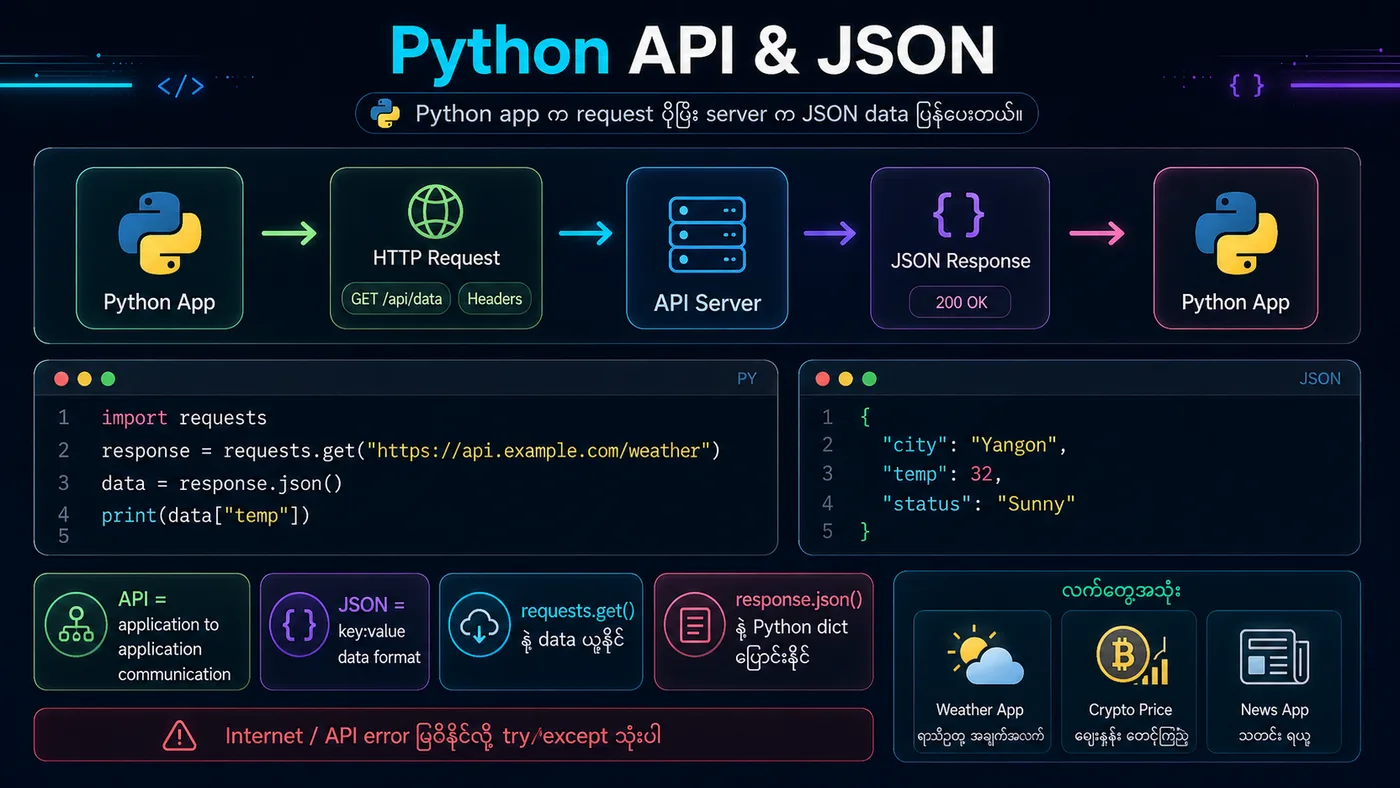
File, မြန်မာစာ နဲ့ date
Default အနေနဲ့ dumps က ASCII မဟုတ်တဲ့ စာလုံးတွေကို \u1019 လို escape လုပ်ပါတယ် — JSON အနေနဲ့ မှန်ပေမယ့် လူဖတ်ဖို့ ခက်ပါတယ်။ File ထဲ ရေးတဲ့အခါ ensure_ascii=False နဲ့ encoding="utf-8" ကို တွဲသုံးရင် မြန်မာစာကို မူရင်းအတိုင်း သိမ်းပါတယ်။ default=str က date ကို "2024-05-01" string ပြောင်းပေးပြီး tuple က list အဖြစ် ပြန်လာတာကိုလည်း မြင်ရပါမယ်။
import json
import tempfile
from datetime import date
from pathlib import Path

profile = {"name": "မောင်မောင်", "joined": date(2024, 5, 1), "tags": ("admin", "dev")}

# Default: non-ASCII text is escaped; date needs default= to be converted
print(json.dumps(profile, default=str))

# Files: always name the encoding; ensure_ascii=False keeps the real characters
path = Path(tempfile.gettempdir()) / "profile.json"
with open(path, "w", encoding="utf-8") as f:
    json.dump(profile, f, ensure_ascii=False, indent=2, default=str)
with open(path, encoding="utf-8") as f:
    loaded = json.load(f)
print(loaded["name"] == profile["name"], loaded["tags"], type(loaded["joined"]).__name__)
လက်တွေ့ project တွေမှာ
Real project တွေမှာ ဘယ်လို သုံးလဲ
Web API request/response တိုင်း၊ config file တွေ (package.json, VS Code settings)၊ log line တစ်ကြောင်းကို JSON object တစ်ခုစီ ရေးတဲ့ structured logging၊ cache ထဲ ထည့်တဲ့ data — JSON ကို နေရာတိုင်းမှာ တွေ့ရပါတယ်။ requests ရဲ့ response.json() နဲ့ requests.post(json=...) တို့ကလည်း နောက်ကွယ်မှာ ဒီ json module လိုမျိုး loads/dumps ကိုပဲ လုပ်တာပါ။
Config file ကို load လုပ်တဲ့ code ကောင်းတွေက parse ပြီးတာနဲ့ လိုအပ်တဲ့ key, type, range တွေကို စစ်ပြီး ပြဿနာ အားလုံးကို message တစ်ခုထဲ စုပြပါတယ်၊ ဒါမှ user က တစ်ခါတည်း ပြင်နိုင်ပါတယ်။ Project ကြီးတွေမှာ ဒီ validation ကို pydantic ဒါမှမဟုတ် jsonschema လို library နဲ့ လုပ်လေ့ ရှိပါတယ်။ File ပြန်ရေးတဲ့အခါမှာလည်း ရေးနေရင်း crash ဖြစ်ရင် file တစ်ဝက်ပဲ ကျန်မနေအောင် temp file ထဲ အရင်ရေးပြီး os.replace() နဲ့ အစားထိုးတဲ့ atomic save နည်းကို သုံးပါတယ်။
အမှားများ
အဖြစ်များတဲ့ အမှားတွေ
1. dump နဲ့ dumps ကို ရောတာ
json.dump(data) လို file မပေးဘဲ ခေါ်ရင် "dump() missing 1 required positional argument: 'fp'" ရပါတယ်။ String လိုရင် dumps၊ file ထဲ ရေးချင်ရင် dump(data, f) ကို သုံးပါ။ load နဲ့ loads မှာလည်း အတူတူပါပဲ။
2. Parse ဖြစ်တာနဲ့ data မှန်တယ်လို့ ယူဆတာ
json.loads() အောင်မြင်ပေမယ့် key ပျောက်နေရင် နောက်ပိုင်း KeyError၊ "8000" လို string ဖြစ်နေရင် TypeError က code ရဲ့ တခြားနေရာမှာ ပေါ်လာပါတယ်။ Parse ပြီးတာနဲ့ boundary မှာပဲ validate လုပ်ပါ။
3. int key တွေ string ဖြစ်သွားတာကို မေ့တာ
{1: "a"} ကို dumps ပြီး loads ပြန်လုပ်ရင် {"1": "a"} ရလို့ data[1] က KeyError ဖြစ်ပါတယ်။ JSON object key တွေက string ပဲ ဖြစ်နိုင်လို့ပါ။ Load ပြီးမှ int() နဲ့ key ကို ပြန်ပြောင်းပါ။
4. File ဖွင့်တဲ့အခါ encoding မပေးတာ
Windows မှာ default encoding က UTF-8 မဟုတ်နိုင်လို့ ensure_ascii=False နဲ့ မြန်မာစာ ရေးရင် UnicodeEncodeError ဒါမှမဟုတ် စာလုံးပျက် ဖြစ်တတ်ပါတယ်။ open() ခေါ်တိုင်း encoding="utf-8" ကို ရေးပါ။
Best Practices
အကောင်းဆုံး အလေ့အကျင့်များ
- JSON text ကို f-string ဒါမှမဟုတ် str() နဲ့ ကိုယ်တိုင် မဆောက်ပါနဲ့၊ dict တစ်ခု ဆောက်ပြီး json.dumps() ကို ခေါ်ပါ။
- Git ထဲ သိမ်းမယ့် JSON file တွေမှာ indent=2 နဲ့ sort_keys=True သုံးပါ၊ diff တွေ ဖတ်ရ လွယ်ပါတယ်။
- ပြင်ပကလာတဲ့ JSON ကို parse လုပ်ခင် size ကို ကန့်သတ်ပြီး parse လုပ်ပြီးတာနဲ့ validate လုပ်ပါ။
- အရေးကြီးတဲ့ file ကို ပြန်ရေးရင် temp file ထဲ အရင်ရေးပြီး os.replace() နဲ့ အစားထိုးပါ။
Mini challenge
Mini challenge: config ကို load, validate, save
App config JSON text ကို parse လုပ်ပြီး field တွေကို validate လုပ်၊ released ကို date object အဖြစ် ပြောင်းပေးတဲ့ load_config() နဲ့ ပြန်ပြီး JSON text ထုတ်ပေးတဲ့ save_config() ကို ရေးပါ။
- JSON မမှန်ရင် ဒါမှမဟုတ် top level က object မဟုတ်ရင် ValueError raise လုပ်ရမယ်
- app က str၊ port က 1-65535 ကြား int (bool မရ)၊ debug က bool၊ released က YYYY-MM-DD ဖြစ်ရမယ်
- ပြဿနာ အားလုံးကို "; " နဲ့ ဆက်ပြီး ValueError တစ်ခုတည်းထဲ ပြရမယ်
- save_config() က indent=2, sort_keys=True သုံးပြီး date ကို ISO string ပြောင်းရမယ်
import json
from datetime import date


def load_config(text):
    # TODO: json.loads, turning JSONDecodeError into ValueError
    # TODO: the top level must be a dict
    problems = []
    # TODO: check app, port (int but not bool, 1-65535), debug, released
    # TODO: raise ValueError("; ".join(problems)) if anything failed
    # TODO: return the dict with "released" converted to a date
    ...


def save_config(config):
    # TODO: indent=2, sort_keys=True, and a default= that handles date
    ...


# TODO: load one good config and print it via save_config()
# TODO: try two or three bad configs and print each "rejected: ..." message
ရလဒ်: အောင်မြင်တဲ့ config တစ်ခုနဲ့ ငြင်းပယ်ခံရတဲ့ config သုံးခုအတွက် output: 2025 date { "app": "shop", "debug": false, "port": 8000, "released": "2025-03-01" } rejected: port must be an integer 1-65535; debug must be true or false; released must be YYYY-MM-DD rejected: port must be an integer 1-65535 rejected: not valid JSON: Illegal trailing comma before end of object
အရိပ်အမြွက် ကြည့်ရန်
bool က int ရဲ့ subclass ဖြစ်လို့ isinstance(True, int) က True ပါ၊ port အတွက် type(port) is int နဲ့ စစ်ပါ။ date.fromisoformat() က format မှားရင် ValueError၊ None ရရင် TypeError ပစ်ပါတယ်။
အဖြေ ကြည့်ရန်
import json
from datetime import date


def load_config(text):
    try:
        raw = json.loads(text)
    except json.JSONDecodeError as e:
        raise ValueError(f"not valid JSON: {e.msg}") from e
    if not isinstance(raw, dict):
        raise ValueError("top level must be an object")
    problems = []
    if not isinstance(raw.get("app"), str):
        problems.append("app must be a string")
    port = raw.get("port")
    if type(port) is not int or not 1 <= port <= 65535:
        problems.append("port must be an integer 1-65535")
    if not isinstance(raw.get("debug"), bool):
        problems.append("debug must be true or false")
    try:
        released = date.fromisoformat(raw.get("released", ""))
    except (TypeError, ValueError):
        problems.append("released must be YYYY-MM-DD")
    if problems:
        raise ValueError("; ".join(problems))
    return {**raw, "released": released}


def save_config(config):
    return json.dumps(config, indent=2, sort_keys=True, default=date.isoformat)


good = '{"app": "shop", "port": 8000, "debug": false, "released": "2025-03-01"}'
config = load_config(good)
print(config["released"].year, type(config["released"]).__name__)
print(save_config(config))

for bad in ['{"app": "shop", "port": "8000", "debug": 1, "released": "soon"}',
            '{"app": "shop", "port": true, "debug": false, "released": "2025-03-01"}',
            '{"app": "shop",}']:
    try:
        load_config(bad)
    except ValueError as e:
        print("rejected:", e)
Quick Quiz 1 / 3
Quick Quiz 2 / 3
Quick Quiz 3 / 3
မှတ်ထားရမယ့် အချက်များ
- dumps/loads က string နဲ့၊ dump/load က file နဲ့ အလုပ်လုပ်ပါတယ်။
- JSON type ခြောက်မျိုးပဲ ရှိလို့ tuple က list၊ int key က str ဖြစ်ပြီး date လို type တွေအတွက် default= လိုပါတယ်။
- File တွေမှာ encoding="utf-8" ကို အမြဲ ရေးပြီး မြန်မာစာ ထိန်းချင်ရင် ensure_ascii=False သုံးပါ။
- JSONDecodeError ကို ကိုင်တွယ်ပြီး parse ပြီးတဲ့ data ကို field, type, range အလိုက် validate လုပ်ပါ။
Python Standard Library — json — Python Software Foundation