ရိုးရိုးလေး ရှင်းပြမယ်
ရိုးရိုးလေး ရှင်းရရင်
ဟင်းချက်နည်း ကတ်ပြားတစ်ခုကို စဉ်းစားကြည့်ပါ။ "ကြက်ဥကြော်" ဆိုတဲ့ ကတ်မှာ အဆင့်တွေ ရေးထားပြီး ကြက်ဥ ဘယ်နှလုံး (input) ထည့်မလဲ ဆိုတာပဲ ပြောင်းပါတယ်။ ချက်တိုင်း အဆင့်တွေကို အစကနေ ပြန်ရေးစရာ မလိုဘဲ "ကြက်ဥကြော် — ကြက်ဥ ၃ လုံး" လို့ ခေါ်လိုက်ရုံပါပဲ။
Function က code အတွက် ဟင်းချက်နည်း ကတ်ပါ။ def နဲ့ တစ်ခါ ရေးထားပြီး နာမည်နဲ့ ခေါ်တိုင်း run ပါတယ်။ Input ကို parameter တွေကနေ လက်ခံပြီး ရလဒ်ကို return နဲ့ ပြန်ပေးပါတယ်။ ခေါ်မှသာ run ပါတယ် — def လုပ်ရုံနဲ့ ဘာမှ မဖြစ်သေးပါဘူး။
Problem → Why → Solution
ပြဿနာ: copy-paste လုပ်ထားတဲ့ code မှာ bug ကို တစ်နေရာပဲ ပြင်မိတာ
Shop script တစ်ခုမှာ အခွန် 5% ပေါင်းတဲ့ တွက်ချက်မှုကို နေရာ သုံးခုမှာ copy-paste လုပ်ထားပါတယ်။ အခွန်နှုန်း 7% ပြောင်းတော့ developer က နေရာ နှစ်ခုကိုပဲ ရှာတွေ့ပြီး ပြင်ပါတယ်။ အခု receipt တစ်ခုက 5% နဲ့ ဆက်တွက်နေပြီး customer တွေ ငွေ မှားပေးနေပါတယ်။ Error တစ်ခုမှ မတက်တဲ့အတွက် လအတော်ကြာမှ သိရပါတယ်။
cart_total = 20000 * 1.07        # updated to 7%
delivery_total = 3000 * 1.07      # updated to 7%
gift_total = 15000 * 1.05         # missed: still 5%!

print(cart_total, delivery_total, gift_total)
ဘာကြောင့် ဒီ bug ဖြစ်တာလဲ
စည်းမျဉ်း တစ်ခုတည်း (အခွန်ပေါင်းနည်း) က နေရာ သုံးခုမှာ ကွဲထွက်နေလို့ ပြင်တိုင်း အကုန်ရှာရပါတယ်၊ တစ်ခုလွတ်တာနဲ့ program က မတူညီတော့ပါဘူး။ def with_tax(amount): return amount * 1.07 လို function တစ်ခုထဲ ထည့်ထားရင် စည်းမျဉ်းက တစ်နေရာတည်းမှာ ရှိပြီး with_tax(gift) လို ခေါ်တဲ့ နေရာတိုင်းက ပြင်ဆင်ချက်ကို အလိုအလျောက် ရပါတယ်။ Function နာမည်ကလည်း 1.07 ဆိုတဲ့ number ထက် အဓိပ္ပာယ် ပိုရှင်းပါတယ်။
Core concept: def, call, parameter နဲ့ return
def function_name(parameters): နဲ့ function ကို သတ်မှတ်ပြီး body ကို indent လုပ်ပါတယ်။ Python က def line ကို ရောက်တဲ့အခါ function object ကို ဖန်တီးပြီး နာမည်နဲ့ ချိတ်ထားရုံပဲ လုပ်ပါတယ်၊ body ကို မ run သေးပါဘူး။ function_name() လို parentheses နဲ့ ခေါ်မှသာ body run ပါတယ်။ Python က file ကို အပေါ်ကနေ အောက် ဖတ်လို့ function ကို မသတ်မှတ်ခင် ခေါ်ရင် NameError တက်ပါတယ်။
Parameter ဆိုတာ def line ထဲက variable နာမည်တွေ (def add(a, b) ထဲက a နဲ့ b) ဖြစ်ပြီး argument ဆိုတာ ခေါ်တဲ့အခါ ပို့တဲ့ value တွေ (add(5, 3) ထဲက 5 နဲ့ 3) ပါ။ ပုံမှန်အားဖြင့် argument တွေကို position အစဉ်အတိုင်း parameter တွေနဲ့ တွဲပါတယ်။ add(b=3, a=5) လို name=value ပုံစံ keyword argument နဲ့ ပို့ရင်တော့ အစဉ် အရေးမကြီးတော့ပါဘူး။ Argument အရေအတွက် မကိုက်ရင် TypeError: add() missing 1 required positional argument: 'b' လို error ရပါတယ်။
return value က function ကို ချက်ချင်း ရပ်ပြီး value ကို ခေါ်တဲ့နေရာဆီ ပြန်ပို့ပါတယ်၊ ဒါကြောင့် result = add(5, 3) လို variable ထဲ သိမ်းတာ၊ add(add(1, 2), 10) လို နောက် function ဆီ ထပ်ပို့တာ လုပ်လို့ရပါတယ်။ print() ကတော့ screen ပေါ် ပြရုံပဲ လုပ်ပြီး value ကို caller ဆီ မပို့ပါဘူး။ return statement မပါတဲ့ function (ဒါမှမဟုတ် return ပဲ ရေးထားတဲ့ function) က None ကို အလိုအလျောက် ပြန်ပါတယ်။ return a, b လို comma နဲ့ ရေးရင် tuple တစ်ခု ပြန်ပြီး low, high = min_max(nums) လို ခွဲယူလို့ ရပါတယ်။
Parameter တစ်ခုကို def greet(name, title="Mr.") လို default value ပေးထားရင် caller က အဲဒီ argument ကို ချန်ခဲ့လို့ ရပါတယ်။ Default ရှိတဲ့ parameter တွေက default မရှိတဲ့ parameter တွေ နောက်မှာ ရှိရပါမယ်၊ မဟုတ်ရင် SyntaxError ပါ။ Function ထဲမှာ ဖန်တီးတဲ့ variable တွေက local ဖြစ်ပြီး function ပြီးတာနဲ့ ပျောက်ပါတယ်၊ အပြင်ကနေ မမြင်ရပါဘူး။
- Call က argument တွေ ပို့
- Parameter နာမည်တွေနဲ့ ချိတ်
- Body ကို local variable နဲ့ run
- return က value ကို caller ဆီ ပြန်
- return မရှိရင် None ပြန်
print က လူကို ပြတာ ဖြစ်ပြီး return က program ကို ပြန်ပေးတာပါ။
အထွေထွေ ပုံစံ
def function_name(required, optional=default_value):
    # body: indented, runs only when called
    result = do_something(required, optional)
    return result

value = function_name(argument)
value = function_name(argument, other_argument)
value = function_name(optional=other_argument, required=argument)
def line မှာ default မရှိတဲ့ parameter ကို အရင်၊ default ရှိတဲ့ parameter ကို နောက်မှ ရေးပါတယ်။ Body က return နဲ့ ရလဒ်ကို ပြန်ပေးပါတယ်။ ခေါ်တဲ့ ပုံစံ သုံးမျိုးက default ကို သုံးတာ၊ position နဲ့ override လုပ်တာ၊ keyword argument နဲ့ နာမည်တပ်ပြီး ပို့တာပါ။
Example: နှုတ်ဆက်၊ ပေါင်း၊ default နဲ့ value နှစ်ခု ပြန်
Function ငါးခုက ပုံစံ တစ်မျိုးစီကို ပြပါတယ် — parameter မရှိတာ၊ parameter တစ်ခုပါပြီး print ပဲ လုပ်တာ၊ value return ပြန်တာ၊ default ရှိတာ၊ value နှစ်ခု ပြန်တာပါ။ နောက်ဆုံး line က print ပဲ လုပ်တဲ့ function ရဲ့ ရလဒ်ကို print ထုတ်ရင် ဘာဖြစ်လဲ ပြပါတယ်။
def greet():
    print("Hello, World!")


def greet_person(name):
    print(f"Hello, {name}!")


def add(a, b):
    return a + b


def greet_with_title(name, title="Mr."):
    return f"Hello, {title} {name}"


def min_max(numbers):
    return min(numbers), max(numbers)


greet()
greet_person("Kyaw Kyaw")

result = add(5, 3)
print(f"5 + 3 = {result}")
print(add(add(1, 2), 10))

print(greet_with_title("Aung"))
print(greet_with_title("Mya", "Dr."))
print(greet_with_title(title="Daw", name="Hla"))

low, high = min_max([7, 2, 9, 4])
print(low, high)

print(greet_person("Ma Ma"))
Code ကို တစ်ပိုင်းချင်း ရှင်းပြမယ်
- Lines 9-10
return a + badd() က ရလဒ်ကို print မလုပ်ဘဲ return ပြန်လို့ result ထဲ သိမ်းလို့ရပြီး add(add(1, 2), 10) လို အတွင်းဆုံး call ရဲ့ 3 ကို နောက် call ဆီ ပို့လို့ ရပါတယ်။
- Line 13
def greet_with_title(name, title="Mr."):title မှာ default ရှိလို့ greet_with_title("Aung") က Mr. ကို သုံးပြီး "Dr." ပို့ရင် default ကို အစားထိုးပါတယ်။ name ကတော့ မဖြစ်မနေ ပို့ရပါမယ်။
- Line 30
print(greet_with_title(title="Daw", name="Hla"))Keyword argument တွေကို နာမည်နဲ့ ချိတ်လို့ title ကို အရင် ရေးထားပေမယ့် မှန်ကန်စွာ "Hello, Daw Hla" ရပါတယ်။
- Lines 17-18, 32
low, high = min_max([7, 2, 9, 4])return min(numbers), max(numbers) က tuple (2, 9) ကို ပြန်ပြီး ဒီ line က အဲဒါကို variable နှစ်ခုထဲ ခွဲထည့်ပါတယ်။
- Line 35
print(greet_person("Ma Ma"))greet_person() က အရင် run ပြီး "Hello, Ma Ma!" ကို print ထုတ်ပါတယ်။ return မရှိလို့ None ပြန်ပြီး အပြင်က print က အဲဒီ None ကို ထပ်ထုတ်ပါတယ်။
Hello, World!
Hello, Kyaw Kyaw!
5 + 3 = 8
13
Hello, Mr. Aung
Hello, Dr. Mya
Hello, Daw Hla
2 9
Hello, Ma Ma!
None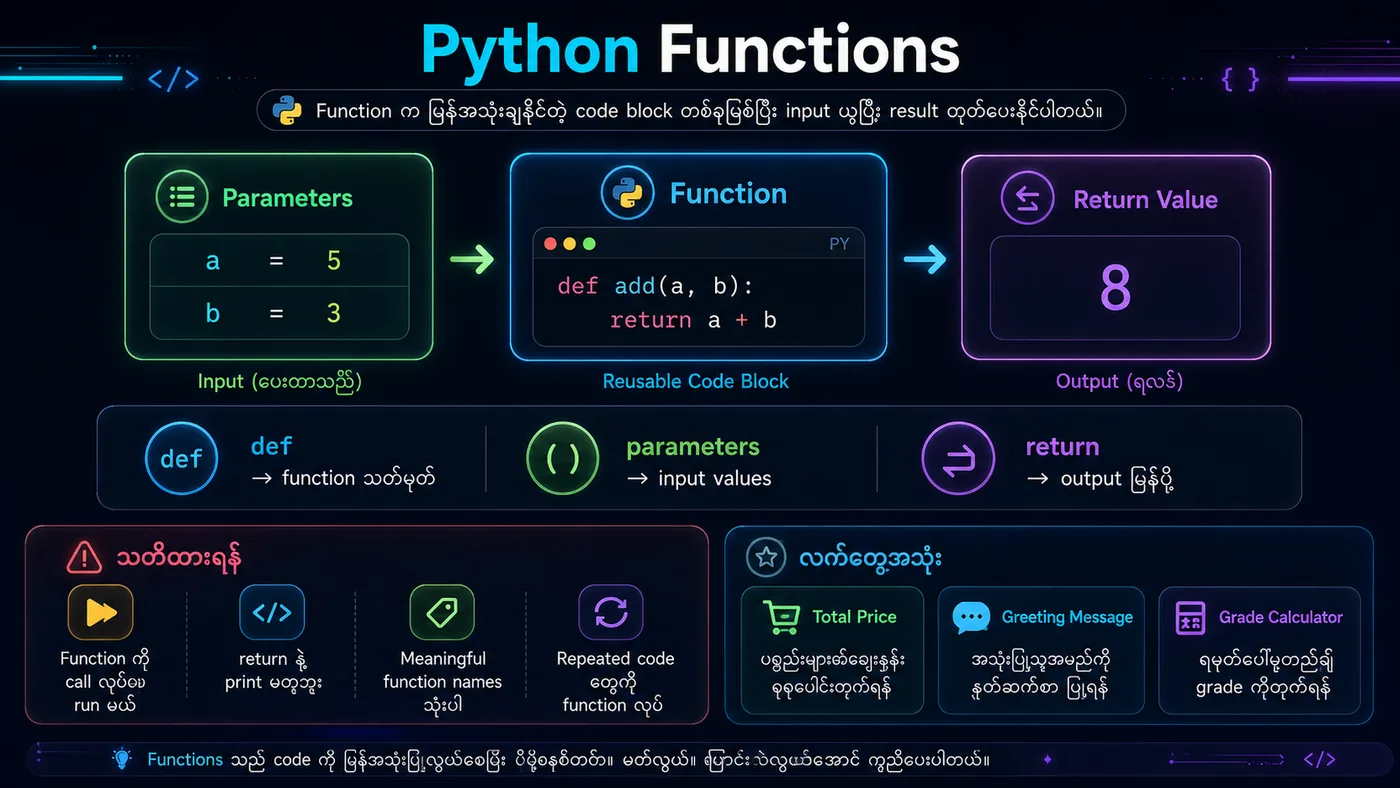
- 5 ကို a နဲ့၊ 3 ကို b နဲ့ ချိတ်
- Body က a + b = 8 တွက်
- return က 8 ကို caller ဆီ ပို့
- result = 8 ဖြစ်ပြီး a, b ပျောက်
Local variable နဲ့ function ရဲ့ နယ်နိမိတ်
Function ထဲမှာ assign လုပ်တဲ့ variable တွေက အဲဒီ call အတွက်ပဲ ရှိပြီး function ပြီးတာနဲ့ ပျောက်ပါတယ်။ အပြင်မှာ နာမည်တူ variable ရှိနေရင်လည်း မထိခိုက်ပါဘူး — function ထဲက price က အပြင်က price နဲ့ သီးခြားစီပါ။ ဒါကြောင့် function တစ်ခုက ရလဒ်ကို အပြင်ကို ပေးချင်ရင် global variable ကို ပြင်တာ မဟုတ်ဘဲ return ကို သုံးရပါတယ်။ အောက်က code မှာ အပြင်က price က 100 ဆက်ဖြစ်နေပြီး function ထဲက price ကို အပြင်ကနေ ခေါ်ရင် ရလဒ်က return လုပ်ထားတာပဲ ဖြစ်ပါတယ်။
price = 100


def with_tax(amount):
    price = amount * 1.07   # a new local variable, not the outer one
    return round(price, 2)


print(with_tax(50))  # 53.5
print(price)         # 100: the outer price was never touched
လက်တွေ့ project တွေမှာ
Real project တွေမှာ ဘယ်လို သုံးလဲ
Real project တွေမှာ code ကို နာမည်ကောင်းတဲ့ function သေးသေးလေးတွေ အဖြစ် ခွဲပါတယ် — calculate_total(), format_price(), is_valid_email() စတာတွေပါ။ Function တစ်ခုက အလုပ်တစ်ခုပဲ လုပ်ရင် နာမည်ကို ဖတ်ရုံနဲ့ ဘာလုပ်လဲ သိပြီး input တစ်ခုပေးကာ output ကို စစ်တဲ့ test ရေးရတာ လွယ်ပါတယ်။ Return ပြန်တဲ့ function တွေကို web page, CLI, API ဆိုတဲ့ နေရာ အမျိုးမျိုးကနေ ပြန်သုံးနိုင်ပြီး print လုပ်တဲ့ function ကတော့ terminal မှာပဲ အသုံးဝင်ပါတယ်။
Default parameter တွေက API ဒီဇိုင်းမှာ အရေးကြီးပါတယ်။ Python ရဲ့ built-in တွေကိုယ်တိုင် ဒီပုံစံကို သုံးပါတယ် — sorted(items) ကို ပုံမှန်သုံးပြီး ပြောင်းပြန်လိုမှ sorted(items, reverse=True) လို့ keyword argument နဲ့ ထည့်ပါတယ်၊ print() ကလည်း sep နဲ့ end parameter တွေမှာ default ရှိပါတယ်။ ကိုယ့် function တွေမှာလည်း အသုံးအများဆုံး တန်ဖိုးကို default ထားပြီး ရှားရှားပါးပါး လိုတဲ့ option တွေကို keyword argument နဲ့ ပို့ခိုင်းတာက ခေါ်တဲ့ code ကို တိုတောင်းပြီး ဖတ်ရလွယ်စေပါတယ်။
အမှားများ
အဖြစ်များတဲ့ အမှားတွေ
1. return လိုတဲ့နေရာမှာ print လုပ်တာ
def area(w, h): print(w * h) ပြီးမှ total = area(3, 4) + 1 လို့ ရေးရင် area က None ပြန်လို့ TypeError: unsupported operand type(s) for +: 'NoneType' and 'int' တက်ပါတယ်။ ရလဒ်ကို နောက်ထပ် သုံးမယ်ဆိုရင် return w * h လို့ ရေးပါ။
2. Parentheses မပါဘဲ ခေါ်တာ
greet လို့ ရေးတာက function object ကို ရည်ညွှန်းရုံပဲ ဖြစ်ပြီး run မလုပ်ပါဘူး။ print(greet) ဆိုရင် <function greet at 0x...> လို စာသား ထွက်ပါတယ်။ Function ကို run ချင်ရင် greet() လို့ အမြဲ ရေးပါ။
3. Default parameter ကို ရှေ့မှာ ထားတာ
def greet(title="Mr.", name): က SyntaxError: parameter without a default follows parameter with a default ပေးပါတယ်။ Default မရှိတဲ့ parameter တွေကို ရှေ့မှာ အရင် ရေးပါ။
4. return နောက်က code ကို run မယ်ထင်တာ
return က function ကို ချက်ချင်း ရပ်လို့ return result ရဲ့ နောက်မှာ ရေးထားတဲ့ print("done") က ဘယ်တော့မှ run မလာပါဘူး။ Log ထုတ်တာ၊ cleanup လုပ်တာတွေကို return မတိုင်ခင် ထားပါ။
Best Practices
အကောင်းဆုံး အလေ့အကျင့်များ
- Function နာမည်ကို calculate_total လို လုပ်ဆောင်ချက်ကို ဖော်ပြတဲ့ verb နဲ့ snake_case ဖြင့် ပေးပါ။
- Function တစ်ခုကို အလုပ်တစ်ခုပဲ လုပ်ခိုင်းပြီး ရလဒ်ကို print မလုပ်ဘဲ return ပြန်ပါ။
- Copy-paste လုပ်ချင်စိတ် ပေါ်လာတာနဲ့ အဲဒီ code ကို function အဖြစ် ထုတ်ဖို့ အချိန်ရောက်ပါပြီ။
Mini challenge
Mini challenge: အပူချိန် helper များ
တစ်ပတ်စာ အပူချိန် (Celsius) တွေအတွက် function သုံးခု ရေးပြီး ပေါင်းသုံးကာ report ထုတ်ပါ။
- c_to_f(celsius) — Fahrenheit ကို return ပြန်ရမယ် (F = C × 9 / 5 + 32)
- describe(celsius, hot_limit=30) — hot_limit နဲ့အထက် "hot"၊ 15 နဲ့အောက် "cool"၊ ကျန်တာ "mild" ကို return ပြန်ရမယ်
- summary(readings) — အနိမ့်ဆုံး၊ အမြင့်ဆုံး၊ ပျမ်းမျှ (ဒသမ တစ်နေရာ) သုံးခုကို return ပြန်ရမယ်
- Function တွေထဲမှာ print မလုပ်ရ၊ hot_limit ကို keyword argument နဲ့ တစ်ခါ override လုပ်ပြရမယ်
def c_to_f(celsius):
    # TODO: return the Fahrenheit value
    pass


def describe(celsius, hot_limit=30):
    # TODO: return "hot", "cool" or "mild"
    pass


def summary(readings):
    # TODO: return low, high and the rounded average
    pass


week = [24, 31, 28, 14, 33]
# TODO: unpack summary(week) into three variables and print them
# TODO: print the hottest day in F with its description
# TODO: describe the coldest day, then 28 with hot_limit=27
ရလဒ်: Output က ဒီလို ဖြစ်ရပါမယ်: low 14, high 33, average 26.0 33 C is 91.4 F and feels hot 14 C feels cool 28 C with hot_limit=27: hot
အရိပ်အမြွက် ကြည့်ရန်
Value သုံးခုကို return low, high, avg လို comma နဲ့ ပြန်ပြီး low, high, avg = summary(week) လို ခွဲယူပါ။ ပျမ်းမျှအတွက် sum(readings) / len(readings) ကို round(..., 1) နဲ့ ပတ်ပါ။
အဖြေ ကြည့်ရန်
def c_to_f(celsius):
    return celsius * 9 / 5 + 32


def describe(celsius, hot_limit=30):
    if celsius >= hot_limit:
        return "hot"
    if celsius <= 15:
        return "cool"
    return "mild"


def summary(readings):
    average = sum(readings) / len(readings)
    return min(readings), max(readings), round(average, 1)


week = [24, 31, 28, 14, 33]
low, high, avg = summary(week)
print(f"low {low}, high {high}, average {avg}")
print(f"{high} C is {c_to_f(high)} F and feels {describe(high)}")
print(f"{low} C feels {describe(low)}")
print("28 C with hot_limit=27:", describe(28, hot_limit=27))
Quick Quiz 1 / 3
Quick Quiz 2 / 3
Quick Quiz 3 / 3
မှတ်ထားရမယ့် အချက်များ
- def က function ကို သတ်မှတ်ရုံပဲ လုပ်ပြီး name() လို parentheses နဲ့ ခေါ်မှ body run ပါတယ်။
- Parameter က def ထဲက နာမည်၊ argument က ခေါ်တဲ့အခါ ပို့တဲ့ value ပါ — position ဒါမှမဟုတ် keyword နဲ့ ပို့နိုင်ပါတယ်။
- return က value ကို caller ဆီ ပြန်ပို့ပြီး function ကို ရပ်ပါတယ်၊ return မပါရင် None ပါ။
- Default ရှိတဲ့ parameter တွေကို default မရှိတာတွေ နောက်မှာ ထားပါ။
The Python Tutorial — Python Software Foundation