ရိုးရိုးလေး ရှင်းပြမယ်
ရိုးရိုးလေး ရှင်းရရင်
အိမ်ဆောက်တဲ့ ပုံစံကြမ်း (blueprint) တစ်ခုကနေ အိမ်အစစ် အများကြီး ဆောက်လို့ ရပါတယ်။ ပုံစံကြမ်းက အခန်း ဘယ်နှခန်း၊ တံခါး ဘယ်မှာ ဆိုတာကို သတ်မှတ်ပေးပေမယ့် အိမ်တစ်လုံးချင်းရဲ့ အရောင်နဲ့ ပိုင်ရှင်က ကွဲပြားပါတယ်။ Class က ပုံစံကြမ်းဖြစ်ပြီး object တွေက အဲဒီကနေ ဆောက်ထားတဲ့ အိမ်တွေပါ။
Object တစ်ခုစီက ကိုယ်ပိုင် data (attribute — ဥပမာ name, age) ရှိပြီး လုပ်နိုင်တဲ့ အရာတွေ (method — ဥပမာ bark(), open_door()) ရှိပါတယ်။ Data နဲ့ အဲဒီ data ကို သုံးတဲ့ code က အတူတူ နေတာမို့ "ဒီ dog ရဲ့ နာမည်ကို ဘယ် function က ပြင်လဲ" လို့ ရှာစရာ မလိုတော့ပါဘူး။
Problem → Why → Solution
ပြဿနာ: data နဲ့ function တွေ ကွဲနေတော့ စည်းမျဉ်း ပျက်တာ
Bank account တွေကို dict နဲ့ သိမ်းပြီး deposit() function ကို သီးခြား ရေးထားပါတယ်။ deposit() က amount အနုတ် မဖြစ်အောင် စစ်ပေးပေမယ့် code ရဲ့ တခြားနေရာက account["balance"] = -999 လို့ တိုက်ရိုက် ပြင်လိုက်တာကို ဘာမှ မတားနိုင်ပါဘူး။ Project ကြီးလာတာနဲ့ balance ကို ပြင်တဲ့ နေရာ ဆယ်နေရာ ဖြစ်လာပြီး "balance က အနုတ် မဖြစ်ရ" ဆိုတဲ့ စည်းမျဉ်းကို ဘယ်သူမှ မစောင့်ရှောက်တော့ပါဘူး။
account = {"owner": "Aye", "balance": 0}

def deposit(acct, amount):
    if amount > 0:
        acct["balance"] += amount

deposit(account, 50)
account["balance"] = -999   # bypasses every rule in deposit()
account["balanse"] = 10     # typo creates a new key silently
print(account)
ဘာကြောင့် ဒီလိုဖြစ်တာလဲ
Data (dict) နဲ့ စည်းမျဉ်း (function) က ချိတ်ဆက်မှု မရှိဘဲ ကွဲနေလို့ data ကို ကိုင်ချင်သူ ဘယ်သူမဆို စည်းမျဉ်းကို ကျော်နိုင်ပါတယ်။ OOP က account ရဲ့ data နဲ့ deposit/withdraw စည်းမျဉ်းကို class တစ်ခုထဲ စုလိုက်လို့ "balance ကို ပြောင်းချင်ရင် method ကနေ လုပ်ပါ" ဆိုတဲ့ လမ်းကြောင်း တစ်ခုတည်းကို ဖန်တီးပေးပါတယ်။ Python က private ကို အတင်းအကျပ် မတားပေမယ့် ဒီ convention က team တစ်ခုလုံးကို လမ်းပြပါတယ်။
Core concept: class, object, __init__ နဲ့ self
class Dog: က Dog ဆိုတဲ့ type အသစ် တစ်ခုကို သတ်မှတ်ပါတယ်။ Class နာမည်ကို CapWords (PascalCase) နဲ့ ရေးတာ Python ထုံးစံပါ။ Dog("Bobby", 3) လို class ကို function လို ခေါ်လိုက်တဲ့အခါ Python က object အသစ် တစ်ခု ဖန်တီးပြီး __init__ method ကို အလိုအလျောက် ခေါ်ပါတယ်။ __init__ (initializer) ရဲ့ အလုပ်က object အသစ်ရဲ့ attribute တွေကို စတင် သတ်မှတ်ပေးတာပါ — return ကတော့ မလုပ်ပါဘူး။
Method တိုင်းရဲ့ ပထမ parameter က self ဖြစ်ပြီး method ကို ခေါ်နေတဲ့ object ကိုယ်တိုင်ကို ရည်ညွှန်းပါတယ်။ dog1.bark() လို့ ခေါ်ရင် Python က နောက်ကွယ်မှာ Dog.bark(dog1) လို့ ပြောင်းပြီး dog1 ကို self အဖြစ် ပို့ပေးပါတယ်။ ဒါကြောင့် self.name = name က "ဒီ object ရဲ့ name attribute" ကို သတ်မှတ်တာ ဖြစ်ပြီး self. မပါဘဲ name = name လို့ ရေးရင် local variable တစ်ခုပဲ ဖြစ်ကာ object ပေါ်မှာ ဘာမှ မသိမ်းပါဘူး။
Class တစ်ခုကနေ object အများကြီး ဖန်တီးနိုင်ပြီး တစ်ခုစီမှာ ကိုယ်ပိုင် attribute တွေ ရှိပါတယ်။ dog1.tricks ကို ပြင်လည်း dog2.tricks က မပြောင်းပါဘူး၊ ဘာကြောင့်လဲဆိုတော့ __init__ က object တစ်ခုစီအတွက် list အသစ် ဖန်တီးပေးလို့ပါ။ Method တွေကတော့ class ပေါ်မှာ တစ်ခါပဲ ရှိပြီး object အားလုံး မျှသုံးပါတယ်။ isinstance(dog1, Dog) က object က ဘယ် class ကနေ လာလဲ စစ်ပေးပါတယ်။
တကယ်တော့ သင်ခဲ့ပြီးသား value တိုင်းက Python မှာ object တွေပါ။ 42 က int class ရဲ့ object၊ "hi" က str class ရဲ့ object ဖြစ်ပြီး "hi".upper() က str class ပေါ်က method ကို ခေါ်တာပါ။ ကိုယ်ပိုင် class ရေးတာဆိုတာ အဲဒီ built-in type တွေလိုပဲ ကိုယ့် program ရဲ့ domain (account, order, student) အတွက် type အသစ် ဖန်တီးတာပါပဲ။
OOP ရဲ့ ရည်မှန်းချက် လေးခု ရှိပါတယ်။ Encapsulation က data ကို method တွေနောက်မှာ ဖုံးပြီး စည်းမျဉ်း စောင့်ရှောက်တာ၊ inheritance က ရှိပြီးသား class ကို ပြန်သုံးပြီး ချဲ့တာ၊ polymorphism က class မတူပေမယ့် method နာမည်တူ (speak()) ကို ကိုယ့်နည်းကိုယ်နဲ့ အလုပ်လုပ်တာ၊ abstraction က ရှုပ်ထွေးမှုကို ဖုံးပြီး လိုအပ်တာပဲ ပြတာပါ။ ဒါတွေက ဒီဇိုင်း ရည်မှန်းချက်တွေ ဖြစ်ပြီး class အဆင့်ဆင့် တည်ဆောက်ဖို့ မဖြစ်မနေ လိုအပ်ချက် မဟုတ်ပါဘူး — နောက် lesson တွေမှာ တစ်ခုချင်း လေ့လာပါမယ်။
- class က shape ကို သတ်မှတ်
- Dog(...) က object အသစ် ဖန်တီး
- __init__ က self ပေါ် data ထည့်
- obj.method() က obj ကို self အဖြစ် ပို့
Data က object တစ်ခုစီမှာ သီးခြား ရှိပြီး method တွေကိုတော့ class ပေါ်မှာ တစ်ခါပဲ ရေးပြီး မျှသုံးပါတယ်။
အထွေထွေ ပုံစံ
class ClassName:
    def __init__(self, param1, param2):
        self.attribute1 = param1
        self.attribute2 = param2

    def method_name(self, argument):
        return use(self.attribute1, argument)


instance = ClassName(value1, value2)
instance.method_name(value3)
__init__ က object ဖန်တီးတဲ့အချိန် တစ်ခါ run ပြီး self ပေါ်မှာ attribute တွေ သိမ်းပါတယ်။ တခြား method တွေကလည်း self ကို ပထမ parameter အဖြစ် ယူပါတယ်။ ခေါ်တဲ့အခါတော့ self ကို ကိုယ်တိုင် မပို့ပါဘူး — Python က dot ရှေ့က object ကို ပို့ပေးပါတယ်။
Example: Dog class နဲ့ object နှစ်ခု
Dog class မှာ attribute သုံးခု (name, age, tricks) နဲ့ method နှစ်ခု (bark, learn) ပါပါတယ်။ Object နှစ်ခု ဖန်တီးပြီး တစ်ခုကို ပြင်တာက နောက်တစ်ခုကို မထိခိုက်ကြောင်း၊ object ရဲ့ attribute ကို ဖတ်ပြီး ပြင်လို့ရကြောင်း ပြပါတယ်။
class Dog:
    def __init__(self, name, age):
        self.name = name
        self.age = age
        self.tricks = []

    def bark(self):
        return f"{self.name} says Woof!"

    def learn(self, trick):
        self.tricks.append(trick)
        return f"{self.name} learned {trick}"


dog1 = Dog("Bobby", 3)
dog2 = Dog("Lucky", 5)

print(dog1.bark())
print(dog2.bark())
print(dog1.learn("sit"))
print(dog1.tricks, dog2.tricks)

dog2.age += 1
print(dog2.name, "is now", dog2.age)
print(type(dog1).__name__, isinstance(dog2, Dog), dog1 is dog2)
Code ကို တစ်ပိုင်းချင်း ရှင်းပြမယ်
- Lines 2-5
def __init__(self, name, age):Dog("Bobby", 3) ခေါ်တဲ့အခါ ဒီ method run ပြီး name, age နဲ့ empty tricks list ကို object အသစ်ပေါ် သိမ်းပါတယ်။ self ကို ကိုယ်တိုင် မပို့ရပါဘူး။
- Lines 7-8
return f"{self.name} says Woof!"self.name က method ကို ခေါ်တဲ့ object ရဲ့ နာမည်ပါ။ Method တစ်ခုတည်းဖြစ်ပေမယ့် dog1 ပေါ်မှာ ခေါ်ရင် Bobby၊ dog2 ပေါ်မှာ ခေါ်ရင် Lucky ရပါတယ်။
- Line 21
print(dog1.tricks, dog2.tricks)dog1 က sit ကို သင်ပြီးပေမယ့် dog2.tricks က empty ဆက်ဖြစ်ပါတယ်၊ object တစ်ခုစီမှာ ကိုယ်ပိုင် list ရှိလို့ပါ။
- Line 23
dog2.age += 1Attribute ကို object.attribute နဲ့ တိုက်ရိုက် ဖတ်ပြီး ပြင်လို့ ရပါတယ်။ dog2 ရဲ့ age ပဲ 6 ဖြစ်ပြီး dog1 က 3 ဆက်ဖြစ်ပါတယ်။
- Line 25
print(type(dog1).__name__, isinstance(dog2, Dog), dog1 is dog2)Object နှစ်ခုလုံး Dog type ဖြစ်ပေမယ့် dog1 is dog2 က False ပါ — class တူတဲ့ သီးခြား object နှစ်ခု ဖြစ်လို့ပါ။
Bobby says Woof!
Lucky says Woof!
Bobby learned sit
['sit'] []
Lucky is now 6
Dog True False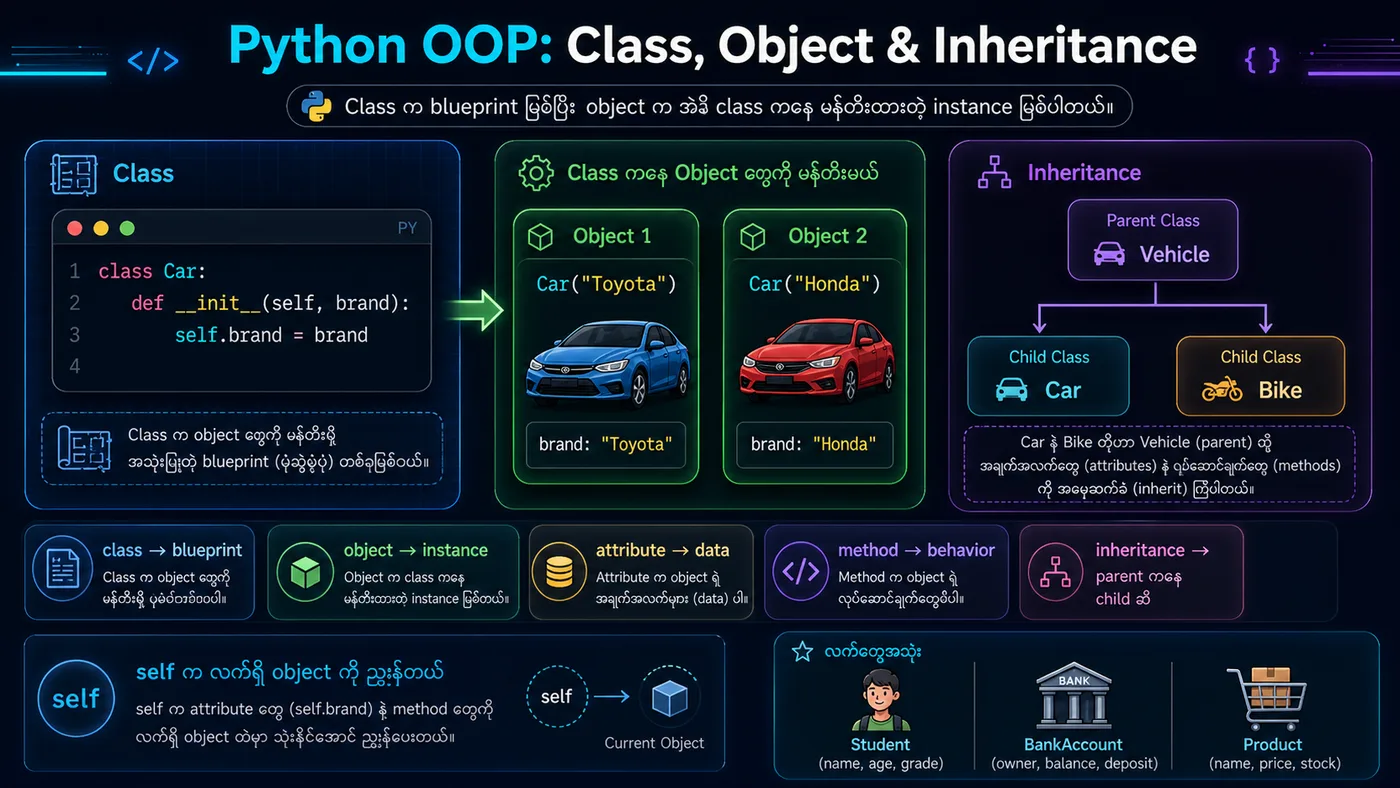
Procedural နဲ့ OOP ဘေးချင်းယှဉ်
Problem section က account ကို class နဲ့ ပြန်ရေးကြည့်ပါမယ်။ deposit() က method ဖြစ်သွားပြီး amount ကို စစ်တဲ့ စည်းမျဉ်းက data နဲ့ အတူတူ နေပါတယ်။ True/False ကို return ပြန်လို့ caller က deposit အောင်မြင်လား သိနိုင်ပါတယ်။ Python မှာ acct.balance = -999 ကို အတင်း တားတာ မဟုတ်ပေမယ့် method ကနေ ပြောင်းရမယ့် ရှင်းလင်းတဲ့ လမ်းကြောင်း ရှိသွားပါပြီ၊ encapsulation lesson မှာ အဲဒါကို ပိုခိုင်မာအောင် လုပ်နည်း ကြည့်ပါမယ်။
class Account:
    def __init__(self, owner):
        self.owner = owner
        self.balance = 0

    def deposit(self, amount):
        if amount <= 0:
            return False
        self.balance += amount
        return True


acct = Account("Aye")
print(acct.deposit(50), acct.deposit(-10), acct.balance) # True False 50| ရှုထောင့် | Procedural | OOP |
|---|---|---|
| Structure | Data (dict) နဲ့ function တွေ သီးခြားစီ | Data နဲ့ method တွေ object တစ်ခုထဲမှာ |
| စည်းမျဉ်း ရှိတဲ့နေရာ | Function တွေထဲ ပျံ့နေ၊ ကျော်လို့ရ | Class ရဲ့ method ထဲမှာ စုထား |
| ပြန်သုံးခြင်း | Function တွေကို copy လုပ်ပြီး ပြင်ရ | Inheritance နဲ့ class ကို ချဲ့နိုင် |
| ခေါ်ပုံ ဥပမာ | deposit(account, 50) | acct.deposit(50) |
လက်တွေ့ project တွေမှာ
Real project တွေမှာ ဘယ်လို သုံးလဲ
Shopping cart တစ်ခုကို ဒီဇိုင်းဆွဲတဲ့အခါ "ဘယ်အရာက ကိုယ်ပိုင် data နဲ့ စည်းမျဉ်း ရှိလဲ" လို့ အရင် မေးပါတယ်။ Cart မှာ item list ရှိပြီး "quantity က 0 အောက် မဖြစ်ရ"၊ "total က item ဈေး ပေါင်းလဒ်နဲ့ အမြဲ ညီရမယ်" ဆိုတဲ့ invariant တွေ ရှိလို့ class ဖြစ်သင့်ပါတယ်။ အခွန်တွက်တဲ့ calculate_tax(amount) ကတော့ state မရှိတဲ့ ရိုးရိုး function တစ်ခုပဲ လုံလောက်ပါတယ်။
Python ecosystem ကိုယ်တိုင်က object တွေနဲ့ ပြည့်နေပါတယ်။ String ရဲ့ "hi".upper()၊ list ရဲ့ items.append() တွေက method call တွေပါ။ Django မှာ database table တစ်ခုစီကို model class တစ်ခုနဲ့ ကိုယ်စားပြုပြီး row တစ်ခုစီက object တစ်ခု ဖြစ်ပါတယ်။ Game တွေမှာ player, enemy, bullet တစ်ခုစီက position နဲ့ update() method ရှိတဲ့ object တွေပါ။ Data သိမ်းရုံပဲ လိုပြီး behavior မရှိရင်တော့ dataclass ဒါမှမဟုတ် dict က class အပြည့်အစုံထက် ပိုရိုးရှင်းပါတယ်။
အမှားများ
အဖြစ်များတဲ့ အမှားတွေ
1. Method မှာ self မေ့တာ
class ထဲမှာ def bark(): လို့ ရေးပြီး dog1.bark() ခေါ်ရင် TypeError: Dog.bark() takes 0 positional arguments but 1 was given တက်ပါတယ်။ Python က object ကို argument အဖြစ် အလိုအလျောက် ပို့လို့ပါ။ Method တိုင်းရဲ့ ပထမ parameter ကို self ထားပါ။
2. __init__ ထဲမှာ self. မေ့တာ
def __init__(self, name): name = name က local variable ကိုပဲ assign လုပ်ပြီး ပျောက်သွားပါတယ်။ နောက်မှ obj.name ကို ဖတ်ရင် AttributeError: 'Cat' object has no attribute 'name' ရပါတယ်။ self.name = name လို့ ရေးရပါမယ်။
3. Mutable value ကို class level မှာ ထားတာ
class Dog: tricks = [] လို့ __init__ အပြင်မှာ ရေးရင် list တစ်ခုတည်းကို dog အားလုံး မျှသုံးပါတယ်၊ ဒါကြောင့် dog တစ်ကောင် sit သင်တာနဲ့ အကုန်လုံး sit တတ်သွားပါတယ်။ Object တစ်ခုစီရဲ့ list ကို __init__ ထဲမှာ self.tricks = [] နဲ့ ဖန်တီးပါ။
4. အရာအားလုံးကို class လုပ်တာ
Method တစ်ခုပဲ ပါပြီး state မရှိတဲ့ class (class TaxCalculator: def calc(self, x): ...) က function တစ်ခုထက် ပိုရှုပ်ရုံပဲ ရှိပါတယ်။ Class ကို data နဲ့ စည်းမျဉ်း အတူ ရှိမှသာ သုံးပါ။
Best Practices
အကောင်းဆုံး အလေ့အကျင့်များ
- Attribute အားလုံးကို __init__ ထဲမှာ သတ်မှတ်ပါ၊ ဒါမှ object တိုင်းမှာ shape တူတူ ရှိပါမယ်။
- Attribute ကို အပြင်ကနေ တိုက်ရိုက် ပြင်မယ့်အစား စည်းမျဉ်း ပါတဲ့ method ကနေ ပြောင်းပါ။
- Class နာမည်ကို Account လို noun နဲ့၊ method နာမည်ကို deposit လို verb နဲ့ ပေးပါ။
Mini challenge
Mini challenge: BankAccount class
Deposit, withdraw နဲ့ statement method ပါတဲ့ BankAccount class ရေးပြီး account နှစ်ခုနဲ့ စမ်းပါ။ Account တစ်ခုရဲ့ history က နောက်တစ်ခုကို မထိခိုက်ရပါဘူး။
- __init__(self, owner, balance=0) က owner, balance နဲ့ empty history list ကို သိမ်းရမယ်
- deposit(amount) — 0 နဲ့ အောက်ဆို "Deposit must be positive" ပြန်ပြီး အောင်ရင် history ထဲ "+50" လို ထည့်ရမယ်
- withdraw(amount) — balance ထက် များရင် ငြင်းပြီး message ပြန်ရမယ်၊ အောင်ရင် "-30" ထည့်ရမယ်
- statement() က "Aye: 120 (+50, -30)" ပုံစံ string ကို return ပြန်ရမယ်
class BankAccount:
    def __init__(self, owner, balance=0):
        # TODO: store owner and balance on self, start an empty history list
        pass

    def deposit(self, amount):
        # TODO: reject amount <= 0, otherwise add it and record "+amount"
        pass

    def withdraw(self, amount):
        # TODO: refuse if amount > balance, otherwise subtract and record "-amount"
        pass

    def statement(self):
        # TODO: return "owner: balance (entry, entry)"
        pass


# TODO: aye = BankAccount("Aye", 100) and bo = BankAccount("Bo")
# TODO: deposit 50, try to withdraw 500, withdraw 30, deposit -5 into bo
# TODO: print both statements
ရလဒ်: Output က ဒီလို ဖြစ်ရပါမယ်: Deposited 50 Refused: balance is only 150 Withdrew 30 Deposit must be positive Aye: 120 (+50, -30) Bo: 0 ()
အရိပ်အမြွက် ကြည့်ရန်
History entry တွေကို ', '.join(self.history) နဲ့ ပေါင်းပါ။ Method တွေက message string ကို return ပြန်ပြီး ခေါ်တဲ့နေရာက print လုပ်ပါ။ history list ကို __init__ ထဲမှာ ဖန်တီးမှ account တစ်ခုစီမှာ ကိုယ်ပိုင် list ရပါမယ်။
အဖြေ ကြည့်ရန်
class BankAccount:
    def __init__(self, owner, balance=0):
        self.owner = owner
        self.balance = balance
        self.history = []

    def deposit(self, amount):
        if amount <= 0:
            return "Deposit must be positive"
        self.balance += amount
        self.history.append(f"+{amount}")
        return f"Deposited {amount}"

    def withdraw(self, amount):
        if amount > self.balance:
            return f"Refused: balance is only {self.balance}"
        self.balance -= amount
        self.history.append(f"-{amount}")
        return f"Withdrew {amount}"

    def statement(self):
        return f"{self.owner}: {self.balance} ({', '.join(self.history)})"


aye = BankAccount("Aye", 100)
bo = BankAccount("Bo")
print(aye.deposit(50))
print(aye.withdraw(500))
print(aye.withdraw(30))
print(bo.deposit(-5))
print(aye.statement())
print(bo.statement())
Quick Quiz 1 / 3
Quick Quiz 2 / 3
Quick Quiz 3 / 3
မှတ်ထားရမယ့် အချက်များ
- Class က blueprint ဖြစ်ပြီး ClassName(...) နဲ့ ခေါ်တိုင်း object (instance) အသစ် ရပါတယ်။
- __init__ က object ဖန်တီးချိန်မှာ run ပြီး self.attribute တွေကို သတ်မှတ်ပါတယ်။
- Method တိုင်းရဲ့ ပထမ parameter က self ဖြစ်ပြီး obj.method() မှာ obj ကို အလိုအလျောက် ပို့ပါတယ်။
- OOP ကို data နဲ့ စည်းမျဉ်း အတူရှိတဲ့ နေရာမှာ သုံးပါ၊ state မရှိတဲ့ logic အတွက် function က လုံလောက်ပါတယ်။
Python Documentation — Classes — Python Software Foundation