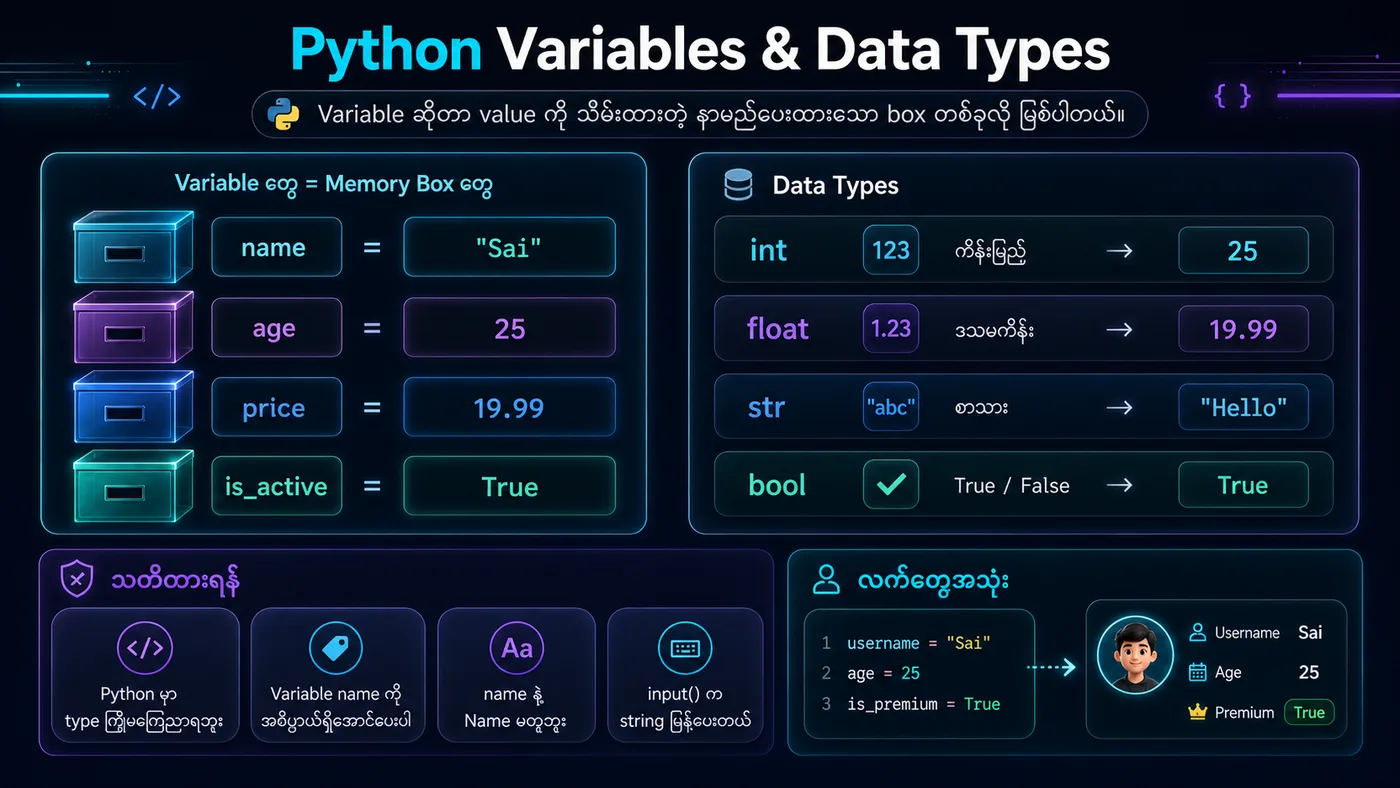
📦 1. Variable ဆိုတာဘာလဲ? / What is a Variable?
မြန်မာ → Variable ဆိုတာ တန်ဖိုး (value) တစ်ခုကို အမည်တစ်ခုနဲ့ ချိတ်ဆက်ထားတဲ့ memory box လိုမျိုး။
English → A variable is like a named box in memory that stores a value.
📝 2. Variable အမည်ပေးတဲ့ Rule / Naming Rules
မြန်မာ → နံပါတ်နဲ့ မစရ, keyword မသုံးရ, အမည်ကို အဓိပ္ပာယ်ရှိအောင်ပေး။
English → Cannot start with a number, cannot use Python keywords, should be meaningful.
✅ age = 25 - မှန်ကန်ပါတယ် / Correct
❌ 1name = "Sai" - မှားပါတယ် / Wrong (starts with number)
🎯 3. Variable Types / Data Types
- • int (ကိန်းပြည့် / integer) →
a = 10 - • float (ဒဿမကိန်း / decimal) →
pi = 3.14 - • str (စာသား / string) →
greet = "Hello" - • bool (အမှန်/အမှား / boolean) →
is_active = True
💻 4. Variable အသုံးပြုပုံ / Using Variables
Variables များသည် data များကို သိုလှောင်ရန် နာမည်ပေးထားသော memory location များ ဖြစ်သည်။ Python မှာ Dynamic typing ကိုသုံးသောကြောင့် variable ၏ type ကို အလိုအလျောက် သတ်မှတ်ပေးသည်။
မြန်မာ → Variables တွေကို တန်ဖိုးတွေ သိမ်းဆည်းပြီး တွက်ချက်မှုတွေ လုပ်ဆောင်နိုင်ပါတယ်။
English → Variables can store values and perform calculations.
📌 5. အကျဉ်းချုပ် / Summary
• Variable = အမည်ပေးထားတဲ့ memory box
• Assign with = sign → name = value
• Types: int, float, str, bool
• Dynamic typing - Type ကို အလိုလျောက် သတ်မှတ်ပေးသည်
# ===== 1. Variable Declaration Examples =====
x = 5        # x ထဲမှာ 5 ကို သိမ်းထားတယ် / x stores the value 5
name = "Sai" # name ထဲမှာ "Sai" ဆိုတဲ့ စာသားကို သိမ်းထားတယ် / name stores the string "Sai"

print(f"x = {x}")
print(f"name = {name}")

# ===== 2. Variable Types Examples =====
# Different data types
age = 25              # int (ကိန်းပြည့် / integer)
height = 5.9          # float (ဒဿမကိန်း / decimal)
greet = "Hello"       # str (စာသား / string)
is_student = True     # bool (အမှန်/အမှား / boolean)

print(f"\nAge: {age}, Type: {type(age)}")
print(f"Height: {height}, Type: {type(height)}")
print(f"Greet: {greet}, Type: {type(greet)}")
print(f"Is Student: {is_student}, Type: {type(is_student)}")

# ===== 3. Using Variables in Calculations =====
a = 10
b = 20
sum_result = a + b
print(f"\na + b = {a} + {b} = {sum_result}")

# ===== 4. Variable Type Can Change (Dynamic Typing) =====
my_var = 42
print(f"\nInitial: my_var = {my_var}, Type: {type(my_var)}")

my_var = "Now I'm a string"
print(f"Changed: my_var = {my_var}, Type: {type(my_var)}")x = 5 name = Sai Age: 25, Type: Height: 5.9, Type: Greet: Hello, Type: Is Student: True, Type: a + b = 10 + 20 = 30 Initial: my_var = 42, Type: Changed: my_var = Now I'm a string, Type: