Explain it simply
Explain it simply
From one house blueprint you can build many real houses. The blueprint fixes how many rooms there are and where the doors go, yet each house has its own colour and owner. A class is the blueprint; objects are the houses built from it.
Each object has its own data (attributes, such as name and age) and things it can do (methods, such as bark() or open_door()). Because the data and the code that uses it live together, you no longer hunt for "which function changes this dog's name?"
Problem → Why → Solution
The problem: rules break when data and functions drift apart
Bank accounts are stored as dicts, with a separate deposit() function. deposit() refuses negative amounts, but nothing stops some other part of the code from writing account["balance"] = -999 directly. As the project grows, ten different places change the balance, and nobody is guarding the rule that a balance must never go negative.
account = {"owner": "Aye", "balance": 0}

def deposit(acct, amount):
    if amount > 0:
        acct["balance"] += amount

deposit(account, 50)
account["balance"] = -999   # bypasses every rule in deposit()
account["balanse"] = 10     # typo creates a new key silently
print(account)
Why does this happen?
The data (a dict) and the rule (a function) are disconnected, so anyone holding the data can bypass the rule. OOP gathers an account's data and its deposit/withdraw rules into one class, creating a single, obvious path: change the balance through a method. Python does not enforce privacy strictly, but this convention guides the whole team.
Core concept: class, object, __init__ and self
class Dog: defines a new type called Dog; by Python convention class names use CapWords (PascalCase). When you call the class like a function, Dog("Bobby", 3), Python creates a new object and automatically calls its __init__ method. The job of __init__ (the initializer) is to set up the new object's attributes; it does not return anything.
Every method's first parameter is self, which refers to the object the method is called on. When you write dog1.bark(), Python turns it into Dog.bark(dog1) behind the scenes and passes dog1 as self. So self.name = name sets this object's name attribute, while name = name without self. only creates a local variable and stores nothing on the object.
One class can produce many objects, and each object has its own attributes. Changing dog1.tricks does not touch dog2.tricks, because __init__ creates a fresh list for every object. Methods, by contrast, live once on the class and are shared by all its objects. isinstance(dog1, Dog) tells you which class an object came from.
In fact, every value you have met so far is already an object in Python. 42 is an object of the int class, "hi" is an object of the str class, and "hi".upper() calls a method defined on str. Writing your own class simply means creating a new type for your program's domain, such as an account, an order or a student, in the same way the built-in types were made.
OOP has four goals. Encapsulation hides data behind methods so rules are kept; inheritance reuses and extends an existing class; polymorphism lets different classes answer the same method name, such as speak(), in their own way; abstraction hides complexity and shows only what matters. These are design goals, not a demand for deep class hierarchies, and the next lessons cover each of them in turn.
- The class defines the shape
- Dog(...) creates a new object
- __init__ stores data on self
- obj.method() passes obj as self
Data lives separately in each object; methods are written once on the class and shared.
General pattern
class ClassName:
    def __init__(self, param1, param2):
        self.attribute1 = param1
        self.attribute2 = param2

    def method_name(self, argument):
        return use(self.attribute1, argument)


instance = ClassName(value1, value2)
instance.method_name(value3)
__init__ runs once when the object is created and stores attributes on self. Every other method also takes self first. When calling, you never pass self yourself: Python supplies the object in front of the dot.
Example: a Dog class and two objects
The Dog class has three attributes (name, age, tricks) and two methods (bark, learn). We create two objects and show that changing one does not affect the other, and that an object's attributes can be read and updated.
class Dog:
    def __init__(self, name, age):
        self.name = name
        self.age = age
        self.tricks = []

    def bark(self):
        return f"{self.name} says Woof!"

    def learn(self, trick):
        self.tricks.append(trick)
        return f"{self.name} learned {trick}"


dog1 = Dog("Bobby", 3)
dog2 = Dog("Lucky", 5)

print(dog1.bark())
print(dog2.bark())
print(dog1.learn("sit"))
print(dog1.tricks, dog2.tricks)

dog2.age += 1
print(dog2.name, "is now", dog2.age)
print(type(dog1).__name__, isinstance(dog2, Dog), dog1 is dog2)
Code breakdown
- Lines 2-5
def __init__(self, name, age):Calling Dog("Bobby", 3) runs this method, which stores name, age and an empty tricks list on the new object. You never pass self yourself.
- Lines 7-8
return f"{self.name} says Woof!"self.name is the name of whichever object the method was called on: the same method gives Bobby for dog1 and Lucky for dog2.
- Line 21
print(dog1.tricks, dog2.tricks)dog1 learned sit, yet dog2.tricks is still empty, because every object has its own list.
- Line 23
dog2.age += 1Attributes can be read and changed directly through object.attribute. Only dog2's age becomes 6; dog1 stays 3.
- Line 25
print(type(dog1).__name__, isinstance(dog2, Dog), dog1 is dog2)Both objects are of type Dog, but dog1 is dog2 is False: they are two separate objects of the same class.
Bobby says Woof!
Lucky says Woof!
Bobby learned sit
['sit'] []
Lucky is now 6
Dog True False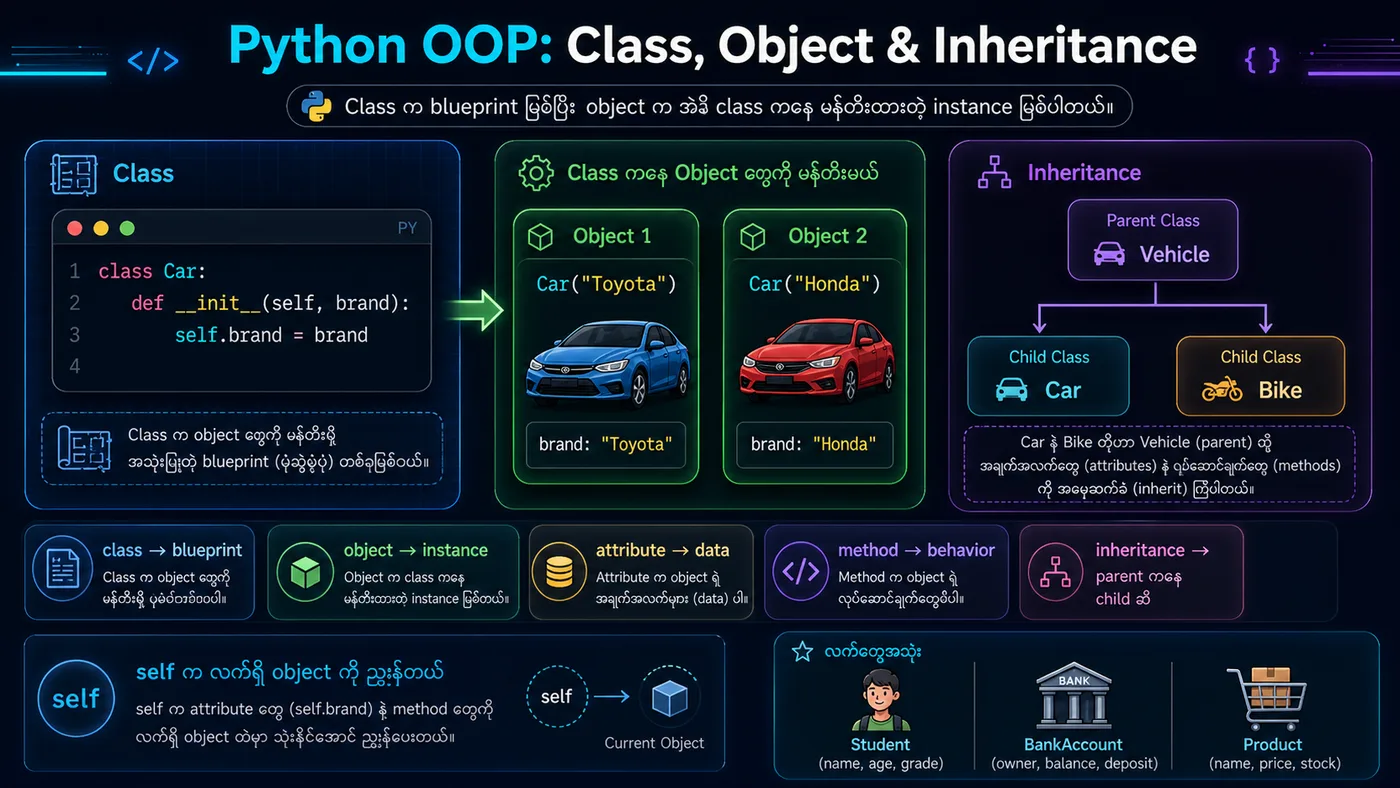
Procedural and OOP side by side
Here is the account from the problem section rewritten as a class. deposit() becomes a method, and the rule that checks the amount lives next to the data. It returns True or False so the caller knows whether the deposit succeeded. Python still does not forcibly block acct.balance = -999, but there is now one clear path for changing the balance; the encapsulation lesson shows how to make that path firmer.
class Account:
    def __init__(self, owner):
        self.owner = owner
        self.balance = 0

    def deposit(self, amount):
        if amount <= 0:
            return False
        self.balance += amount
        return True


acct = Account("Aye")
print(acct.deposit(50), acct.deposit(-10), acct.balance) # True False 50| Aspect | Procedural | OOP |
|---|---|---|
| Structure | Data (a dict) and functions kept apart | Data and methods inside one object |
| Where rules live | Spread across functions, easy to bypass | Gathered in the class's methods |
| Reuse | Copy and adapt functions | Extend a class through inheritance |
| Example call | deposit(account, 50) | acct.deposit(50) |
In real projects
Where this shows up in real projects
When designing a shopping cart, first ask which things own data and rules. The cart holds a list of items and has invariants, such as "quantity never drops below 0" and "the total always equals the sum of item prices", so it deserves a class. A tax calculation such as calculate_tax(amount) has no state and works perfectly well as a plain function.
The Python ecosystem itself is full of objects: "hi".upper() on a string and items.append() on a list are method calls. In Django, each database table is represented by a model class and each row is an object. In games, every player, enemy and bullet is an object with a position and an update() method. When you only need to hold data with no behaviour, a dataclass or even a dict is simpler than a full class.
Common mistakes
Common mistakes
1. Leaving out self in a method
Writing def bark(): inside the class and calling dog1.bark() raises TypeError: Dog.bark() takes 0 positional arguments but 1 was given, because Python passes the object automatically. Make self the first parameter of every method.
2. Forgetting self. inside __init__
def __init__(self, name): name = name only assigns a local variable, which vanishes. Reading obj.name later gives AttributeError: 'Cat' object has no attribute 'name'. Write self.name = name.
3. A mutable value at class level
Writing tricks = [] directly in the class body, outside __init__, creates one list shared by every dog, so when one dog learns sit they all appear to know it. Create each object's list inside __init__ with self.tricks = [].
4. Turning everything into a class
A class with a single method and no state, such as class TaxCalculator with one calc(self, x) method, is just a more complicated function. Reach for a class when data and rules genuinely belong together.
Best practices
Best practices
- Set every attribute in __init__ so all objects of the class have the same shape.
- Change state through methods that enforce the rules, rather than editing attributes from outside.
- Name classes with nouns, such as Account, and methods with verbs, such as deposit.
Mini challenge
Mini challenge: a BankAccount class
Write a BankAccount class with deposit, withdraw and statement methods, and try it with two accounts. One account's history must not leak into the other's.
- __init__(self, owner, balance=0) stores owner, balance and an empty history list
- deposit(amount) returns "Deposit must be positive" for 0 or less, and records "+50" style entries
- withdraw(amount) refuses more than the balance with a message, and records "-30" style entries
- statement() returns a string like "Aye: 120 (+50, -30)"
class BankAccount:
    def __init__(self, owner, balance=0):
        # TODO: store owner and balance on self, start an empty history list
        pass

    def deposit(self, amount):
        # TODO: reject amount <= 0, otherwise add it and record "+amount"
        pass

    def withdraw(self, amount):
        # TODO: refuse if amount > balance, otherwise subtract and record "-amount"
        pass

    def statement(self):
        # TODO: return "owner: balance (entry, entry)"
        pass


# TODO: aye = BankAccount("Aye", 100) and bo = BankAccount("Bo")
# TODO: deposit 50, try to withdraw 500, withdraw 30, deposit -5 into bo
# TODO: print both statements
Expected: Deposited 50 Refused: balance is only 150 Withdrew 30 Deposit must be positive Aye: 120 (+50, -30) Bo: 0 ()
Show hint
Join history entries with ', '.join(self.history). Have the methods return message strings and let the caller print them. Create the history list inside __init__ so each account gets its own.
Show solution
class BankAccount:
    def __init__(self, owner, balance=0):
        self.owner = owner
        self.balance = balance
        self.history = []

    def deposit(self, amount):
        if amount <= 0:
            return "Deposit must be positive"
        self.balance += amount
        self.history.append(f"+{amount}")
        return f"Deposited {amount}"

    def withdraw(self, amount):
        if amount > self.balance:
            return f"Refused: balance is only {self.balance}"
        self.balance -= amount
        self.history.append(f"-{amount}")
        return f"Withdrew {amount}"

    def statement(self):
        return f"{self.owner}: {self.balance} ({', '.join(self.history)})"


aye = BankAccount("Aye", 100)
bo = BankAccount("Bo")
print(aye.deposit(50))
print(aye.withdraw(500))
print(aye.withdraw(30))
print(bo.deposit(-5))
print(aye.statement())
print(bo.statement())
Quick quiz 1 / 3
Quick quiz 2 / 3
Quick quiz 3 / 3
What to remember
- A class is a blueprint; each call ClassName(...) creates a new object (an instance).
- __init__ runs when an object is created and sets its self.attribute values.
- Every method takes self first, and obj.method() passes obj automatically.
- Use OOP where data and rules belong together; stateless logic is fine as a function.
Python Documentation — Classes — Python Software Foundation