Explain it simply
Explain it simply
Before leaving home you glance at the sky. If it is raining you take an umbrella, if it is sunny you wear a hat, and otherwise you take nothing. Each decision depends on a condition, and you act on exactly one choice.
Python's if...else asks a program to decide in the same way. It tests a condition for True or False and runs only the code inside the branch that matched, skipping every other branch completely.
Problem → Why → Solution
The problem: a student who earned an A gets a D
A teacher writes grading code by copying the rule sheet top to bottom, so "60 and above is D" comes before "90 and above is A". A student who scored 95 receives a D, and no error appears. The elif score >= 90 branch can now never run.
score = 95

if score >= 60:
    grade = "D"      # 95 >= 60 is True, so we stop here
elif score >= 90:
    grade = "A"      # unreachable: every 90+ score already matched above
else:
    grade = "F"

print(grade)  # D
Why does this happen?
An if/elif chain tests conditions from top to bottom, runs the first branch that is True, and then leaves the whole chain. Every score of 90 or more is also 60 or more, so the broad condition swallows the narrow one. The fix is to put the most specific condition (>= 90) at the top.
Core concept: only the first true branch runs
An if statement is the if keyword, a condition, a colon and an indented block. Python has no curly braces, so the indentation, normally four spaces, decides which lines belong to the branch. A missing colon is a SyntaxError and uneven indentation is an IndentationError. You can add as many elif (short for else if) branches as you need, and at most one else at the end, which takes no condition.
Python tests the conditions from the top, runs the first one that is True and skips the rest, so an if/elif/else chain never runs more than one branch. Separate if statements without elif are different: each condition is tested, so several blocks can run. When you want exactly one outcome, use elif.
A condition does not have to be a real True or False. Python treats every value as truthy or falsy: False, None, 0, 0.0, "" (the empty string), [], (), {} and set() are falsy, and everything else is truthy. That makes if not name: a simple test for an empty string. Watch out for the string "0", which contains a character and is therefore truthy.
Combine conditions with and (both), or (either) and not (the opposite). Python allows chained comparisons such as 18 <= age < 65, which means the same as age >= 18 and age < 65. When you only need to pick a value, use a conditional expression (often called a ternary): status = "adult" if age >= 18 else "minor". For longer logic that performs actions, a normal if block reads better.
- Test the first condition
- True: run that block
- Leave the whole chain
- False: drop to the next elif
- Nothing matched: run else
Put the narrow gates on top; a wide gate placed first catches everyone before the narrow ones get a chance.
General pattern
if condition_a:
    action_a()
elif condition_b:
    action_b()
else:
    fallback()

value = option_1 if condition else option_2
Every if and elif needs a condition and a colon; else needs only the colon. Lines inside a block share the same indentation. The last line is the expression form that picks one of two values.
Example: grades, weather, nesting and truthiness
This example shows five forms of the if statement: an elif chain for grades, a plain if/else, an if nested inside another if, an empty string tested as falsy, and a conditional expression with a chained comparison. Predict each printed line before you look at the output.
score = 75

if score >= 90:
    grade = "A"
elif score >= 80:
    grade = "B"
elif score >= 70:
    grade = "C"
elif score >= 60:
    grade = "D"
else:
    grade = "F"
print(f"Score {score} -> grade {grade}")

temperature = 25
if temperature > 30:
    print("It's a hot day!")
else:
    print("It's a nice day.")

num = 15
if num > 0:
    if num % 2 == 0:
        print(num, "is positive and even")
    else:
        print(num, "is positive and odd")

nickname = ""
if not nickname:
    print("No nickname given")

age = 20
status = "adult" if age >= 18 else "minor"
print(status)

if 18 <= age < 65 and status == "adult":
    print("Can apply for the job")
Code breakdown
- Lines 3-12
elif score >= 70:75 fails >= 90 and >= 80, then passes >= 70, so grade becomes "C". The >= 60 branch would also be True, but the chain has already finished, so it is never tested.
- Lines 22-26
if num % 2 == 0:The nested if is tested only when the outer condition, num > 0, is True. 15 % 2 is 1, so the inner else runs. Notice the two levels of indentation.
- Line 29
if not nickname:The empty string is falsy, so not nickname is True. It gives the same result as if nickname == "":, but this is the idiomatic Python form.
- Line 33
status = "adult" if age >= 18 else "minor"A conditional expression produces a value, so it can sit directly on the right of an assignment. 20 >= 18, so the result is "adult".
- Line 36
if 18 <= age < 65 and status == "adult":The chained comparison checks both bounds on age at once, and and lets the block run only when the second condition is True as well.
Score 75 -> grade C
It's a nice day.
15 is positive and odd
No nickname given
adult
Can apply for the job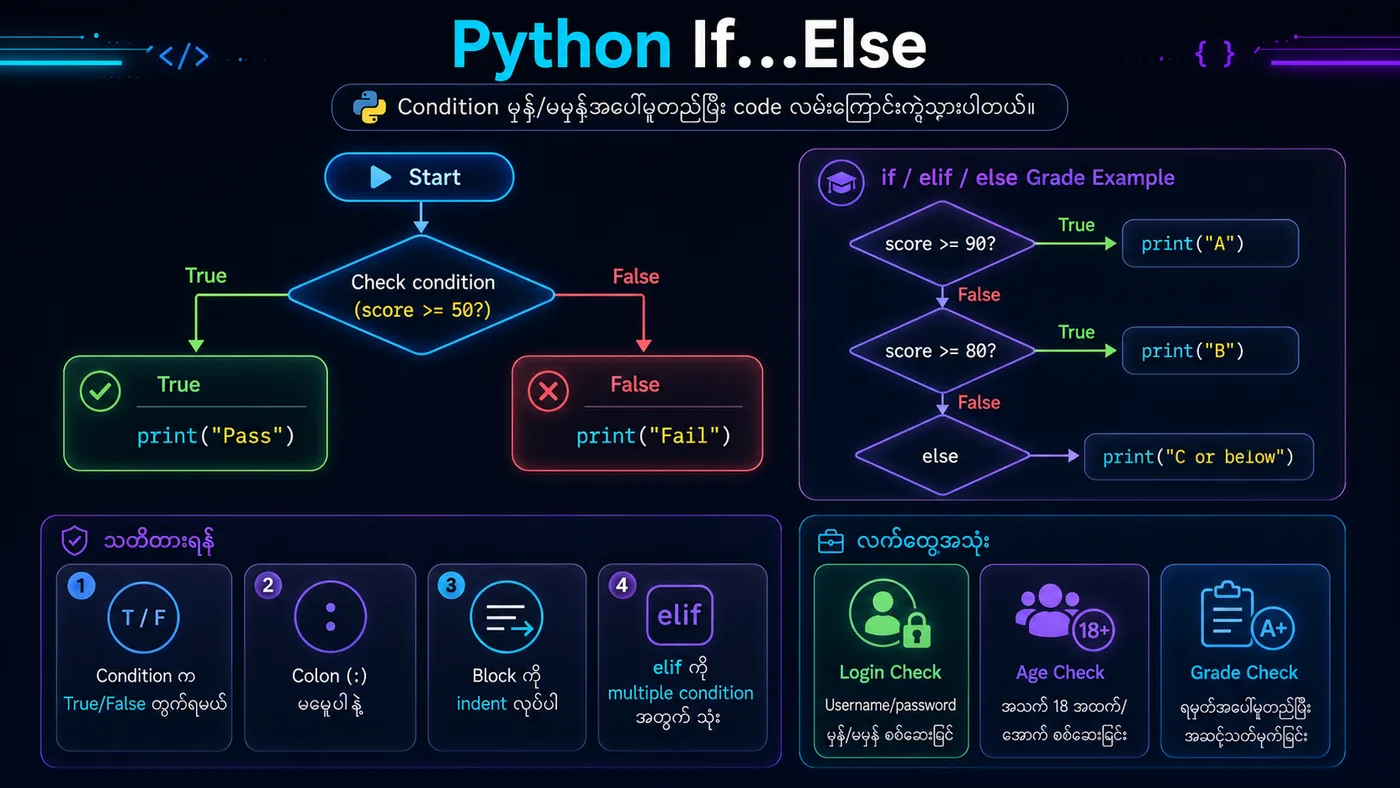
Guard conditions to reduce nesting
Four or five levels of nested if make it hard to see which else belongs to which if. It is clearer to rule out the invalid cases first (guards) and leave the normal path at the end with little indentation. Once you learn functions, these guards become early return statements.
address = "12 Bogyoke Rd"
country = "MM"
total = 42

if not address:
    message = "Add an address first"
elif country not in ("MM", "TH"):
    message = "We do not ship there yet"
elif total >= 50:
    message = "Free shipping"
else:
    message = f"Add {50 - total} more for free shipping"
print(message)
This prints "Add 8 more for free shipping". The two guards check the address and the country first, so by the time the last two branches are reached the data is known to be valid. When one value must be compared against many patterns, Python 3.10 and later also offer the match statement, but for plain ranges and boolean conditions if/elif remains the right tool.
In real projects
Where this shows up in real projects
In an online shop, the shipping decision at checkout is an if/elif chain. The rejections come first, such as a missing address, a suspended account or a country the shop cannot reach, and the normal rule, free shipping over 50, is checked last. Tests prepare one input per branch so every branch runs at least once, plus the boundary values 49.99 and 50 on their own.
You meet if/elif everywhere: web form validation, scoring rules in a game, the menu shown to each user role. When business rules pile up, store each condition in a well-named boolean such as is_eligible and then write if is_eligible:, which reviewers can read at a glance. Also decide explicitly in the else branch what happens with an unknown status value; otherwise bad data slips through silently.
Common mistakes
Common mistakes
1. Writing if color == "red" or "blue":
Python reads this as (color == "red") or "blue". "blue" is a non-empty string and always truthy, so the branch runs even when color is green. Write color == "red" or color == "blue", or better, color in ("red", "blue").
2. Separate ifs where elif was meant
With if score >= 90: grade = "A" followed by a separate if score >= 80: grade = "B", a score of 95 runs both and the grade is overwritten with B. Use elif whenever exactly one outcome should win.
3. Using = instead of ==
if age = 18: is a SyntaxError, because = assigns and comparison needs ==. Python catches this before running anything, which is lucky; in some languages, such as C, the same typo silently assigns.
4. Mixing up indentation
Forget to indent a print that belongs inside a branch and the line moves outside the if, so it always runs. There is no error, which makes it hard to spot; configure your editor to insert four spaces instead of tabs.
Best practices
Best practices
- Order range conditions from most specific to broadest, and test the boundary values.
- Use truthiness directly, if x: and if items:, instead of x == True or len(items) > 0.
- Move long conditions into well-named boolean variables and keep nesting to three levels at most.
Mini challenge
Mini challenge: cinema ticket price
Work out a cinema ticket price from age, day, student status and coupon. Change the variable values and try to make every branch run.
- Print "Invalid age" for ages below 0 or above 120 (check this guard first)
- Under 5 is free, under 13 is 3000, students or 65+ pay 4000, everyone else 6000
- On Sat/Sun add 1000 to any non-free ticket; a coupon takes 500 off
- Choose "free" or "paid" with a conditional expression and print it
age = 16
day = "Sat"
is_student = True
has_coupon = False

# TODO: if/elif/else chain that sets price
#   invalid age (< 0 or > 120) -> None, then the age bands, most specific first

# TODO: if price is None, print "Invalid age"
# TODO: otherwise apply the weekend surcharge and the coupon,
#       pick "free"/"paid" in one line, and print the result
Expected: With the given values: Age 16, Sat: 5000 MMK (paid)
Show hint
Test the weekend with day in ("Sat", "Sun"). Check for None with price is None; if not price: would also treat a free ticket (0) as invalid.
Show solution
age = 16
day = "Sat"
is_student = True
has_coupon = False

if age < 0 or age > 120:
    price = None
elif age < 5:
    price = 0
elif age < 13:
    price = 3000
elif is_student or age >= 65:
    price = 4000
else:
    price = 6000

if price is None:
    print("Invalid age")
else:
    if day in ("Sat", "Sun") and price > 0:
        price += 1000
    if has_coupon:
        price -= 500
    kind = "free" if price == 0 else "paid"
    print(f"Age {age}, {day}: {price} MMK ({kind})")
Quick quiz 1 / 3
Quick quiz 2 / 3
Quick quiz 3 / 3
What to remember
- An if/elif/else chain tests from the top and runs only the first true branch.
- Indentation defines each block, and every condition ends with a colon.
- False, None, 0, "" and empty collections are falsy; everything else is truthy.
- Put specific conditions first, and use x if cond else y when you only pick a value.
The Python Tutorial — Python Software Foundation