Explain it simply
Explain it simply
A list is like a shopping list: items written in order on one sheet of paper, where you can add, cross out or change entries whenever you like. In Python you write one inside square brackets with commas between the items, like ["rice", "eggs", "milk"].
A plain variable holds one value, but a list can hold as many as you need. Instead of 30 variables for 30 students' scores, you keep one list and process the scores one by one with a loop.
Problem → Why → Solution
The problem: the backup list changed too
Before editing a to-do list you "save a copy" with backup = tasks, then add a new task to tasks. When you open backup to undo the change, the new task is there as well. The backup protected nothing, and no error warned you.
tasks = ["write report", "email Mya"]
backup = tasks                 # NOT a copy

tasks.append("call bank")
print(backup)    # ['write report', 'email Mya', 'call bank']
print(backup is tasks)         # True: one list, two names
Why does this happen?
A Python variable is not a box that holds a value; it is a name tag stuck onto an object. backup = tasks creates no new list, it just sticks a second tag on the same one. Lists are mutable, so a change made through one name is visible through the other. For a real copy, use tasks.copy() or tasks[:].
Core concept: a list is an ordered, mutable collection
A list has three properties. It is ordered, so items stay in the order you added them; it is mutable, so you can change it after creating it; and it allows duplicate values. You can mix types, as in [1, "two", 3.0, True], but in practice a list holding one kind of item is much easier to work with.
There are several ways to build one. [] is an empty list ready to be filled, list("abc") turns another collection into a list, [0] * 3 repeats an element to give [0, 0, 0], and [1, 2] + [3] joins two lists into a new one. A list can even contain other lists, which is how a table of rows is often represented.
Indexing and slicing work exactly as they do on strings: fruits[0] is the first item, fruits[-1] the last, and fruits[0:2] a new list holding indexes 0 and 1. The difference is that a list can be changed in place: fruits[1] = "mango" replaces that element.
| Method | What it does | Returns |
|---|---|---|
| append(x) | Adds x at the end | None |
| insert(i, x) | Puts x at index i, shifting the rest | None |
| remove(x) | Deletes the first x found | None (ValueError if missing) |
| pop(i) | Takes out index i (default: last) | The removed item |
| clear() | Deletes every element | None |
Most list methods change the list in place and return None. So fruits = fruits.append("kiwi") loses the list and leaves fruits set to None, the opposite of how string methods behave. pop() is the exception: it returns the item it removed, which is why next_task = tasks.pop(0) is useful.
for item in fruits: hands you each element in order. len(fruits) returns the number of elements, and "cherry" in fruits tests whether the list contains a value.
- [...] creates one list object
- A variable is a tag pointing at it
- Methods change the object itself
- b = a adds a tag; it is not a copy
Change a list and every name pointing at it sees the change.
General pattern
items = [first, second, third]
item = items[index]           # read
items[index] = new_value      # replace in place
part = items[start:stop]      # new list

items.append(value)           # add to the end -> None
items.insert(index, value)    # add at a position -> None
items.remove(value)           # delete first match -> None
taken = items.pop(index)      # delete and return the item

copy_of_items = items.copy()  # a real, separate copy
Read with indexes and slices; change with methods. The changing methods work in place, so do not assign their result back; only pop() returns the item.
Example: create, change and loop over a fruit list
This example creates a list, reads from it, replaces an element, adds items and removes items. The list is printed after every step, so you can follow how the indexes shift. The final loop goes over the modified fruits list itself, so it reflects every change above, and the example also shows the item that pop() returns.
# ===== 1. Create a List =====
fruits = ["apple", "banana", "cherry"]
print(f"Original: {fruits}")
print(f"Type: {type(fruits)}")

# ===== 2. Indexing & Slicing =====
print("\n===== Indexing & Slicing =====")
print(f"First item: {fruits[0]}")
print(f"Last item: {fruits[-1]}")
print(f"Slice [0:2]: {fruits[0:2]}")

# ===== 3. Change List Items =====
print("\n===== Modifying =====")
fruits[1] = "mango"
print(f"After change: {fruits}")

# ===== 4. Add Items =====
fruits.append("orange")       # Add to end
print(f"After append: {fruits}")

fruits.insert(1, "banana")    # Insert at index 1
print(f"After insert: {fruits}")

# ===== 5. Remove Items =====
fruits.remove("apple")        # Remove by value
print(f"After remove: {fruits}")

removed = fruits.pop(0)       # Remove by index (returns the item)
print(f"After pop: {fruits} (popped {removed!r})")

# ===== 6. Loop Through List =====
print("\n===== Looping =====")
for fruit in fruits:
    print(fruit)

# ===== 7. List Length =====
print(f"\nLength: {len(fruits)}")

# ===== 8. Check Membership =====
print(f"\n'cherry' in fruits: {'cherry' in fruits}")
Code breakdown
- Line 14
fruits[1] = "mango"Replaces "banana" at index 1 with "mango". The same line on a string would raise TypeError, but lists are mutable.
- Line 21
fruits.insert(1, "banana") # Insert at index 1"banana" goes into index 1, and mango, cherry and orange each move one place to the right.
- Line 25
fruits.remove("apple") # Remove by valueremove() searches by value and deletes only the first "apple" it finds; if there were none, it would raise ValueError.
- Line 28
removed = fruits.pop(0) # Remove by index (returns the item)pop(0) takes "banana" out of index 0 and returns it, so it can be kept in removed.
- Lines 33-34
for fruit in fruits:The loop places each of the three current elements into fruit in order and prints one per line.
Original: ['apple', 'banana', 'cherry']
Type: <class 'list'>

===== Indexing & Slicing =====
First item: apple
Last item: cherry
Slice [0:2]: ['apple', 'banana']

===== Modifying =====
After change: ['apple', 'mango', 'cherry']
After append: ['apple', 'mango', 'cherry', 'orange']
After insert: ['apple', 'banana', 'mango', 'cherry', 'orange']
After remove: ['banana', 'mango', 'cherry', 'orange']
After pop: ['mango', 'cherry', 'orange'] (popped 'banana')

===== Looping =====
mango
cherry
orange

Length: 3

'cherry' in fruits: True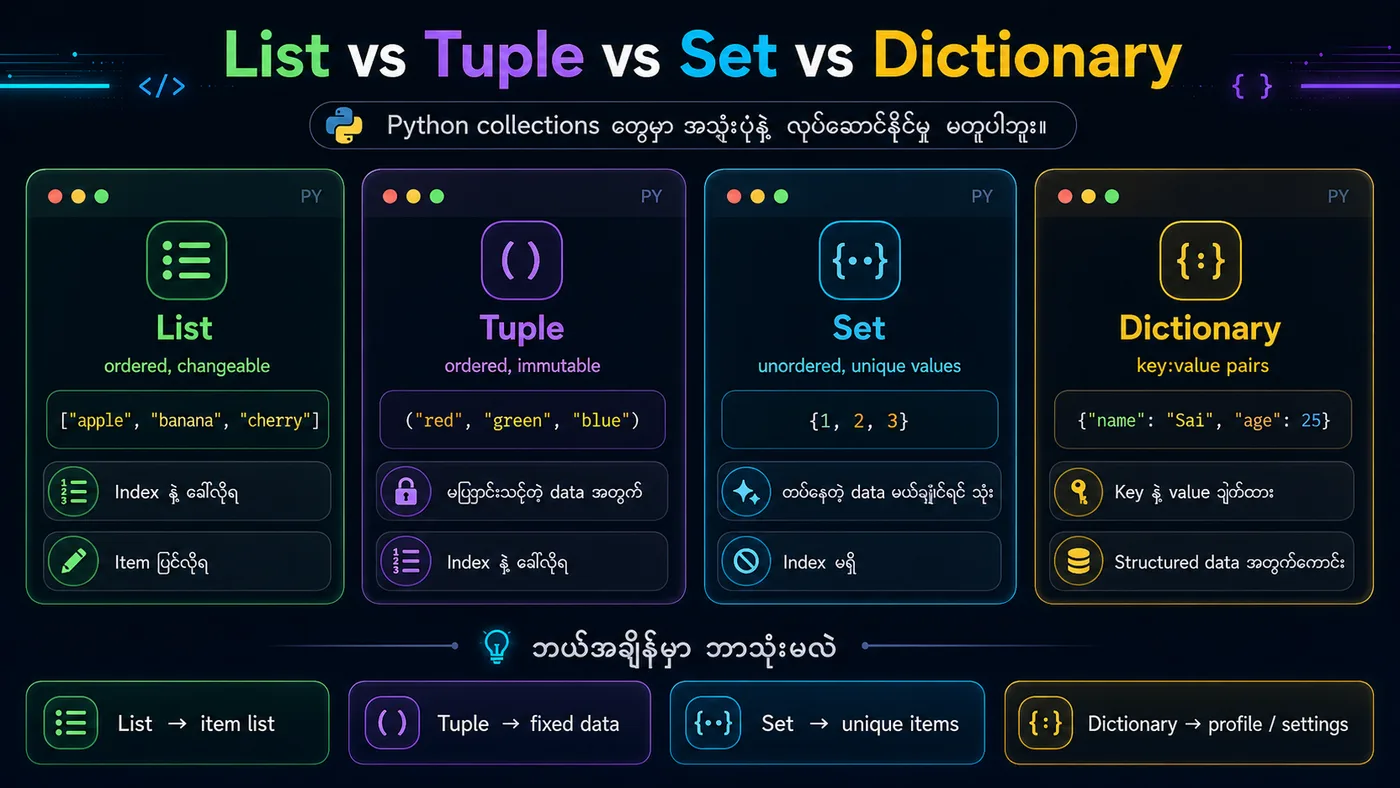
append vs extend, sort() vs sorted()
append() adds its argument as one element, so appending a list puts a list inside your list. To add the elements one by one, use extend(). Sorting also comes in two forms: items.sort() sorts the list itself and returns None, while sorted(items) leaves the original alone and returns a new sorted list. Pass reverse=True to sort from largest to smallest.
a = [1, 2]
a.append([3, 4])
print(a)                    # [1, 2, [3, 4]]

b = [1, 2]
b.extend([3, 4])
print(b)                    # [1, 2, 3, 4]

scores = [70, 95, 82]
print(sorted(scores, reverse=True), scores)   # [95, 82, 70] [70, 95, 82]
print(scores.sort(), scores)                  # None [70, 82, 95]
In real projects
Where this shows up in real projects
Lists are used wherever data has to be kept in order. A JSON array returned by an API becomes a Python list, and database query results, the lines of a file (file.readlines()) and the output of string.split() are all lists. Shopping carts, notifications and chat histories are usually modelled as lists too.
When you pass a list to a function and the function appends to it, the caller's list changes as well; it is the same aliasing as in the problem section. Decide deliberately whether you want that, as in add_item(cart, item), or whether to protect the caller with .copy(). Once a list holds tens of thousands of items, in becomes slow and a set is the better choice.
Common mistakes
Common mistakes
1. Assigning a method's result back
items = items.append("x") or items = items.sort() sets items to None, and the next line fails with AttributeError: 'NoneType' object has no attribute .... Just write items.append("x") on its own line.
2. Treating b = a as a copy
After b = a, changing b changes a. Use b = a.copy() or b = list(a). If the list contains other lists, remember that copy.deepcopy() is needed for those too.
3. Calling remove() without checking
items.remove("tea") raises ValueError: list.remove(x): x not in list when "tea" is absent. Check with if "tea" in items: first. Likewise, pop() on an empty list raises IndexError.
4. Removing items while looping over the list
for n in nums: if n < 0: nums.remove(n) shifts the remaining items left after each removal, so the second of two adjacent negatives is skipped. Nothing crashes; the result is simply wrong. Build positives = [] and append only the items you want to keep.
Best practices
Best practices
- Give lists plural names like fruits or scores, and loop variables the singular: fruit, score.
- Use sorted() instead of sort() when the original order must be kept.
- Do not remove from or append to a list while looping over it; build a new list instead.
Mini challenge
Mini challenge: a shopping list without duplicates
Write two functions that update a shopping list, then show how copy() and sorted() protect the original.
- add_item(items, item) strips and lowercases, and skips empty or already-present items
- remove_item(items, item) deletes the item and returns True, or returns False if absent (no ValueError)
- Take backup = shopping.copy(), change shopping, and show backup is unchanged
- Print a sorted() version and show the original order is still intact
def add_item(items: list[str], item: str) -> None:
    # TODO: clean the item; append only if non-empty and not already present
    ...


def remove_item(items: list[str], item: str) -> bool:
    # TODO: remove and return True if present, otherwise return False
    ...


shopping = ["rice", "eggs"]
# TODO: add "Milk", " eggs ", "onions" and "" one by one, then print the list
# TODO: remove "eggs" and "tea", printing each result
# TODO: make a backup with .copy(), append "bread" to shopping, print both
# TODO: print sorted(shopping) and then shopping itself
Expected: The program prints: List: ['rice', 'eggs', 'milk', 'onions'] Removed 'eggs': True Removed 'tea': False Shopping: ['rice', 'milk', 'onions', 'bread'] Backup: ['rice', 'milk', 'onions'] Sorted copy: ['bread', 'milk', 'onions', 'rice'] Original order kept: ['rice', 'milk', 'onions', 'bread']
Show hint
if item and item not in items: rejects both the empty string (falsy) and duplicates in one check. add_item changes the list in place, so it needs no return value.
Show solution
def add_item(items: list[str], item: str) -> None:
    """Append item (cleaned, lowercase) unless it is already in the list."""
    item = item.strip().lower()
    if item and item not in items:
        items.append(item)


def remove_item(items: list[str], item: str) -> bool:
    """Remove item if present; return whether something was removed."""
    if item in items:
        items.remove(item)
        return True
    return False


shopping = ["rice", "eggs"]
for new in ["Milk", " eggs ", "onions", ""]:
    add_item(shopping, new)
print(f"List: {shopping}")

print(f"Removed 'eggs': {remove_item(shopping, 'eggs')}")
print(f"Removed 'tea': {remove_item(shopping, 'tea')}")

backup = shopping.copy()
shopping.append("bread")
print(f"Shopping: {shopping}")
print(f"Backup:   {backup}")
print(f"Sorted copy: {sorted(shopping)}")
print(f"Original order kept: {shopping}")
Quick quiz 1 / 3
Quick quiz 2 / 3
Quick quiz 3 / 3
What to remember
- A list is an ordered, mutable collection that allows duplicates.
- append, insert, remove and clear change the list in place and return None; pop() returns the removed item.
- A for loop, len() and in are the everyday tools for working with lists.
- b = a is not a copy; use a.copy() when you need a separate list.
The Python Tutorial — Python Software Foundation