Explain it simply
Explain it simply
Think of a tightrope walker with a safety net underneath. The try block is the walk along the rope, the code that might fail, and the except block is the net. If the walker falls, meaning an exception is raised, the net catches them and the show goes on.
Without a net, Python prints an error report called a traceback and the whole program stops. Still, you should not hang nets everywhere: catch only the kinds of error you know how to handle and let the rest surface, so bugs stay visible.
Problem → Why → Solution
The problem: a bare except: hides even a typo
To avoid crashes, a developer wraps a whole function in try and uses a bare except:, which catches every error, to return 0.0. The trouble is that price is misspelled as prise. Even a valid input such as "12.50" raises NameError, the bare except: swallows it, and the function returns 0.0. No error message ever appears, so finding the cause can take hours.
def load_price(text):
    try:
        price = float(text)
        return round(prise * 1.05, 2)   # typo: prise -> NameError
    except:
        return 0.0                      # swallows EVERY error, even the typo

print(load_price("12.50"))              # 0.0  (wrong, and no clue why)
Why is this wrong?
A bare except: catches expected input errors such as ValueError, programmer bugs such as NameError, and even the KeyboardInterrupt from pressing Ctrl+C. The fix has two parts: put only the line that can legitimately fail, float(text), inside try, and catch the specific type with except ValueError:. Then input like "abc" still yields 0.0, while the typo shows up immediately with a traceback.
Core concept: what try, except, else and finally each do
Python runs the try block line by line. The moment an exception is raised, the rest of the try block is skipped and the except clauses are checked from top to bottom. The first except whose type matches the exception, or is a parent class of it, runs, and the others are skipped. If none matches, the exception travels up to the caller, and if nobody catches it the program stops.
except Type as e:
e is the exception object: str(e) gives the message and type(e).__name__ the class name. Some exceptions carry extra attributes, such as e.filename on FileNotFoundError. To handle several types the same way, list them as a tuple: except (ValueError, TypeError):.
else:
Runs only when the try block finished without an exception. Putting success-only code in else instead of inside try means errors raised by that code are not caught by accident.
finally:
Always runs, whether or not an exception happened and even when try or except contains a return. It is for cleanup such as closing files, releasing locks or closing connections.
The two most important rules are to keep the try block as small as possible and to catch only exception types you know how to handle. Catch an error only when a real recovery exists, such as using a default, retrying or asking the user again. Otherwise let it travel up to the caller; the next lesson shows how to add context and re-raise with raise ... from .... Write the full traceback to a log for developers, and show users only a short, safe message.
- Run the try block
- Error: the matching except runs
- No error: the else block runs
- Either way, finally runs last
If no except matches, finally still runs, then the exception continues to the caller.
General pattern
try:
    risky_operation()                 # only what can fail
except SpecificError as e:
    handle(e)                         # a real recovery
except (OtherError, ThirdError):
    fallback()
else:
    use_the_result()                  # success-only code
finally:
    clean_up()                        # always runs
Order the except clauses from the most specific type to the broadest. else and finally are optional, but when present, else comes after the excepts and finally comes last.
Example: safe_divide and other error types
safe_divide() is called with three inputs and prints which blocks run, and in what order. After that, the code opens a missing file and catches two exception types with one tuple. Try to predict the output before reading it.
def safe_divide(a, b):
    try:
        result = a / b                   # the only line that can fail
    except ZeroDivisionError:
        print("  cannot divide by zero")
        return None
    except TypeError as e:               # 'as e' gives the exception object
        print(f"  bad input: {e}")
        return None
    else:                                # runs only if nothing was raised
        print("  division ok")
        return result
    finally:                             # runs no matter what
        print("  division attempted")


for a, b in [(10, 2), (10, 0), (10, "a")]:
    print(f"safe_divide({a!r}, {b!r})")
    print("  ->", safe_divide(a, b))

try:
    with open("missing-file.txt") as f:
        content = f.read()
except FileNotFoundError as e:
    print("File not found:", e.filename)

for text in ["42", "abc", None]:
    try:
        print(int(text) * 2)
    except (ValueError, TypeError) as e:
        print(type(e).__name__, "for", repr(text))
Code breakdown
- Line 3
result = a / b # the only line that can failThe try block holds just the one line that can fail. b == 0 raises ZeroDivisionError, and a string raises TypeError.
- Lines 10-12
else: # runs only if nothing was raisedRuns only when the division succeeded and returns result. It is skipped for (10, 0) and (10, "a").
- Lines 13-14
finally: # runs no matter whatEven though except and else both return, finally runs before the function actually exits. That is why "division attempted" always appears before the "-> ..." line.
- Line 25
print("File not found:", e.filename)A FileNotFoundError object stores the name of the file it tried to open in e.filename.
- Line 30
except (ValueError, TypeError) as e:int("abc") raises ValueError and int(None) raises TypeError. The tuple catches both with one handler, and type(e).__name__ shows which one happened.
safe_divide(10, 2)
  division ok
  division attempted
  -> 5.0
safe_divide(10, 0)
  cannot divide by zero
  division attempted
  -> None
safe_divide(10, 'a')
  bad input: unsupported operand type(s) for /: 'int' and 'str'
  division attempted
  -> None
File not found: missing-file.txt
84
ValueError for 'abc'
TypeError for None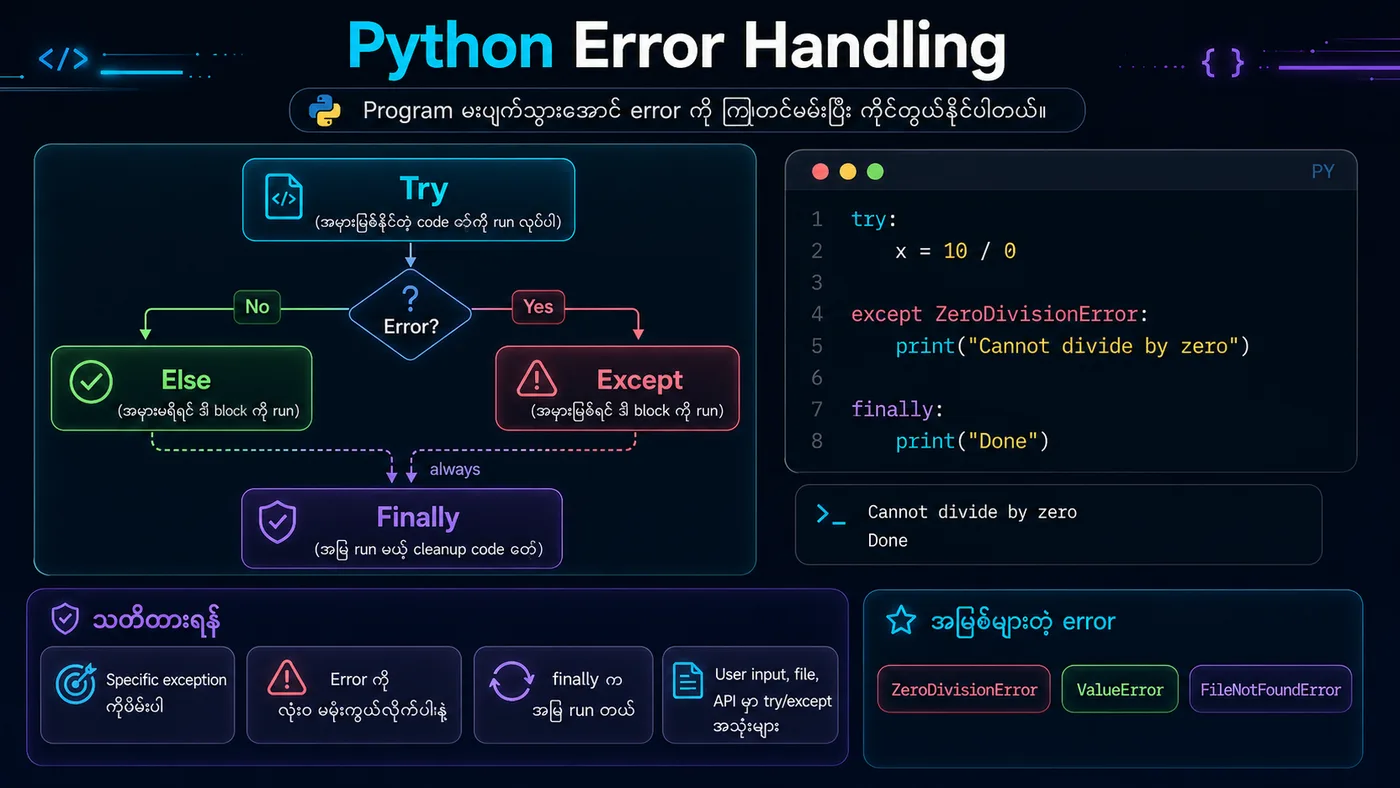
EAFP versus LBYL
Python code uses two styles. LBYL, "look before you leap", checks first and then acts. EAFP, "easier to ask forgiveness than permission", just acts and catches the exception if it fails. The Python community leans toward EAFP, partly because it avoids race conditions such as another process deleting a file between your check and your open. When a missing key is routine, dict.get() is simpler than either.
stock = {"pen": 12, "book": 3}

# LBYL: "look before you leap"
if "cup" in stock:
    print(stock["cup"])
else:
    print("cup: not stocked")

# EAFP: "easier to ask forgiveness than permission"
try:
    print(stock["cup"])
except KeyError:
    print("cup: not stocked")
Logging at the top level
At one top-level place, such as a web server's request handler, a broad except Exception: is appropriate, so one failing request does not take down the whole server. Even there, write the full traceback to the log for developers with logging.exception(), and show users a message without internal details. except Exception does not catch KeyboardInterrupt or SystemExit, which makes it safer than a bare except:.
import logging

logging.basicConfig(level=logging.ERROR, format="%(levelname)s %(message)s")

def handle_request(data):
    return 100 / data["count"]

for data in [{"count": 4}, {"count": 0}]:
    try:
        print("result:", handle_request(data))
    except Exception:
        logging.exception("request failed")      # full traceback for devs
        print("Sorry, something went wrong.")    # safe message for users
In real projects
Where this shows up in real projects
An import script that loads ten thousand rows from a CSV file is useless if one row containing "N/A" instead of a number stops everything. The usual pattern parses each row inside try/except ValueError, collects the bad rows with their line numbers, and prints a report at the end.
Code that calls the network catches exceptions such as Timeout and ConnectionError from the requests library, waits briefly and retries, but it does not catch errors such as a 404 that retrying cannot fix. Database code rolls back the transaction in except and returns the connection to the pool in finally. Frameworks such as Flask and Django catch exceptions at the top level, log the traceback and show users a "500 Internal Server Error" page, so you do not need except Exception in every view function.
Common mistakes
Common mistakes
1. Putting the broad except first
Writing except Exception: above except ZeroDivisionError: means the first clause always wins, because ZeroDivisionError is a subclass of Exception, and the second clause never runs. Python gives no warning, so it goes unnoticed. Put specific types first.
2. Catching an error and doing nothing
except ValueError: pass makes the error disappear without solving anything, and you discover the lost data much later. At the very least, log it or record it in a list of bad rows.
3. Wrapping too much code in try
Wrapping a whole function in try with except KeyError: catches the KeyError you expected from one dict lookup and also an unexpected KeyError from some helper function. Keep only the line that can fail inside try and move the rest into else.
Mini challenge
Mini challenge: parsing quantities safely
Convert a list of quantity strings from a form into integers. Bad values must not stop the program; they go into a bad list instead.
- parse_quantities(raw_values) returns a (good, bad) tuple
- Values for which int() raises ValueError or TypeError go into bad
- Inside the else block, negative numbers also go into bad
- finally prints "checked ..." for every value
def parse_quantities(raw_values):
    good, bad = [], []
    for raw in raw_values:
        # TODO: try converting raw with int()
        # TODO: except the two error types int() can raise -> bad
        # TODO: else: negative -> bad, otherwise -> good
        # TODO: finally: print(f"checked {raw!r}")
        pass
    return good, bad


# TODO: call it with ["3", "ten", "7", None, "-2", " 5 "]
# TODO: print the good list with its total, then the bad list
Expected: After six "checked ..." lines: good: [3, 7, 5] total: 15 bad: ['ten', None, '-2']
Show hint
int(" 5 ") ignores the surrounding spaces and gives 5, while int(None) raises TypeError. Catch both with except (ValueError, TypeError):.
Show solution
def parse_quantities(raw_values):
    good, bad = [], []
    for raw in raw_values:
        try:
            qty = int(raw)
        except (ValueError, TypeError):
            bad.append(raw)
        else:
            if qty < 0:
                bad.append(raw)
            else:
                good.append(qty)
        finally:
            print(f"checked {raw!r}")
    return good, bad


good, bad = parse_quantities(["3", "ten", "7", None, "-2", " 5 "])
print("good:", good, "total:", sum(good))
print("bad:", bad)
Quick quiz 1 / 3
Quick quiz 2 / 3
Quick quiz 3 / 3
What to remember
- When the try block raises, the first matching except runs; if none matches, the exception goes up to the caller.
- else runs only when there was no error, and finally always runs, even after a return.
- Keep try small and catch only specific exception types you know how to handle.
- Avoid bare except: and except: pass; log details for developers and show users a safe message.
Python Documentation — Errors and Exceptions — Python Software Foundation