Explain it simply
Explain it simply
In a restaurant you cannot walk into the kitchen and cook for yourself. You order an item from the menu through a waiter, and the waiter brings back either your dish or a reply such as "sorry, that is sold out today".
An API (Application Programming Interface) is that menu and waiter. Your Python program never reads the weather service's database directly; it sends a request to a published URL and gets back a response carrying a status code and, usually, JSON data. Most web APIs speak HTTP.
Problem → Why → Solution
The problem: a delivered response is not a successful one
The code below is what most people write as their first API call. It works while the post exists. When it does not, the server answers with status 404 and {"error": "not found"}, and data["title"] crashes with a KeyError. If the server never answers at all, there is no timeout, so the program waits forever.
import requests

response = requests.get("https://api.example.com/posts/42")  # no timeout
data = response.json()
print(data["title"])  # KeyError: the body was {"error": "not found"}
Why was there no exception earlier?
At the HTTP level this round trip succeeded: the request arrived and a response came back. requests does not raise on 4xx or 5xx statuses by itself; checking the status is your job. It also has no default timeout, so unless you pass one, a single silent server can freeze your whole program.
Core concept: HTTP requests and responses
An HTTP request has four parts. The method says what you want to do: GET to read, POST to create, PUT or PATCH to change, DELETE to remove. The URL names the resource and may carry a query string such as ?city=Yangon. Headers carry metadata such as Accept, Content-Type and Authorization, and the body holds the data you send with POST or PUT, usually JSON.
| Method | Typical use | Safe to repeat? |
|---|---|---|
| GET | read a resource | yes: it changes nothing |
| POST | create a new resource | no: it may create a duplicate |
| PUT | replace a whole resource | yes: the end state is the same |
| PATCH | change some fields | depends on the change |
| DELETE | remove a resource | yes, though a repeat may get 404 |
A response carries a status code, headers and a body. The first digit of the status code tells you its family, so you do not need to memorise every code.
| Family | Meaning and examples |
|---|---|
| 2xx | success: 200 OK, 201 Created, 204 No Content |
| 3xx | redirect: 301, 302 (requests follows them automatically, except for HEAD) |
| 4xx | the client's mistake: 400 Bad Request, 401 Unauthorized, 404 Not Found, 429 Too Many Requests |
| 5xx | the server's failure: 500 Internal Server Error, 503 Service Unavailable |
In Python, the requests library (pip install requests) makes the round trip easy. requests.get(url, params=..., headers=..., timeout=5) returns a Response object, and response.status_code, response.headers, response.text and response.json() expose each part. requests.post(url, json=payload) encodes the dict as JSON and adds the Content-Type: application/json header for you. response.raise_for_status() raises HTTPError for 4xx and 5xx statuses and does nothing for 2xx.
APIs come in several styles. REST, built on resource URLs and HTTP methods, is the most common. GraphQL sends queries to a single endpoint and asks only for the fields it needs. SOAP is an older XML-based style.
- Send method + URL + headers + body
- The server acts on the resource
- Status + headers + body come back
- Check the status, then read the body
A response arriving only proves the network worked; the status code tells you whether the API did.
General pattern
import requests

response = requests.get(url, params=query_dict, headers=header_dict, timeout=seconds)
response = requests.post(url, json=payload_dict, timeout=seconds)

response.raise_for_status()   # HTTPError for 4xx / 5xx
status = response.status_code
data = response.json()        # parse the JSON body
params becomes the query string and json= becomes the request body. Pass timeout on every request, and check raise_for_status() or status_code before you read the body.
Example: GET, POST and a 404 against an offline fake API
So that it runs without internet access, the first half of the example starts a tiny API on your own machine (127.0.0.1) with the standard library's http.server. The second half is the client code; swap BASE for a real API URL and it works the same way, because requests sends genuine HTTP requests.
import json
import threading
from http.server import BaseHTTPRequestHandler, HTTPServer

import requests


# --- A tiny fake API on your own machine, so the example runs offline ---
class FakeAPI(BaseHTTPRequestHandler):
    def reply(self, status, data):
        body = json.dumps(data).encode("utf-8")
        self.send_response(status)
        self.send_header("Content-Type", "application/json")
        self.send_header("Content-Length", str(len(body)))
        self.end_headers()
        self.wfile.write(body)

    def do_GET(self):
        if self.path == "/posts/1":
            self.reply(200, {"id": 1, "userId": 1, "title": "Hello API"})
        else:
            self.reply(404, {"error": "post not found"})

    def do_POST(self):
        size = int(self.headers["Content-Length"])
        post = json.loads(self.rfile.read(size))
        self.reply(201, {**post, "id": 101})

    def log_message(self, *args):  # keep the server quiet
        pass


server = HTTPServer(("127.0.0.1", 0), FakeAPI)
threading.Thread(target=server.serve_forever, daemon=True).start()
BASE = f"http://127.0.0.1:{server.server_port}"

# --- The client: the same code works against a real API URL ---
response = requests.get(f"{BASE}/posts/1", timeout=5)
print("GET status:", response.status_code, response.reason)
print("Content-Type:", response.headers["Content-Type"])
print("Title:", response.json()["title"])

new_post = {"title": "Sai's Post", "body": "Hello API", "userId": 1}
response = requests.post(f"{BASE}/posts", json=new_post, timeout=5)
print("POST status:", response.status_code, response.reason)
print("Created:", response.json())

response = requests.get(f"{BASE}/posts/999", timeout=5)
try:
    response.raise_for_status()
except requests.exceptions.HTTPError:
    print("HTTP error:", response.status_code, response.json()["error"])

server.shutdown()
Code breakdown
- Fake server
server = HTTPServer(("127.0.0.1", 0), FakeAPI)Port 0 asks the operating system for any free port. The server runs in a daemon thread so the main program can carry on with the client code.
- GET with timeout
response = requests.get(f"{BASE}/posts/1", timeout=5)timeout=5 raises an exception if connecting or waiting for data takes longer than five seconds. The response's status_code and reason are 200 OK.
- Read JSON
print("Title:", response.json()["title"]).json() parses the response body into a Python dict. It is safest to call it after the status has been checked.
- POST
response = requests.post(f"{BASE}/posts", json=new_post, timeout=5)json= serialises the dict and sets the Content-Type header. The server creates a new resource, so it answers 201 Created with the object, now carrying id 101.
- Handle 404
response.raise_for_status()/posts/999 does not exist, so the status is 404. raise_for_status() raises HTTPError, and the except block reports the status and the error message the server sent.
GET status: 200 OK
Content-Type: application/json
Title: Hello API
POST status: 201 Created
Created: {'title': "Sai's Post", 'body': 'Hello API', 'userId': 1, 'id': 101}
HTTP error: 404 post not found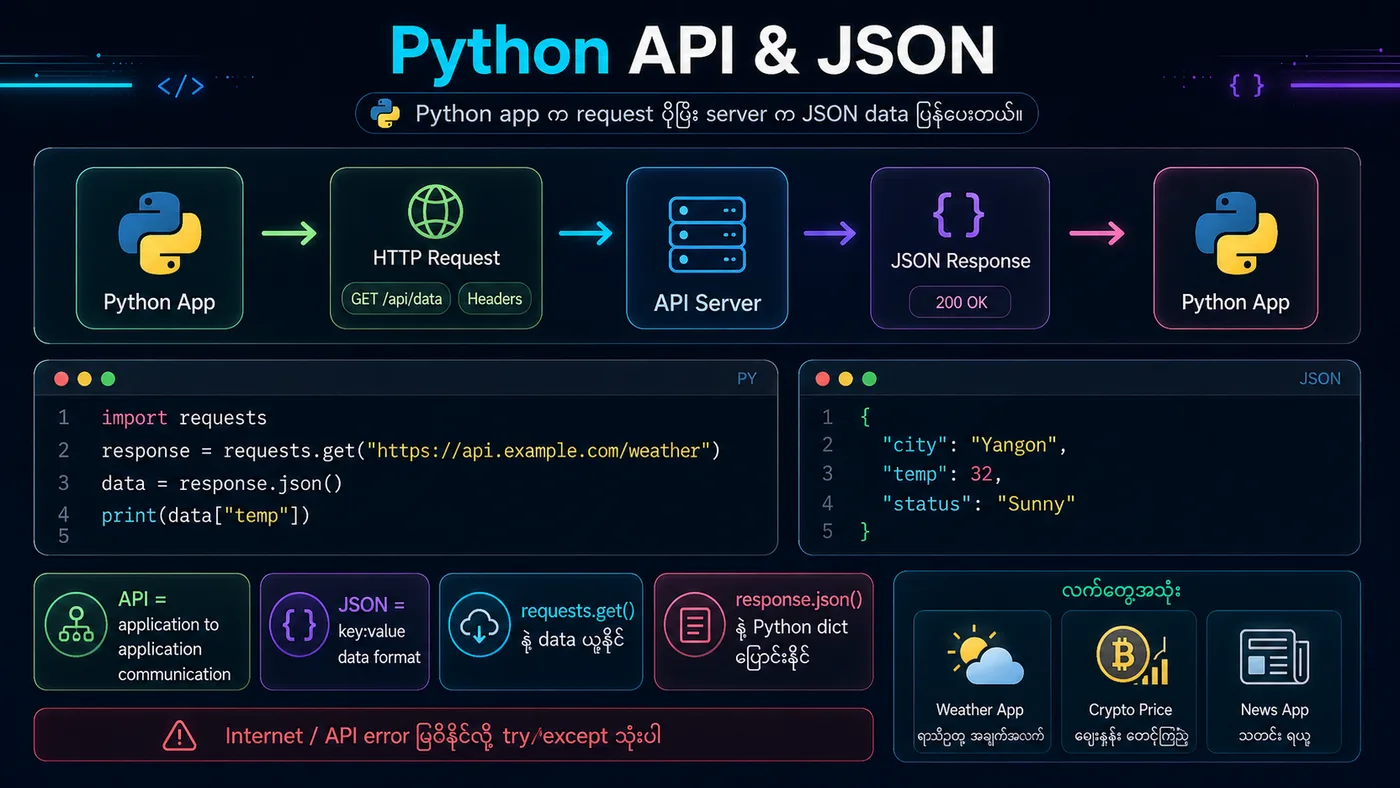
Looking at a request before it is sent
requests.Request(...).prepare() builds the request without touching the network, so you can inspect its URL, headers and body. You can see the space in the params dict encoded as +, and json= setting the Content-Type. That automatic encoding is why you should pass params instead of gluing query strings together yourself.
import requests

search = requests.Request(
    "GET", "https://api.example.com/search",
    params={"q": "mandalay weather", "units": "metric"},
    headers={"Accept": "application/json"},
).prepare()
print(search.method, search.url)

create = requests.Request("POST", "https://api.example.com/posts",
                          json={"title": "Hi"}).prepare()
print(create.headers["Content-Type"], create.body)
In real projects
Where this shows up in real projects
Fetching weather data, creating a charge with a payment provider, turning an address into coordinates with a maps service, reading issues through the GitHub API: all of them follow the request/response shape from this lesson. Most providers ask for an API key in an Authorization header or a query parameter, and that key belongs in an environment variable, not in your source code.
Production clients react differently to each status family. A 400 or 422 means your data was wrong, so sending it again is pointless. A 401 means the key needs checking, and a 429 means waiting as long as the Retry-After header says. 5xx errors and timeouts may be retried a limited number of times with a pause in between, which the next lessons build on.
Common mistakes
Common mistakes
1. Leaving out the timeout
requests has no default timeout, so a server that goes quiet makes the request wait indefinitely, which can freeze a web worker or a whole scheduled job. Pass a value such as timeout=5 on every request.
2. Calling .json() without checking the status
An error response's body lacks the fields you expect, which leads to a KeyError, and if a proxy or load balancer returns an HTML error page, .json() itself raises a JSONDecodeError. Call raise_for_status() first.
3. Hard-coding the API key
Once a key is in a source file and committed to git, anyone who can see the repository can use it. Read it with os.environ["WEATHER_API_KEY"], and never print it to logs.
4. Retrying every error
Resending a 400 Bad Request gives the same answer every time, and blindly resending a POST can create a duplicate record. Retry only temporary failures such as timeouts and 503, and only a limited number of times.
Best practices
Best practices
- Before writing code against an API, read its documentation for endpoints, methods, required headers and the error response format.
- Pass params= instead of building query strings with f-strings; it encodes spaces and characters such as & correctly.
- Keep API calls inside one function so tests can patch requests.get easily.
- Log the URL and status code, but never the API key or the Authorization header.
Mini challenge
Mini challenge: fetch a user's name safely
Write fetch_user_name(user_id). To avoid the network, patch requests.get with unittest.mock.patch so it returns four fakes in turn, and test success, a 404, a 503 and a timeout.
- status_family(code) returns "success", "redirect", "client error", "server error" or "unknown"
- Call requests.get with a timeout and use raise_for_status()
- On HTTPError, return "failed: <code> (<family>)"
- On any other RequestException, return "failed: <ExceptionName>"; on success, return the name field
import json
from unittest.mock import patch

import requests


def fake_response(status, data):
    """Build a real requests.Response without touching the network."""
    resp = requests.Response()
    resp.status_code = status
    resp._content = json.dumps(data).encode("utf-8")
    return resp


def status_family(code):
    # TODO: map 2xx/3xx/4xx/5xx to a family name, anything else to "unknown"
    ...


def fetch_user_name(user_id):
    # TODO: GET https://api.example.com/users/<user_id> with a timeout
    # TODO: raise_for_status(); on HTTPError use e.response.status_code
    # TODO: catch requests.exceptions.RequestException for network problems
    # TODO: return the "name" field from the JSON body on success
    ...


# TODO: patch("requests.get", side_effect=[...]) with a 200, a 404, a 503
#       and requests.exceptions.ConnectTimeout(...), then call ids 1 to 4
Expected: Four lines of output: 1 -> Aye 2 -> failed: 404 (client error) 3 -> failed: 503 (server error) 4 -> failed: ConnectTimeout
Show hint
Given a list, patch's side_effect returns the next item on each call, and raises it instead if the item is an exception. Catch HTTPError before RequestException, because HTTPError is a subclass of it.
Show solution
import json
from unittest.mock import patch

import requests


def fake_response(status, data):
    """Build a real requests.Response without touching the network."""
    resp = requests.Response()
    resp.status_code = status
    resp.reason = {200: "OK", 404: "Not Found", 503: "Service Unavailable"}[status]
    resp.url = "https://api.example.com/users"
    resp._content = json.dumps(data).encode("utf-8")
    return resp


def status_family(code):
    if 200 <= code < 300:
        return "success"
    if 300 <= code < 400:
        return "redirect"
    if 400 <= code < 500:
        return "client error"
    if 500 <= code < 600:
        return "server error"
    return "unknown"


def fetch_user_name(user_id):
    url = f"https://api.example.com/users/{user_id}"
    try:
        response = requests.get(url, timeout=5)
        response.raise_for_status()
    except requests.exceptions.HTTPError as e:
        code = e.response.status_code
        return f"failed: {code} ({status_family(code)})"
    except requests.exceptions.RequestException as e:
        return f"failed: {type(e).__name__}"
    return response.json()["name"]


fakes = [
    fake_response(200, {"id": 1, "name": "Aye"}),
    fake_response(404, {"error": "no such user"}),
    fake_response(503, {"error": "try later"}),
    requests.exceptions.ConnectTimeout("connect timed out"),
]
with patch("requests.get", side_effect=fakes):
    for user_id in [1, 2, 3, 4]:
        print(user_id, "->", fetch_user_name(user_id))
Quick quiz 1 / 3
Quick quiz 2 / 3
Quick quiz 3 / 3
What to remember
- An API is a contract between programs, and most web APIs use HTTP requests and responses.
- A request is method + URL + headers + body; a response is status + headers + body.
- The first digit of a status gives its family: 2xx success, 4xx client error, 5xx server error.
- Put a timeout on every request and check the status with raise_for_status() before reading the body.
Requests — User Guide — Requests